Fotogenic AI vs Pebblely
Compare reference-led settings with Fotogenic AI's product scenes, campaign briefs and reviewed image delivery.
Our pick
Product scenes for campaign placements
 PebblelySpecialist fit
Bulk scenes from visual references
Choose Pebblely for new product settings guided by a reference, including bulk scene creation on Basic and Pro.
The differences that change your choice.
Compare candle composition, bulk scene creation and how accepted images reach your store.
One setting or several roles
Both tools Define the image job
- Fotogenic AI
- Develop a candle scene, refine it and prepare distinct image roles.
- Pebblely
- Direct scene variations around packshots through descriptions and references.
Composition controls
Pebblely Reference positioning
- Fotogenic AI
- Use templates and custom direction, then revise composition and lighting.
- Pebblely
- Combine a description, scene reference and deliberate product positioning.
Accepted-image delivery
Fotogenic AI Connected assignment
- Fotogenic AI
- Review and assign selected WooCommerce images after product approval.
- Pebblely
- Export generated scenes into the publishing process you choose.
Bulk scenes
Both tools
- Fotogenic AI
- Reuse creative setups across selected product sources.
- Pebblely
- Bulk generation is listed on Basic and Pro.
Packaging accuracy
Choose by task
- Fotogenic AI
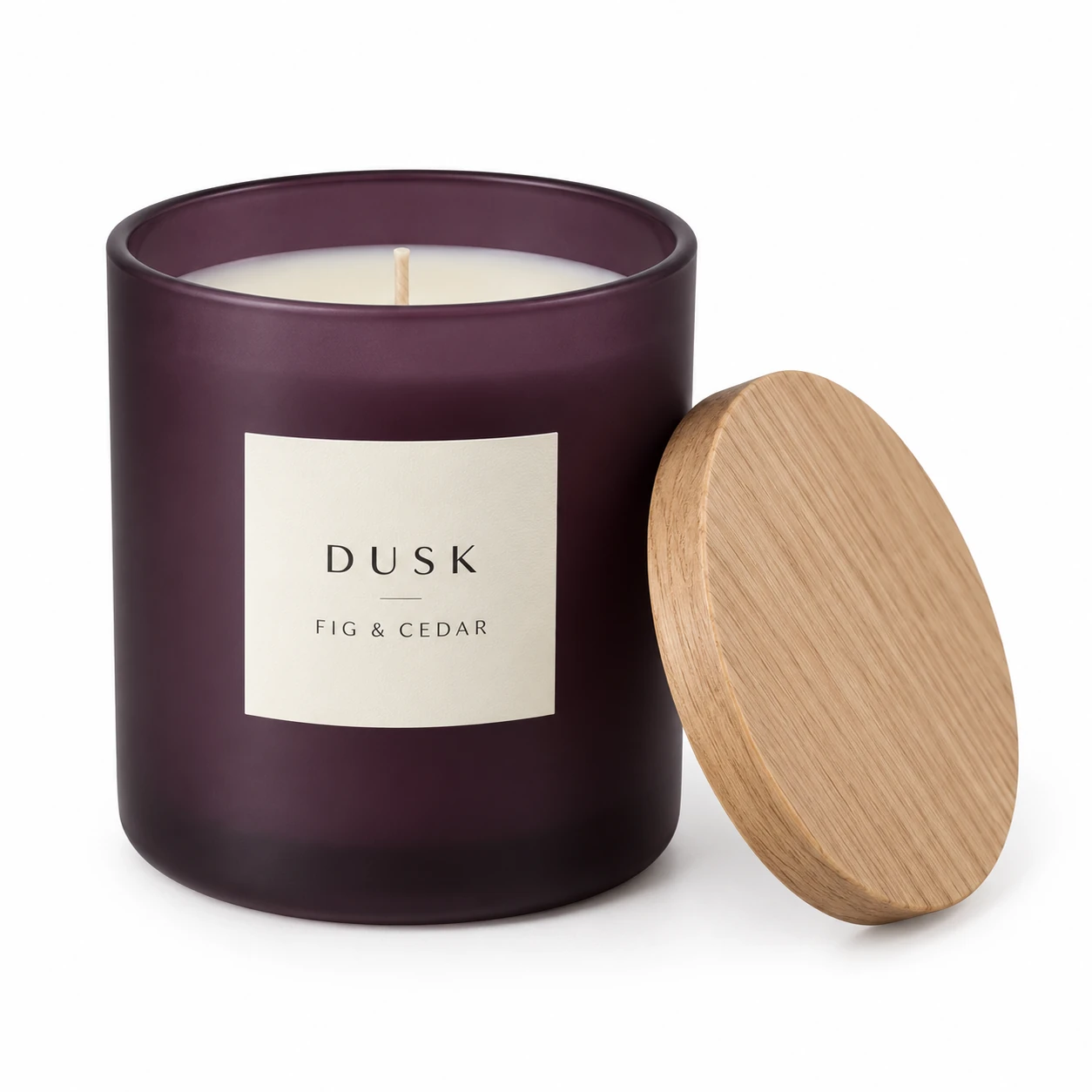
- Inspect label proportions, wording, jar and separate lid in the candle scene.
- Pebblely
- Review product scale, shadows and generated surroundings against the source.
Budget units
Choose by task
- Fotogenic AI
- Weekly or monthly workflow credits refresh without rollover.
- Pebblely
- Monthly Lite, Basic and Pro provide different image allowances.
A candle scene with a label worth checking
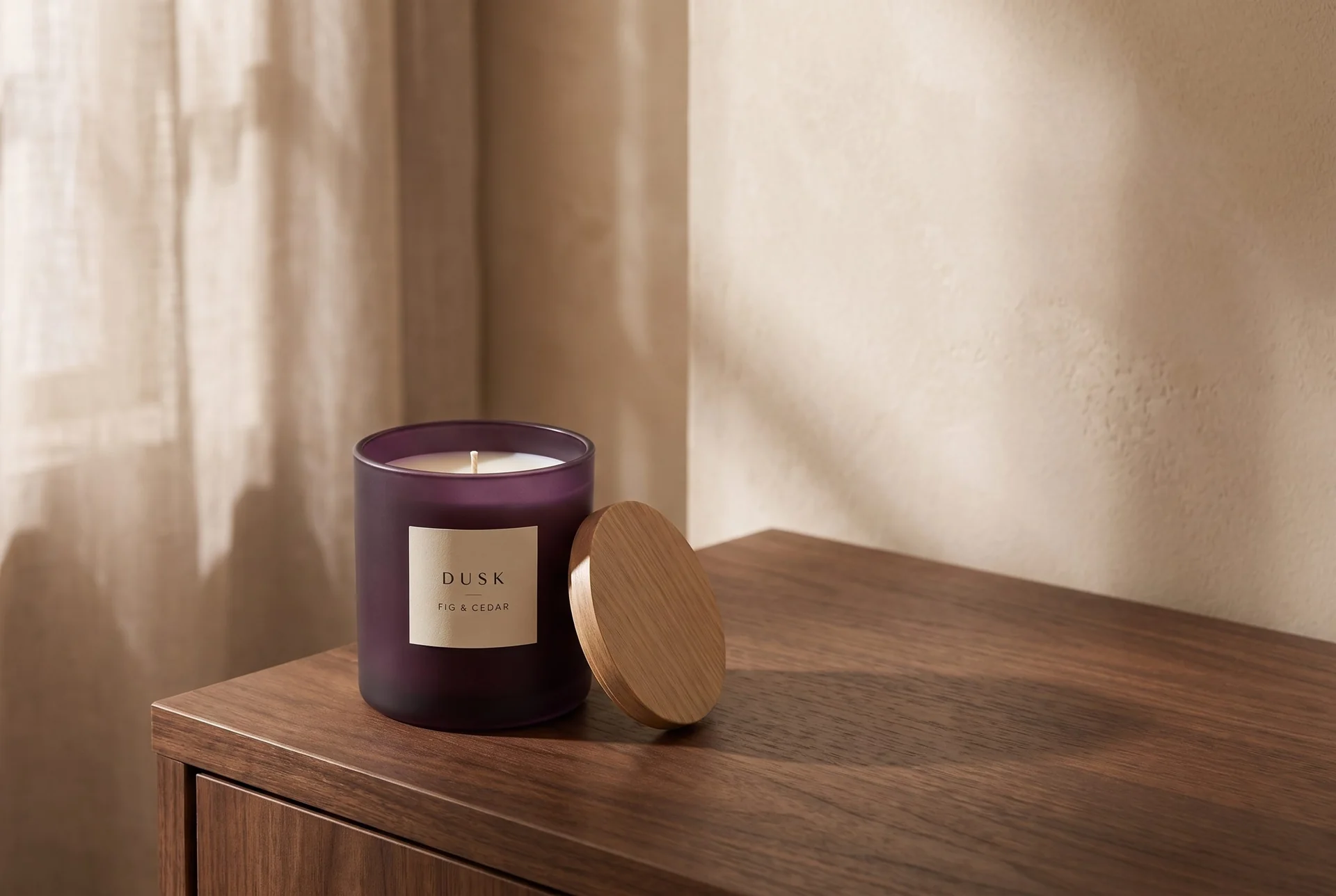
A labelled candle becomes a walnut-console scene, keeping the separate oak lid and readable wording in view.
From the product reference
The candle scene keeps the wording readable, the rim visible and the lid separate. Label proportions and letter spacing need comparison; the second output was excluded because its typography diverged more noticeably.
Plan this product shoot
A candle launch across three placements
One candle identity
The retained DUSK candle reference has FIG & CEDAR wording and a separate oak lid. For the console scene, the acceptance record is the jar's height-to-width ratio, label proportions, rim and lid relationship.
Jar, banner and finish views
The displayed image demonstrates one walnut-console setting. An email banner with copy space and a closer finish view are proposed next placements. The candle has not been demonstrated across all three roles.
Label and scale approval
Inspect the wording at full size, then compare letter spacing and label proportions with the source. The separate lid should remain recognizable as a lid, not become a fixed part of the jar. A second candidate was excluded because its typography diverged more noticeably.
Our recommendation for this brief
Choose Fotogenic AI to develop the setting, then refine the accepted direction for the required placement. Choose Pebblely when reference-guided background changes already complete the delivery. No product-fidelity winner is established.
Use product photography templates to find a starting direction and composition and lighting variations to change one decision at a time. The home-goods photography page helps plan scale and setting. The separate pitcher prompt walkthrough records completed breakfast and cafe scenes, rather than this proposed candle set.
What are you creating next?
One seasonal product needs several image roles
Choose Fotogenic AI when you want to develop an accepted candle direction into distinct listing, banner and detail roles.
Its Campaign Set and variations support that process; approve each role rather than treating a set as automatically usable.
A packshot needs a replacement setting
Choose Pebblely when one reference-led setting completes the job.
Its documented description, scene reference and product positioning address that focused brief without requiring a broader production change.
A collection needs repeated direction across SKUs
Both can create in volume.
Choose Fotogenic AI when reusing direction and reviewed WooCommerce assignment fit your catalog; choose Pebblely when its Basic or Pro bulk scene controls fit the required exports.
Two routes to a product setting.
Fotogenic AI
Add the product reference
Use the candle source and describe the setting and product details to preserve.
Direct the setting
Choose a template or custom scene direction, then generate the new product composition.
Review and export
Compare the label and lid with the reference. Download the accepted file for its intended placement.
Pebblely
Upload and isolate
Upload the product photo and refine the automatically removed background where needed.
Describe and position
Add a scene description and optional reference, position the product proportionally, then generate.
Inspect and export
Check product scale, label and contact shadows before downloading for the chosen placement. Publishing remains a separate handoff.
A closer look at Pebblely.
When Pebblely is worth evaluating
Pebblely suits brands with useful packshots that need fresh settings for marketing. Its product page presents scene and bulk creation; its FAQ covers backgrounds, shadows, reflections, references and paid-plan output sizes.
- A candle launch might need a tabletop email image, seasonal social scene and wider banner.
- The product label and apparent size still need to match the source.
- Those placements give the scene a purpose beyond producing an attractive preview.
When Fotogenic AI is worth evaluating
Choose Fotogenic AI when you want to develop a candle setting, refine the selected composition and keep accepted images attached to the merchant's next task. Campaign Set supports complementary image roles; WooCommerce review and updates provide a connected store handoff.
Pebblely also supports references, related backgrounds and bulk creation. The Fotogenic AI benefit is its own route from direction through review to delivery, rather than an unsupported claim that Pebblely cannot build a campaign.
Guiding composition with references
Pebblely's reference-image tutorial, published in May 2024, combines a scene description, reference image and product positioning. The reference supports the written direction; historical screenshots and mode labels may differ from a current account.
- A product reference identifies the item that must stay accurate.
- A scene reference communicates composition, palette or context. Separating those roles helps distinguish an altered product from a different interpretation of the scene.
- Fotogenic AI's product image generator offers templates and custom direction. Saving an accepted setup gives later variations a clear starting point.
Background quality and product fidelity
The setting affects how shoppers read scale, material and use. Oversized props can make a bottle appear smaller; an on-model necklace can suggest a different chain length.
- Pebblely's reference tutorial includes a necklace-model example, so its background-focused positioning does not imply it lacks model imagery.
- That example alone does not establish suitability for every apparel brief.
Bulk generation and consistency
Both services describe volume workflows: Pebblely lists bulk generation on Basic and Pro, while Fotogenic AI supports selected WooCommerce products and reusable creative setups. See Pebblely plans and the Fotogenic AI store workflow.
- Shared settings can give a collection a related look.
- Product-specific framing still matters; identical placement can make individual items less informative.
- Batch capacity does not guarantee a fully usable collection without review.
Pricing: allowances and usable output
Fotogenic AI
$20.00 / month
Starter in USD: 220 monthly credits. Weekly: $7.00 with 60 credits. Images only; video plans differ.
Plan allowances and terms
Fotogenic AI offers weekly and monthly credit-based plans. Its pricing page states that credits refresh each billing cycle and do not roll over. Use the current Fotogenic AI plans and the estimate for the operation you intend to run. Do not equate one service's image allowance with another service's credits.
Pebblely
US$9 / month
Lite includes 30 images. Bulk generation is listed on Basic and Pro.
Plan allowances and terms
Reviewed October 20, 2026, Pebblely's pricing page listed monthly Lite at US$9 for 30 images, Basic at US$19 for 200 and Pro at US$39 for 500. Basic and Pro list bulk generation. The FAQ's shorter plan summary omits Lite, so the current pricing page is the better source for the available tier list. Verify current billing terms before purchasing.
A useful comparison starts with a real requirement, such as a set of accepted images for a small collection. Record attempts, revisions and remaining allowance. Dividing a plan price by the largest advertised output count produces a theoretical figure; it does not establish the cost of the images your business actually accepts.
Switching from Pebblely to Fotogenic AI
- Keep clean product files, scene references and written directions separately. A useful background reference and an accurate candle source serve different purposes.
- Recreate one accepted setting in Fotogenic AI before moving another scent or SKU. Inspect the label, jar and lid, then use controlled variations for the next change.
- Retain the source-to-export record and confirm who assigns each image. Keep Pebblely if its existing scene workflow already completes the brief; a switch has setup cost even when both tools support it.
Sources and review method
Written by Fotogenic AI. Official product and pricing sources were checked October 20, 2026. The retained candle scene demonstrates one Fotogenic AI setting from a concept product reference. Packaging changes remain visible; the banner and detail roles are a proposed brief. Recommendations are editorial judgments. No matched competitor generation test or purchase was performed.
- Pebblely reference-image tutorial
- Pebblely FAQ
- Pebblely pricing and bulk access
- Fotogenic AI store workflow
- Fotogenic AI review and assignment guide
- Fotogenic AI current plans
Continue with Fotogenic AI vs Photoroom for editing and store workflows, or Fotogenic AI vs VOVV.AI for a broader studio decision. Explore the comparison hub for the shared buying framework.
Continue your comparison.

FAQ
Questions about Fotogenic AI and Pebblely
Its current pricing page lists bulk generation on Basic and Pro. Check the selected plan before treating the entry tier as equivalent for collection work.
Create with Fotogenic AI
Create the scene your product needs.
Start with a clear product photo and refine the setting for its next placement.