Fotogenic AI vs Flair AI
Fotogenic AI directs scenes from product references. Flair AI gives you a canvas for placing products and props.
Our pick
Product campaigns from visual references
 Flair AISpecialist fit
Manual product and prop placement
Choose Flair AI for placing products and props manually on a drag-and-drop canvas. Both tools also create campaigns and fashion imagery.
The differences that change your choice.
Compare reference direction, manual staging and the route from bottle composition to approved store imagery.
Manual placement
Flair AI Manual canvas
- Fotogenic AI
- Guide the setting with references and instructions, then refine it.
- Flair AI
- Arrange products and props on a drag-and-drop canvas.
Reference-led direction
Fotogenic AI Direct the scene
- Fotogenic AI
- Use templates, custom direction and variations around the product source.
- Flair AI
- Reuse canvas templates and trained models where the plan permits.
Delivery owner
Fotogenic AI Connected assignment
- Fotogenic AI
- Review selected WooCommerce product-image updates.
- Flair AI
- Prepare creative batches and exports for the chosen publishing workflow.
Fashion overlap
Both tools
- Fotogenic AI
- Create on-model scenes and related product imagery.
- Flair AI
- Offers on-model imagery, model selection, pose and environment adjustments.
Model setup
Choose by task
- Fotogenic AI
- Reuse product references and approved photographic direction.
- Flair AI
- Standard and fast custom-model allowances differ from output quotas.
Operation budget
Choose by task
- Fotogenic AI
- Weekly or monthly credits fund the chosen creative operations.
- Flair AI
- Instant-image and ad generation consume four times the stated image quota.
Direct the setting around the bottle
A fragrance reference becomes a sunlit countertop scene. The complete bottle, cap and label stay inside the frame.
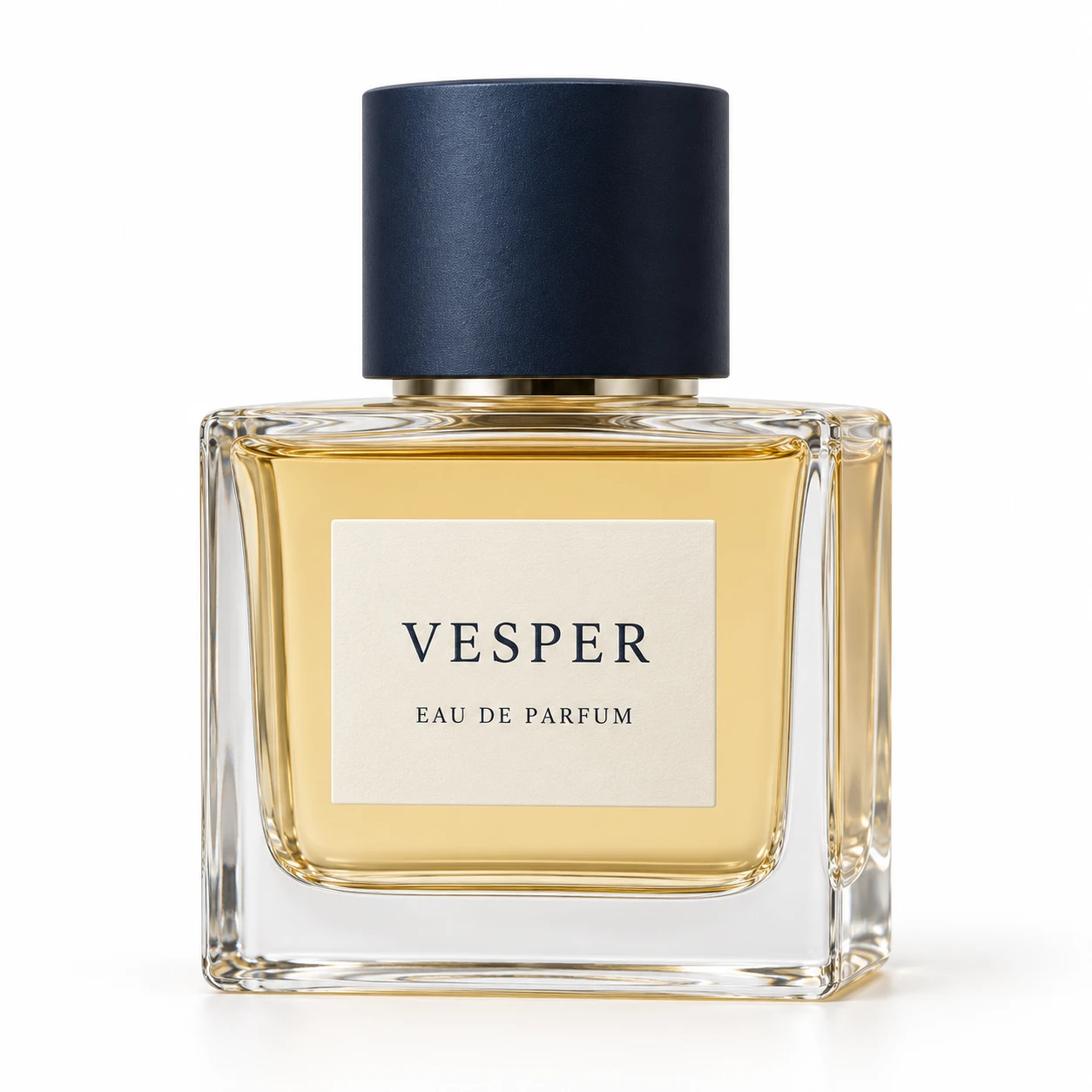
From the product reference
The bottle and cap stay fully visible and label wording remains readable. Generated reflections, liquid appearance and label proportions differ from the source, so the scene needs review before product-detail use.
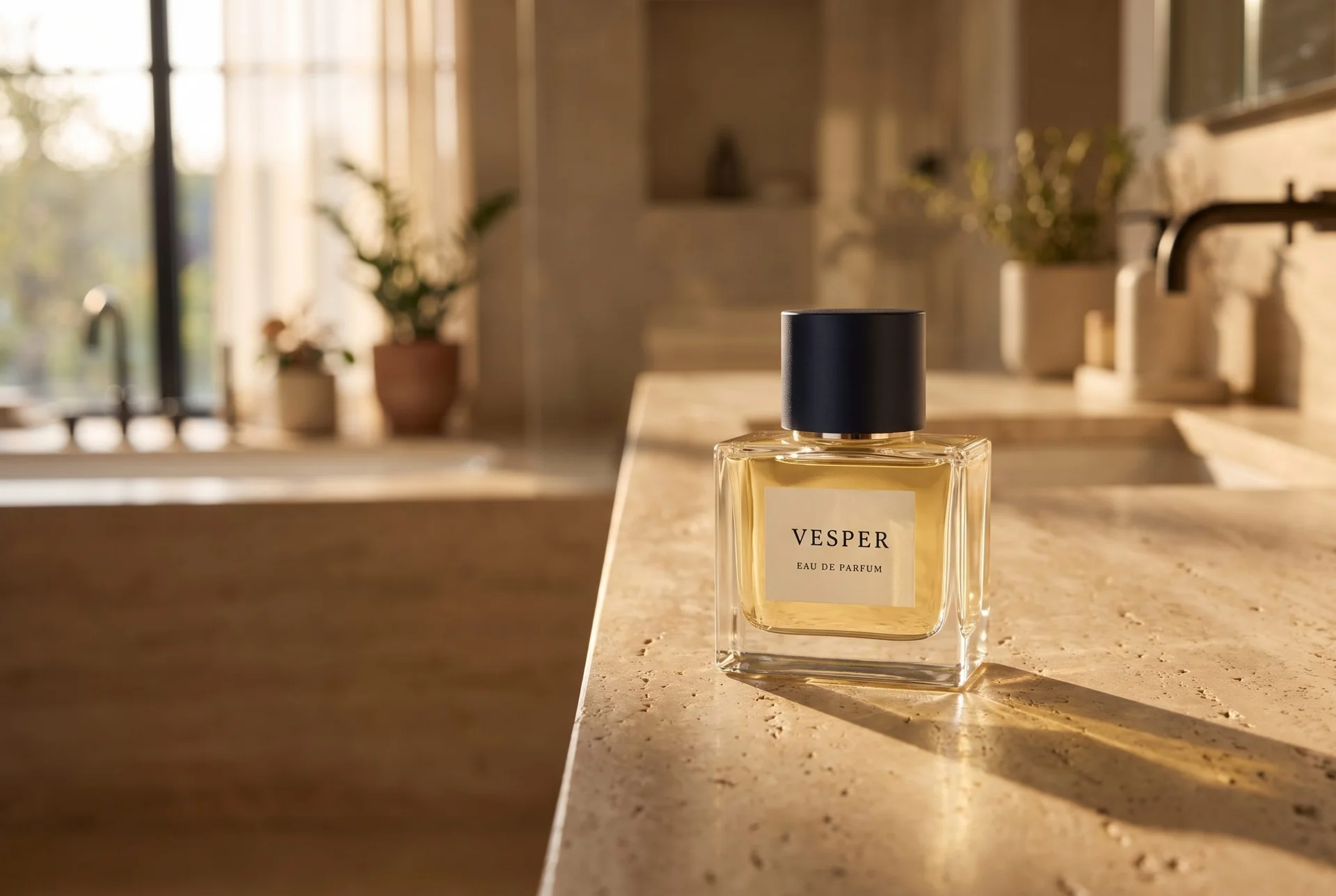
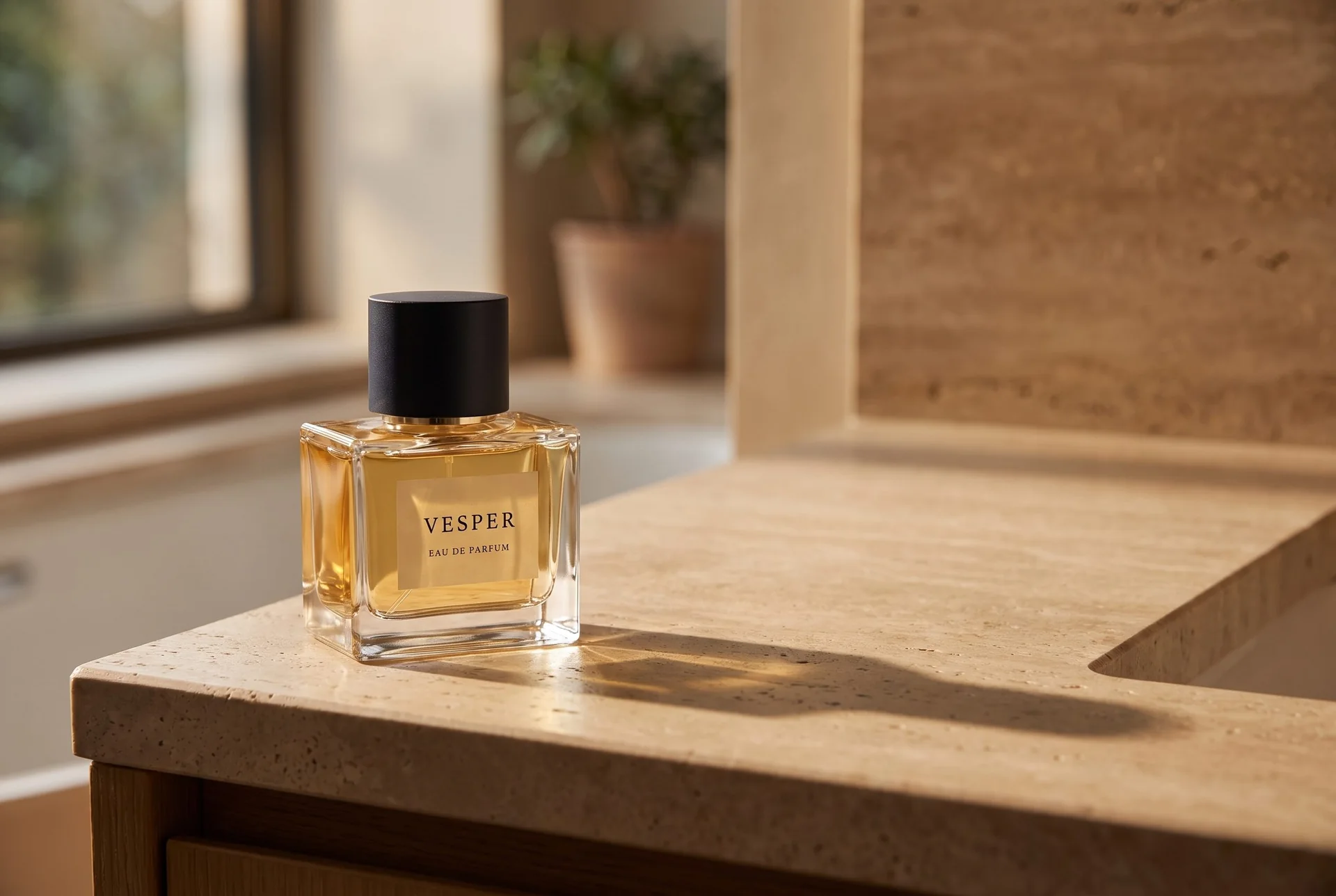
Left placement leaves room for a headline on the right. Warm light tints the label, changing its apparent color.
Plan this product shoot
A fragrance campaign with controlled composition
Bottle and layout requirements
The retained VESPER reference has a navy cap and readable label. For this brief, the bottle must remain complete and recognizable while leaving room for a headline. Reflections and label geometry belong in the product check, not just the mood board.
Hero, campaign and finish views
The two retained scenes show different placement choices: a closer bottle composition and a left-positioned bottle with open counter space to the right. Use the latter to judge headline clearance. A dedicated finish close-up is a proposed next role, not a third demonstrated output.
Composition approval
Compare label proportions, glass edges, liquid appearance and cap with the source. Warm light tints the label in the roomier frame. If exact prop coordinates determine the layout, Flair AI's manual canvas is the appropriate specialist control to evaluate.
Our recommendation for this brief
Choose Fotogenic AI to direct and refine the bottle scene through references and instructions. Choose Flair AI when manual staging is essential. Neither image pair establishes a product-fidelity winner.
Use composition and lighting variations to revise one decision at a time. Beauty product photography gives the bottle a category-specific shot plan. For image-versus-copy and mobile-crop decisions, the clothing banner brief teaches a related layout lesson using a different product.
What are you creating next?
A collection needs product and lifestyle views
Choose Fotogenic AI when the merchant wants to direct new product scenes and review their store assignment.
Use product references and custom direction, then inspect the accepted images in WooCommerce. Flair AI also creates these scenes; manual staging remains its distinct control.
A brand needs a coordinated advertising launch
Choose Fotogenic AI when references and instructions are the preferred way to develop the advertising scene.
Use variations to refine composition and inspect headline clearance. Choose Flair AI when the layout requires manual bottle or prop positioning, and include its higher ad-operation quota cost.
A scene needs exact prop placement
Choose Flair AI when hands-on canvas placement determines the required composition.
Its drag-and-drop canvas and reusable templates give the team direct staging controls. Fotogenic AI supports brief-led direction and related launch assets.
Direct the scene or arrange the canvas.
Fotogenic AI
Add the product reference
Use the bottle photograph and describe the setting, scale and required copy space.
Generate and refine the composition
Choose a template or custom instructions, then adjust a selected image through variations.
Inspect and export
Read the label and review reflections against the source. Download the accepted image for the final layout.
Flair AI
Build the canvas
Upload the product and arrange its position with the props needed for the scene.
Stage and generate
Set the composition or use a reusable template, then generate the directed image.
Review and export
Inspect the product, lighting and final crop before exporting. Store assignment remains part of the delivery process.
A closer look at Flair AI.
When composition is the main decision
Flair's product overview centers on a drag-and-drop canvas, digital props and reusable templates. Choose it when arranging the scene is the main creative task.
- Position products and props within a composition.
- Reuse a scene through templates.
- Explore its fashion imagery, ads and custom human models too.
When Fotogenic AI fits the work
Choose Fotogenic AI when you prefer to describe the product setting, supply references and refine the selected composition. Its product image workflow and variations suit a merchant directing the bottle, lighting and advertising space without manually building a prop layout.
For store delivery, the WooCommerce workflow connects product references to review and selected updates. Flair AI also creates campaign and advertising content. The meaningful choice is how the scene is controlled and delivered, not which service uses the word campaign.
Reusable templates and references
Both tools offer a reusable starting direction. Flair focuses on scene templates; Fotogenic AI's template library helps merchants explore product-image directions.
- Carry lighting, product scale and camera direction into the next brief.
- Adapt the layout to the product's shape.
- Review each result against its own source.
Fashion is part of the overlap
Flair's on-model photography workflow includes product uploads, model selection and pose or environment adjustments. It belongs on a fashion shortlist too.
- Choose around garment presentation, scene control or campaign delivery.
- Read Fotogenic AI vs FASHN when dressing a model is the central task.
Custom models and instant generation
Flair separates standard and fast custom-model allowances from image and video quotas. A trained product model is different from a human model shown in a fashion image.
- Repeated campaigns for a hero product may justify setup.
- A one-off catalog update has a different production budget.
- Include reference preparation and revisions in that budget.
Bulk work and team handoff
Flair's bulk content workflow supports product uploads, content selection and batch configuration. Fotogenic AI connects product selection with reviewed store-image updates in WooCommerce.
- Flair suits creative batches prepared outside the store.
- Fotogenic AI suits merchants working from their store products.
- Keep the source, intended placement and approved export together.
Pricing: plans and operation costs
Fotogenic AI
$20.00 / month
Starter in USD: 220 monthly credits. Weekly: $7.00 with 60 credits. Images only; video plans differ.
Plan allowances and terms
Fotogenic AI's current plans use weekly or monthly credit cycles. Price the selected workflow and expected revisions, and keep the amount of unused allowance visible. Comparing a discounted annual commitment with a short production cycle can hide the difference in actual spend.
Flair AI
$10 / month
Pro on monthly billing. Instant images and ads consume four times the image quota; annual equivalents differ.
Plan allowances and terms
With the annual-discount switch off, Flair's pricing page displayed $10 per month for Pro, $35 for Pro+ and $55 for Scale Tier 1 on October 20, 2026. With the annual discount enabled, the displayed monthly equivalents were $8, $26 and $38. Confirm the selected billing term before treating those figures as the immediate payment.
The page listed 80 generated images for Pro+ and 150 for Scale Tier 1, with instant-image and ad generation consuming four times the stated image quota. It also separates custom-model and video allowances. The plan you need depends on which operation you will actually use, not simply the word “images.”
Flair also labels commercial-license and API access features by plan. Confirm the applicable terms for your intended use and access route. This article does not infer legal rights from a pricing label or promise that an early-access API behaves like a finished store integration.
Switching from Flair AI to Fotogenic AI
- Retain original product photos, approved exports and permitted references. Record bottle scale, prop relationships and headline space in a written composition brief.
- Recreate one direction through Fotogenic AI templates or custom instructions, then use the variations guide to refine lighting or composition.
- Confirm the delivery crop and product assignment. No direct import of Flair AI's editable canvas, templates or trained models is established. Keep manual staging when precise placement remains indispensable.
Sources and review method
Written by Fotogenic AI. Official product and pricing sources were checked October 20, 2026. The retained bottle pair shows Fotogenic AI scene and copy-space choices from a concept product reference. Label and reflection changes remain inspection issues; it is not a manual-canvas or competitor-quality test. Recommendations are editorial judgments. No matched competitor generation test or purchase was performed.
- Flair AI composition canvas
- Flair AI on-model photography
- Flair AI bulk workflow
- Flair AI pricing and operation quotas
- Fotogenic AI store workflow
- Fotogenic AI review and assignment guide
- Fotogenic AI current plans
Read Fotogenic AI vs Claid AI for another scene-and-catalog decision or Fotogenic AI vs Pebblely for reference-led product scenes. Return to the comparison hub for the wider framework.
Continue your comparison.
FAQ
Questions about Fotogenic AI and Flair AI
No. Its official pages cover a composition canvas, reusable templates, fashion imagery, ads and other production capabilities. Evaluate the feature that matches your actual job.
Direct the setting around your product.
Refine the composition, light and copy space from your original product reference.