Fotogenic AI vs Claid AI
Separate enhancement from new scenes. Compare Fotogenic AI's creative workflow with Claid AI's web and API operations.
Our pick
New product scenes for merchandising
 Claid AISpecialist fit
Image cleanup and processing pipelines
Choose Claid AI for cleanup, enhancement, specific placement controls or a dedicated processing API, with costs that vary by operation.
The differences that change your choice.
Separate new merchandising scenes from cleanup, then compare creative controls and catalog delivery.
Source condition
Claid AI Process the source
- Fotogenic AI
- Create new settings from a clear product reference.
- Claid AI
- Clean up, enhance, remove backgrounds or generate a scene.
Creative direction
Both tools Match the controls
- Fotogenic AI
- Use templates, references and variations to develop a new portrayal.
- Claid AI
- Choose Precise, Creative, Inspiration, Background or Product Swap.
Web or API route
Claid AI Separate API purchase
- Fotogenic AI
- Use the merchant workflow for creation, review and selected store updates.
- Claid AI
- Buy dedicated API access separately from the web application.
Catalog handoff
Fotogenic AI
- Fotogenic AI
- Review WooCommerce results before assigning the accepted files.
- Claid AI
- Export processed or generated assets into the defined publishing pipeline.
Scene or enhancement proof
Choose by task
- Fotogenic AI
- The sneaker pair shows separate new scenes.
- Claid AI
- Enhancement is a different operation from AI Photoshoot.
Billing units
Choose by task
- Fotogenic AI
- Weekly or monthly credits fund selected workflows.
- Claid AI
- Photoshoot quality and processing operations have distinct credit costs.
A new scene is different from enhancement
A sneaker reference becomes a woodland scene, with the complete shoe and important upper details clearly visible.
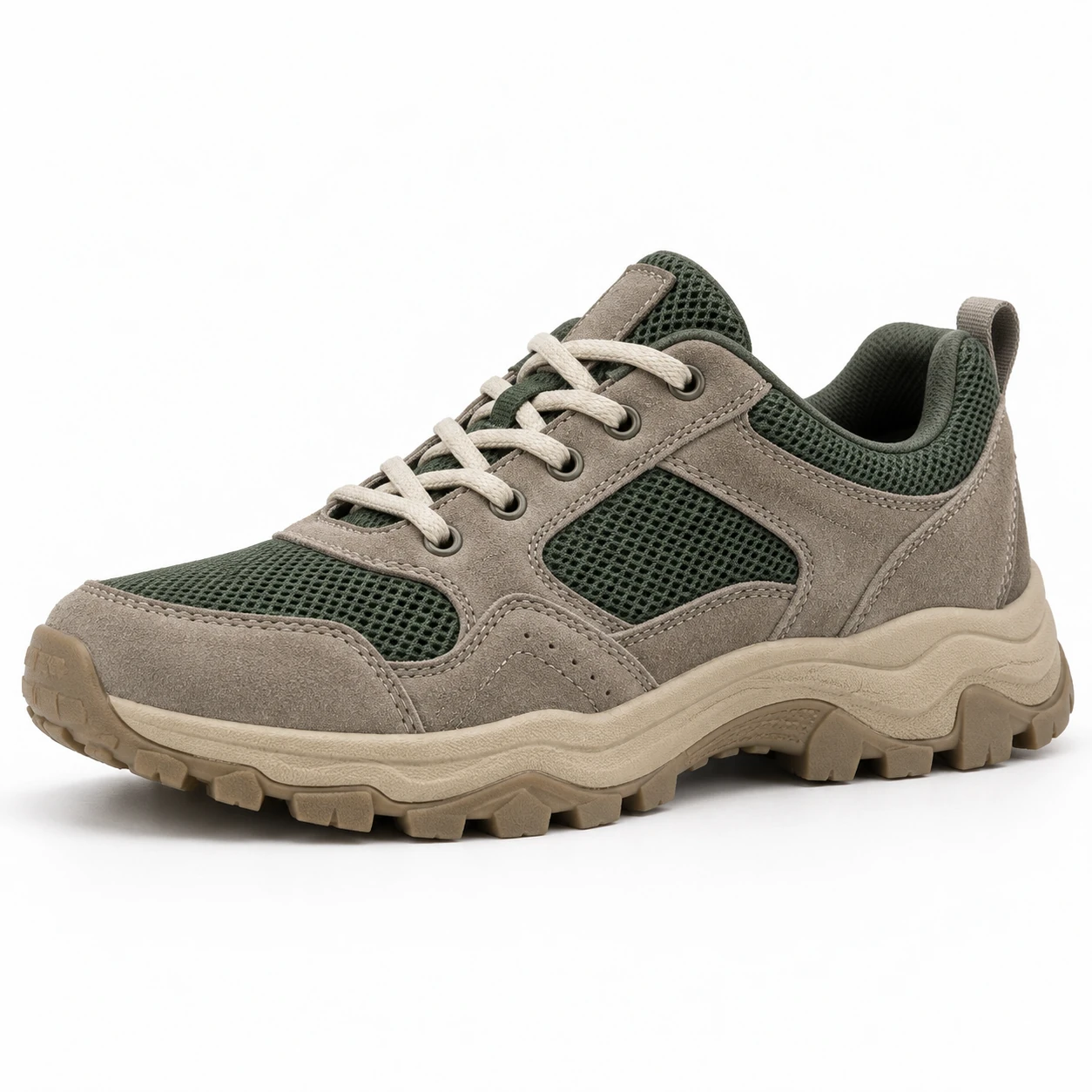
From the product reference
The woodland frame shows the full shoe, grey suede, green mesh and five near-side eyelets. Tread shapes and panel proportions need full-size comparison; this scene is not evidence of increased source resolution.

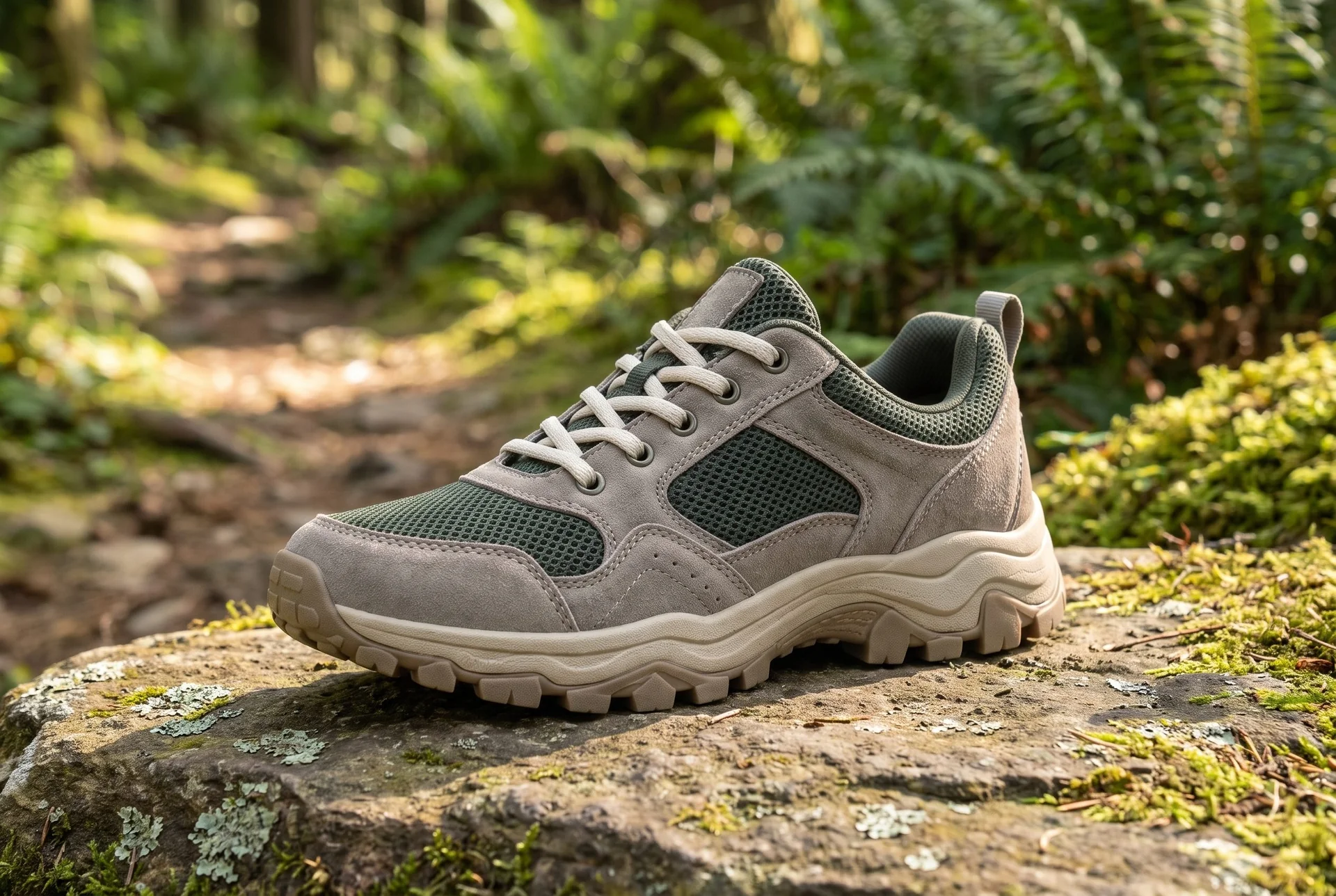
The closer frame highlights eyelets, mesh and sole. It is a separate generation, with no verified enhancement or exact tread geometry.
Plan this product shoot
A footwear launch with mixed source quality
Source classification
The retained source identifies a grey-suede and green-mesh trail sneaker. A useful listing packshot can stay factual; a low-resolution detail may need processing; the new woodland image serves a creative scene role. Keep those three jobs separate.
Creative image roles
The full woodland frame shows the complete shoe and five near-side eyelets. The closer alternative helps inspect mesh, panels and sole, but it is another generation. It is not the first photograph enhanced, and the pair is not a Claid AI benchmark.
Construction approval
Compare eyelets, laces, panel proportions and tread shapes at full size. New texture or geometry is an acceptance issue even if the export is larger. Keep original photography where the listing needs factual construction evidence.
Our recommendation for this brief
Choose Fotogenic AI for the new product setting and controlled revisions. Choose Claid AI when cleanup, enhancement or a specific placement mode is the main requirement.
Use the footwear photography page to plan useful views, the catalog consistency guide for repeat direction and the WooCommerce tutorial for approved product assignment.
What are you creating next?
A launch needs complementary creative images
Choose Fotogenic AI for product shots, lifestyle scenes and ad images from one brief.
Campaign sets and variations develop distinct image roles. Claid is also a creative option through Precise, Creative, Inspiration, Background and Product Swap modes.
Existing catalog photographs need processing
Choose Claid AI for a catalog combining cleanup, enhancement and generation.
Its separate operations match uneven source quality. Existing packshots can follow a processing route while products needing new scenes use AI Photoshoot.
Developers own high-volume image processing
Choose Claid AI's dedicated API route for an owned processing pipeline.
Dedicated API plans address the technical access route. Job handling, result storage, review and publishing remain part of the surrounding system's production cost.
Create a portrayal or process the image.
Fotogenic AI
Choose the product source
Start with a photograph that shows the shoe details needed for the new scene.
Generate the new portrayal
Direct the setting around the reference rather than treating the task as a resolution enhancement.
Review and export
Inspect panels, eyelets and sole geometry, then download the approved composition.
Claid AI
Choose the operation
Classify the source as cleanup, enhancement or a new AI Photoshoot; select the appropriate Studio tool.
Set the scene or processing
For Photoshoot, choose the mode matching placement or reference needs, configure it and generate.
Inspect and deliver
Check the processed or generated result and export it for the destination. API retrieval, storage and publishing require a separate pipeline.
A closer look at Claid AI.
Separate generation from cleanup
Claid suits catalogs with mixed image jobs. Its Studio overview brings generation, editing and enhancement into one workspace, but each operation solves a different source problem.
- Background removal isolates a usable product photo.
- Enhancement works on the existing image.
- Scene generation creates a new presentation around the item.
- An unclear product may need better source photography; a new setting cannot establish missing detail.
When Fotogenic AI fits the work
Choose Fotogenic AI when the source already identifies the product and the task is a new merchandising scene. Campaign Set and variations support related compositions; WooCommerce review and updates keep the final image attached to the merchant handoff.
Claid AI also makes campaign scenes, with five Photoshoot modes. If the source needs cleanup before it can identify the product reliably, classify that processing job first. A different setting cannot recover factual detail the source never showed.
Claid's scene controls deserve a proper comparison
Claid's AI Photoshoot guide describes five modes for different levels of direction. Predictable listing placement and exploratory campaign composition call for different controls.
- Precise retains the product placement chosen on the canvas.
- Creative gives the system more compositional freedom.
- Inspiration uses visual references; Background starts from a chosen scene.
- Product Swap replaces an item within a reference composition.
The appropriate mode depends on whether placement, exploration or an existing layout is the priority. The same product requirements can be expressed through different controls without forcing both tools to use identical prompts.
Editing and enhancement have their own limits
Claid separates enhancement, background removal, expansion and other edits from scene generation. For a cleanup-heavy catalog, unnecessary generation adds cost and review work without addressing the original job.
- Larger exports do not establish more accurate texture or lettering.
- Existing assets may be usable as-is, need editing, need a new scene or require a reshoot.
- That classification gives each source an appropriate route before batch production.
Batch production and delivery
Claid's pricing page describes batch processing and brand-kit access on qualifying plans, with API options presented separately. These suit volume production, while a store-publishing connection requires its own delivery route.
- A merchant handoff includes product association, image names, gallery order, crop and retained originals.
- A technical pipeline also needs failure, duplicate-submission and accepted-file storage behavior.
- Fotogenic AI's WooCommerce route is relevant when store references and final image assignment belong in the same workflow.
Web application and API are separate purchases
Claid's pricing FAQ directs developers toward dedicated API plans and says a paid web plan is not required for that route. Verify the current API offer independently from the merchant interface. Shared branding does not establish identical limits, features or billing behavior.
If your team has no integration requirement, begin with the creative workflow. Building automation before understanding which results are acceptable can multiply an unresolved quality problem. Once the task is reliable, identify the steps that are repetitive enough to automate.
If an API is essential, include the surrounding system in the comparison: source preparation, result retrieval, review, file storage and publishing. Price and validate that surrounding workflow alongside the API.
Pricing: generation and editing costs
Fotogenic AI
$20.00 / month
Starter in USD: 220 monthly credits. Weekly: $7.00 with 60 credits. Images only; video plans differ.
Plan allowances and terms
Fotogenic AI's plans and credits use weekly or monthly cycles without rollover. Compare the cost of a defined task inside the chosen period. Separate generation, revisions and any additional processing so an apparently cheap operation does not obscure the total work.
Claid AI
4 or 10 credits
Standard or Studio AI Photoshoot. Background removal is a different operation.
Plan allowances and terms
Claid's public pricing explains credit consumption by operation. Reviewed October 20, 2026, its FAQ used examples of four credits for a Standard AI Photoshoot, ten for Studio quality and one for background removal. These are different operations, so the same allowance cannot be presented as a fixed number of finished images across all workflows. Check current Claid pricing before selecting a plan.
Claid's current pricing FAQ uses a 2,000-credit Pro allowance to illustrate 500 Standard Photoshoots or 200 Studio Photoshoots when spent entirely on that operation. Mixing in enhancement, background removal or revisions reduces the remaining generation capacity. Confirm the subscription amount and selected quality estimate in your account; the operation is the useful unit for planning this mixed workload.
Switching from Claid AI to Fotogenic AI
- Keep packshots, approved exports and processing specifications with each SKU. Mark which files need cleanup and which need a new setting.
- Recreate one creative scene in Fotogenic AI, then check the shoe and destination crop. The footwear photography page helps choose the required view.
- Retain any necessary processing pipeline until its replacement is separately verified. Moving downloadable images does not migrate API job handling, storage, failure recovery or store publishing.
Sources and review method
Written by Fotogenic AI. Official product and pricing sources were checked October 20, 2026. The retained sneaker pair demonstrates Fotogenic AI scene creation from a concept reference. The close frame is a separate generation, not verified enhancement. Web operation costs and API access are considered separately. Recommendations are editorial judgments. No matched competitor generation test or purchase was performed.
- Claid AI Photoshoot modes
- Claid AI Studio overview
- Claid AI web pricing and operation costs
- Claid AI developer documentation
- Fotogenic AI store workflow
- Fotogenic AI review and assignment guide
- Fotogenic AI current plans
Read Fotogenic AI vs Flair AI for composition-led production or Fotogenic AI vs Photoroom for editing and store workflows. Return to the comparison hub to compare the available guides.
Continue your comparison.

FAQ
Questions about Fotogenic AI and Claid AI
No. Its current AI Photoshoot documentation describes scene generation with placement, creative and reference-led modes. Enhancement is only one part of its offering.
Create a new setting for your product.
Start with a clear source and inspect the details before approving the scene.