Fotogenic AI vs VOVV.AI
Compare reusable studio controls with Fotogenic AI's reference-led creation and reviewed store delivery.
Our pick
Product campaigns with reviewed handoff
 VOVV.AISpecialist fit
Reusable brand identities and perspectives
Choose VOVV.AI for Brand Models, Brand Scenes or Perspectives. Availability varies by tier, and Catalog Studio remains marked beta.
The differences that change your choice.
Compare bag campaign direction, reusable brand controls and the handoff from approved image to product listing.
Reusable identities
VOVV.AI Dedicated brand controls
- Fotogenic AI
- Reuse templates, saved looks and permitted model references.
- VOVV.AI
- Starter lists Brand Profiles; Growth and Pro add Brand Models and Brand Scenes.
Additional angles
VOVV.AI Perspectives control
- Fotogenic AI
- Create complementary portrayals from supplied product references.
- VOVV.AI
- Perspectives explicitly targets additional product views.
Merchant handoff
Both tools Match the store route
- Fotogenic AI
- Review selected WooCommerce updates with the product source attached.
- VOVV.AI
- Advertises downloads, Shopify delivery and ad use from its Studio.
Catalog rollout
Choose by task
- Fotogenic AI
- Reuse direction across selected product sources and inspect each result.
- VOVV.AI
- Catalog Studio remains marked beta on the workflow page.
Access tiers
Choose by task
- Fotogenic AI
- Weekly or monthly credits refresh without rollover.
- VOVV.AI
- Monthly credit tiers include different brand and bulk capabilities.
Motion
Both tools
- Fotogenic AI
- Qualifying plans support short product-video creation.
- VOVV.AI
- Advertises product video alongside still-image tools.
Give an accessory a place in the story
A saddle bag moves into a cafe scene, with its circular clasp facing the camera and strap visible.
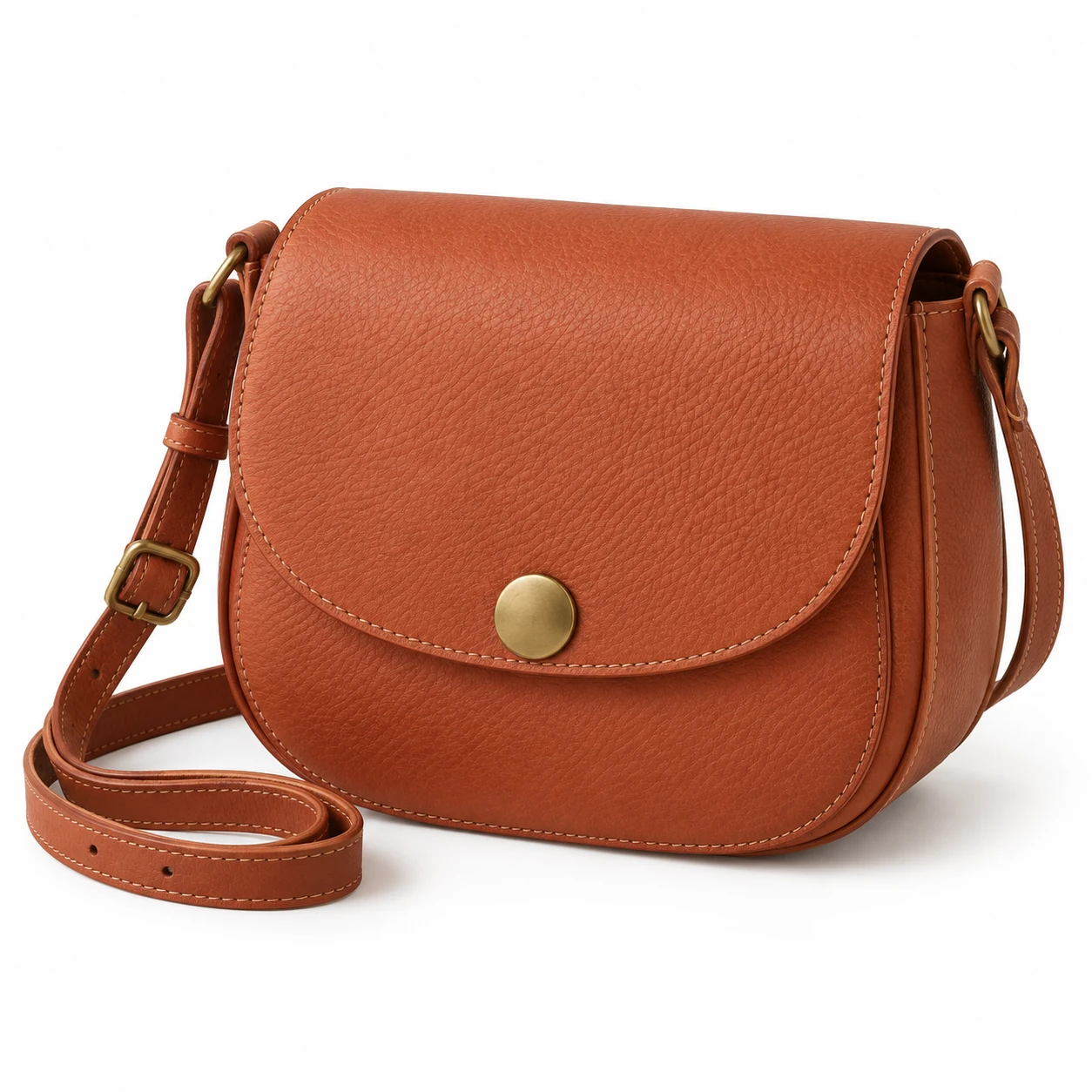
From the product reference
The rounded flap, circular clasp and adjustable strap remain visible. Sunlight changes the apparent leather tone. The quieter main frame emphasizes the bag; the warmer alternative adds more background activity.
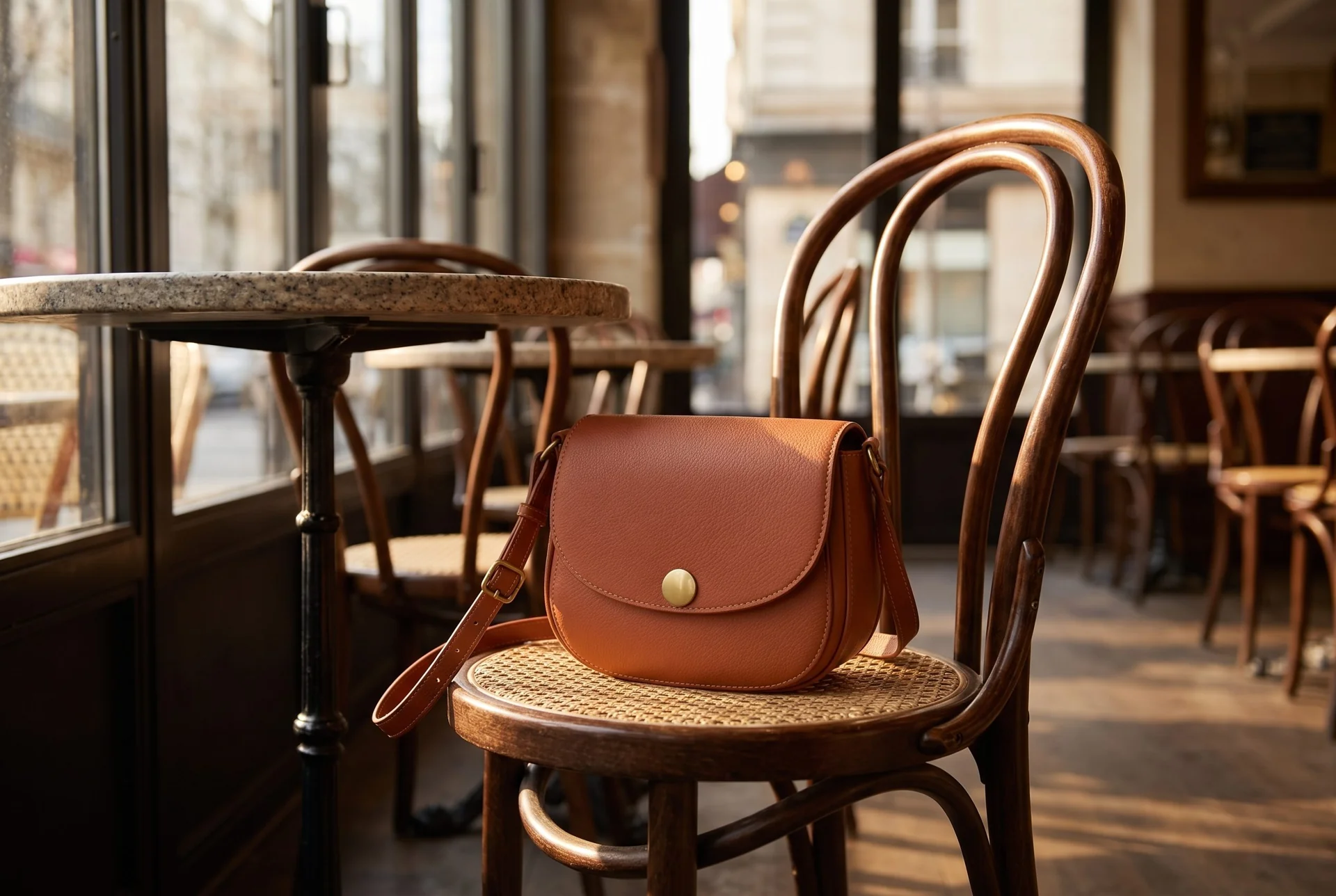
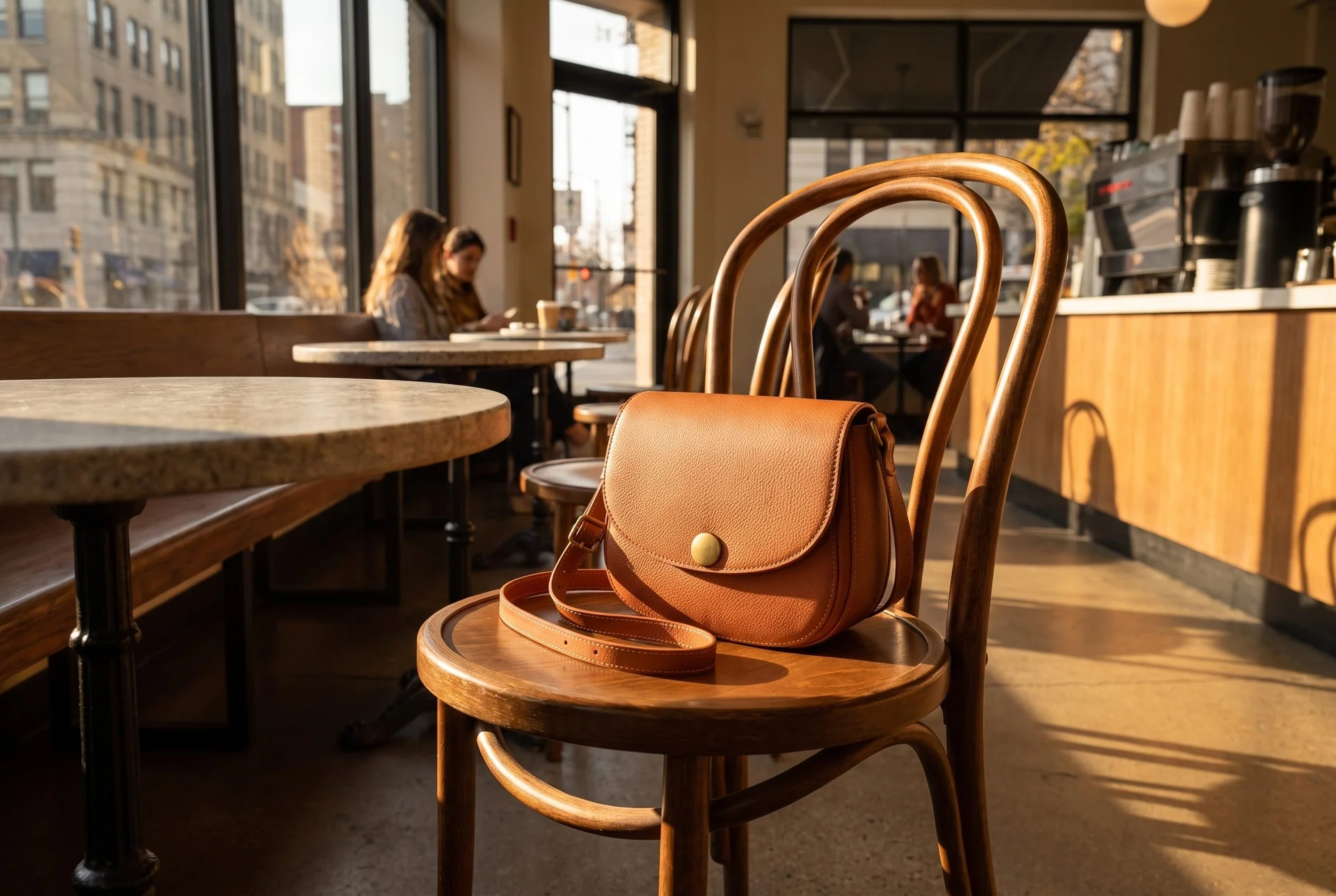
The same bag appears in warmer light and a busier cafe, changing its apparent leather color and visual emphasis.
Plan this product shoot
One launch, two products, a repeatable delivery
Separate product records
The two retained results show one terracotta saddle bag in cafe settings. Keep its rounded flap, circular clasp and adjustable strap as the product record. A garment added to the same campaign would need a separate reference and approval.
Complementary views
The quieter frame makes the bag the focus; the warmer, busier frame makes the setting more prominent. Compare the apparent leather tone before choosing either. These scenes show two compositions, not verified new product angles or a persistent trained identity.
Product and placement approval
Select the frame for its placement, then inspect clasp geometry, strap attachment and bag scale against the source. A proposed garment-and-bag launch needs independent product checks even when the campaign mood is shared.
Our recommendation for this brief
Choose Fotogenic AI to direct and refine the bag scene, with WooCommerce review available for delivery. Choose VOVV.AI when named brand-identity, scene or perspective controls are required. The bag pair does not establish a mixed-product launch or unseen-angle accuracy.
Use the bag campaign guide for product, context and detail roles, Campaign Set for related creation and the WooCommerce tutorial for assignment. The clothing catalog walkthrough is a separate completed garment example.
What are you creating next?
A launch needs garment and accessory imagery
Choose Fotogenic AI when your brief calls for merchant-directed product scenes and a reviewed store handoff.
Give every product its own source and acceptance check. Both services cover clothing and accessories, so category breadth alone is not decisive.
A team needs reusable brand identities
Choose VOVV.AI when Brand Models or Brand Scenes are essential to repeat production.
Confirm Growth or Pro access and test the required persistence. Reusing a written prompt in another service is a different control.
A product needs an additional angle
Choose VOVV.AI when its dedicated Perspectives workflow matches the task.
Supply factual source views when a listing must reveal unseen construction; a generated additional angle cannot establish the shape of a clasp or pocket absent from the reference.
From product reference to campaign assets.
Fotogenic AI
Add the product reference
Start with the bag photograph and the creative direction shared by the required image roles.
Generate the related compositions
Use Campaign Set for the brief, then refine selected images through variations when needed.
Review and download
Compare each clasp, strap and product view with the source before downloading accepted images.
VOVV.AI
Bring the product
Upload a packshot, phone photo or flat lay to Product Images.
Direct and generate
Select shots, scenes, models, framing and an eligible brand profile; configure and generate the set.
Review and deliver
Inspect product details before downloading. The Studio advertises Shopify delivery; confirm the actual account and store controls.
A closer look at VOVV.AI.
Where the workflows overlap
Both tools combine creative direction with product-image generation. VOVV's studio page describes product selection, shots, setup and generation, with Brand Profiles, Brand Models, Virtual Try-On, Perspectives and a beta Catalog Studio.
- Fotogenic AI offers templates, custom direction and campaign sets.
- Its WooCommerce workflow includes saved looks and model choices.
- The useful overlap is reusable direction and complementary product images, rather than feature names alone.
When to evaluate VOVV.AI
VOVV.AI deserves consideration when reusable identity or environment controls are a requirement. Its current plan comparison lists Brand Profiles on Starter and Brand Models plus Brand Scenes on Growth and Pro.
Those are specific purchases. A palette and lighting profile, a recurring cast and a reusable environment are different assets. Fotogenic AI also reuses settings and references; this review does not establish identical identity persistence between the two services.
When to evaluate Fotogenic AI
Choose Fotogenic AI when you want to direct a product scene from its reference, refine the accepted direction and complete a reviewed merchant handoff. Templates, saved looks, model choices and Campaign Set support creation; the documented WooCommerce route supports selected listing updates.
VOVV.AI also covers broad campaign production and advertises Shopify delivery. Fotogenic AI's native Shopify route remains Coming soon. Decide which controls and delivery path the job needs before using campaign breadth as a recommendation.
Catalog work and delivery
Catalog production depends on the link between each SKU, its references and its accepted files. VOVV's Catalog Studio is marked beta; Fotogenic AI documents selected WooCommerce workflows and store updates.
- Beta status remains material when catalog delivery drives the purchase.
- Partial and rejected results need to stay distinguishable from finished assets.
- Product association, permissions and final assignment belong in the delivery decision.
What about video?
Video can be relevant to a launch, but it is a separate evaluation from still-image quality. Fotogenic AI's current pricing lists video generation on qualifying plans. VOVV also advertises video capabilities. This article does not evaluate motion quality or claim that one service's video workflow is better.
If video is essential to the buying decision, define a separate brief covering source accuracy, movement, duration, framing and final delivery. Do not assume that a convincing still image will produce an equally useful video. No video generation was performed for this comparison.
Pricing: plans and production needs
Fotogenic AI
$20.00 / month
Starter in USD: 220 monthly credits. Weekly: $7.00 with 60 credits. Images only; video plans differ.
Plan allowances and terms
Fotogenic AI offers weekly and monthly billing, with credits refreshing per cycle and no rollover. Its public pricing distinguishes product-image and video-enabled plans. Consult the current Fotogenic AI pricing for the currency and workflow you need rather than assuming that equally named tiers include equivalent operations.
VOVV.AI
$39 / month
Starter in the monthly view. Included creative capabilities vary by tier.
Plan allowances and terms
The VOVV.AI monthly view reviewed on October 20, 2026 lists Starter at $39, Growth at $79 and Pro at $179. A free tier and custom Enterprise option are also displayed. The advertised allowances use credits, and the page presents different included capabilities by tier. Check the current VOVV pricing before selecting a plan.
A comparison should account for the required settings, revisions and accepted results. Do not divide a subscription price by a headline capacity and present that number as a measured production cost. If a project uses only part of an allowance, include that unused capacity when considering the total purchase.
Switching from VOVV.AI to Fotogenic AI
- Retain product originals, approved exports, palette and shot instructions. Downloaded images do not transfer a Brand Profile, Brand Model or Brand Scene.
- Recreate one bag direction in Fotogenic AI and check its clasp, strap and color before repeating it. Confirm any indispensable persistence or additional-angle requirement separately.
- Use the WordPress product-image workflow for reviewed store delivery. No automatic account, trained-model or catalog migration is established.
Sources and review method
Written by Fotogenic AI. Official product and pricing sources were checked October 20, 2026. The retained bag pair demonstrates two Fotogenic AI compositions from one concept reference. It does not test trained identity, unseen-angle accuracy or a mixed-product launch. Recommendations are editorial judgments. No matched competitor generation test or purchase was performed.
- VOVV.AI Studio and Catalog Studio beta
- VOVV.AI pricing and brand-tool tiers
- VOVV.AI Perspectives
- Fotogenic AI store workflow
- Fotogenic AI review and assignment guide
- Fotogenic AI current plans
Read Fotogenic AI vs Photoroom for editing and store workflows, or Fotogenic AI vs Pebblely for scene creation. Browse product photography templates when you are ready to define a direction. Return to the comparison hub for the full directory.
Continue your comparison.
FAQ
Questions about Fotogenic AI and VOVV.AI
Choose Fotogenic AI for reference-led scene creation, controlled revisions and a reviewed merchant handoff. Choose VOVV.AI when persistent Brand Models, Brand Scenes or Perspectives are required. Both support broad campaigns; no measured quality winner is established.
Direct your next product scene.
Build from your product reference and refine the composition for its placement.