Fotogenic AI vs FASHN
Compare garment-to-model imagery, existing-person try-on and shopper integrations. Choose around the source and deliverable you need.
Our pick
Garment campaigns and detail images
 FASHNSpecialist fit
Dedicated fashion and shopper try-on
Choose FASHN for separate Product to Model and Try-On workflows, connected fashion tools or a developer-led shopper try-on project.
The differences that change your choice.
Choose the source, fashion controls and delivery route that match your garment campaign.
Garment starting point
FASHN Source decides
- Fotogenic AI
- Direct an on-model portrayal from product references.
- FASHN
- Use Product to Model for a new presentation or Try-On for an existing person.
Merchant or shopper task
Both tools Different purchases
- Fotogenic AI
- Create and review apparel imagery for listings and marketing.
- FASHN
- Its developer route can support an embedded shopper try-on project.
Store handoff
Fotogenic AI Reviewed assignment
- Fotogenic AI
- Review WooCommerce product references and selected image updates.
- FASHN
- Export assets from the connected fashion Studio; an API needs its own delivery system.
Connected editing
FASHN
- Fotogenic AI
- Create scenes, Campaign Set images and selected variations.
- FASHN
- Move results through editing, reframing, upscaling and video tools.
Garment review
Both tools
- Fotogenic AI
- Use separate full-look and waistband views for different inspection roles.
- FASHN
- Product, face and background references direct separate requirements.
Production budget
Choose by task
- Fotogenic AI
- Weekly or monthly workflow credits refresh without rollover.
- FASHN
- Monthly pools, daily bonuses, capped rollover and API billing differ.
One garment, two useful image roles
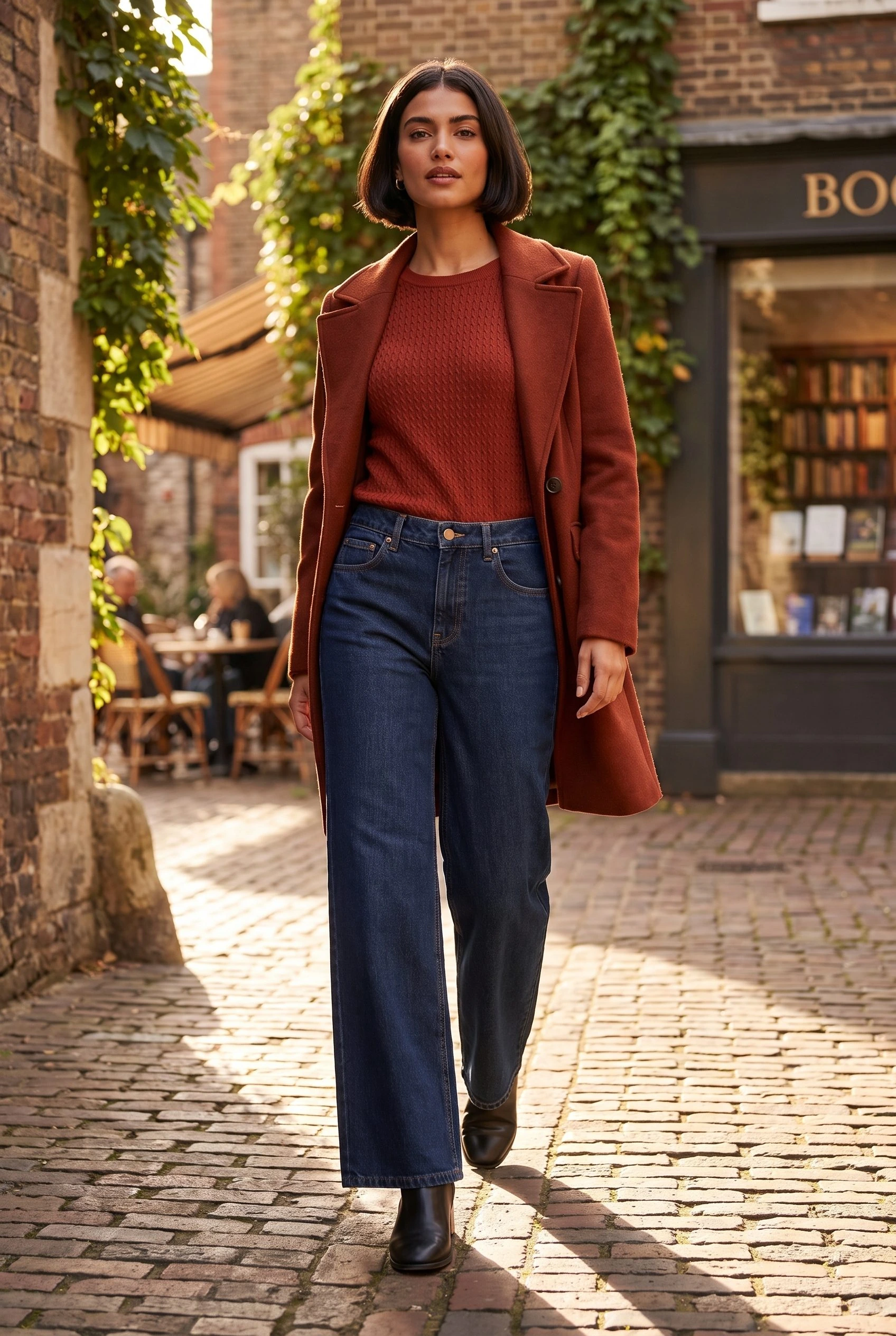
Fotogenic AI takes the jeans reference into a complete street composition and a close view of the construction.
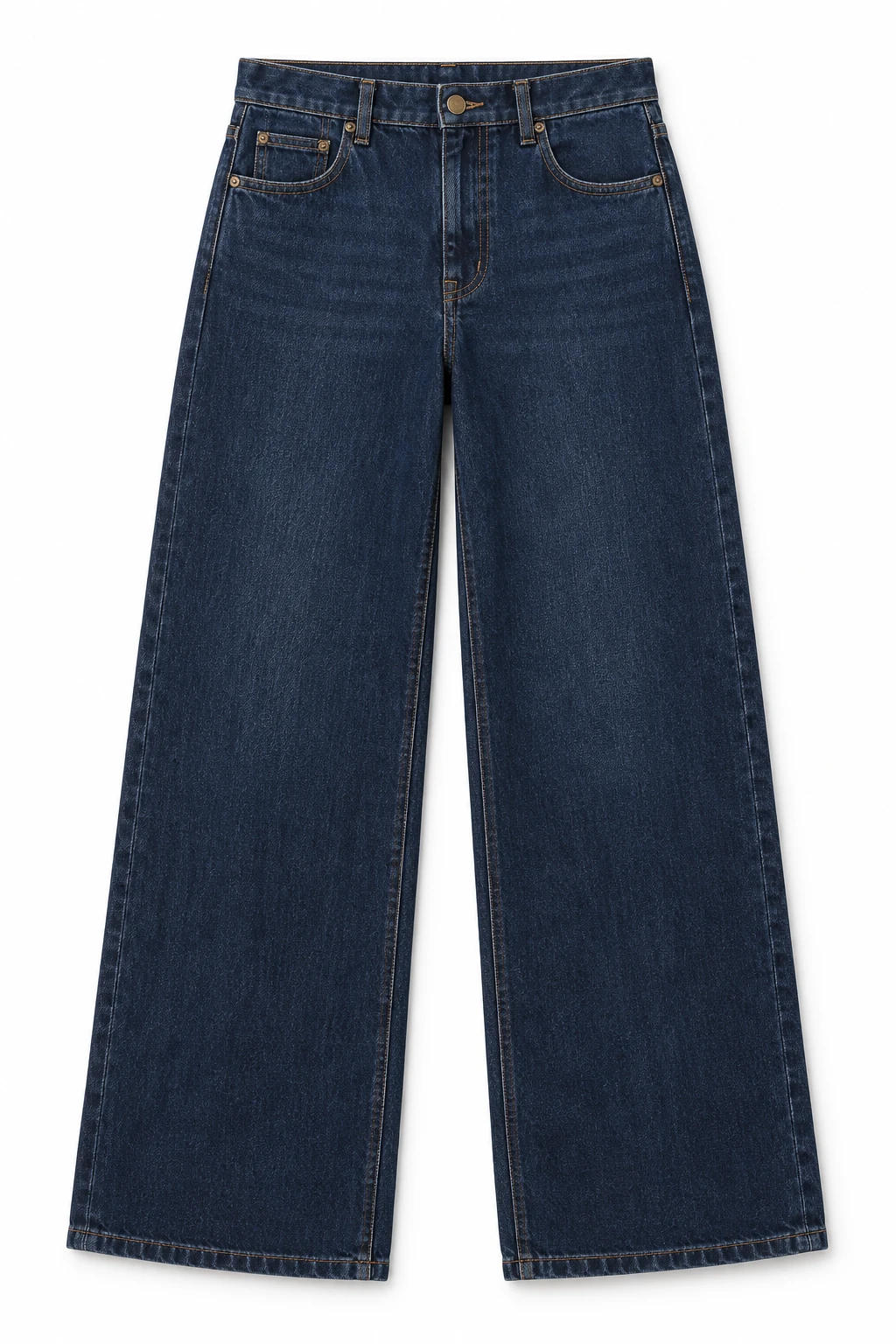
From the product reference
The full composition keeps the model, jeans and street setting visible. The closer view makes the waistband button, fly and contrast stitching easier to inspect. The coat obscures part of the waistband in the full look.
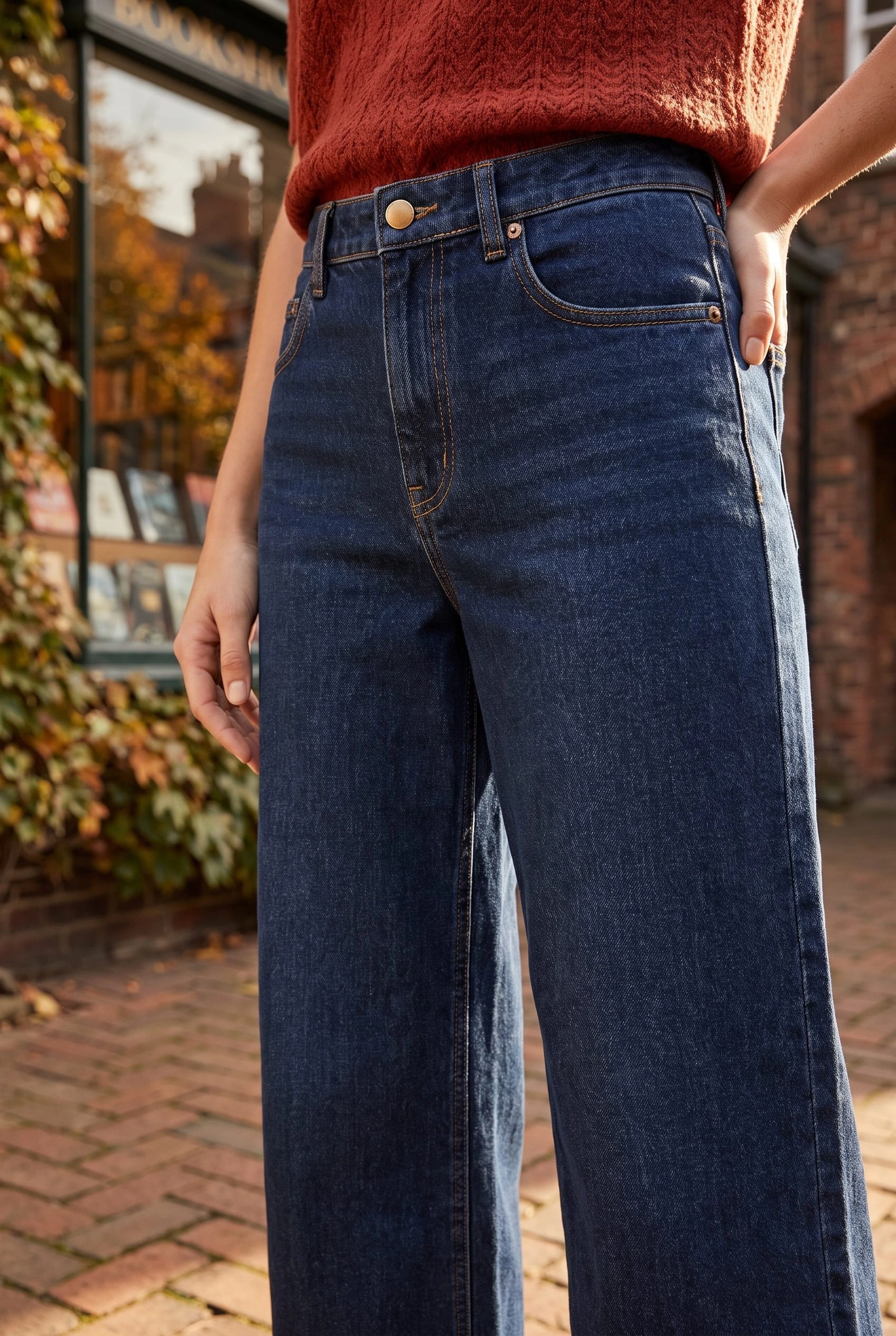
The second view brings the button, fly and seams into focus. Compare their proportions with the reference before using the detail to represent the garment.
Plan this product shoot
A denim collection with two complementary views
Dark indigo jeans reference
Start with the complete dark indigo wide-leg jeans reference. Record the visible waistband, pockets, seams and leg shape so each creative view has a clear garment reference.
Full street composition
The demonstrated on-model frame places the jeans and rust coat in a full street composition. It supplies campaign context, while the coat obscures part of the waistband.
Waistband detail
The separate closer view exposes the button, fly and contrast stitching for inspection. Compare their proportions with the reference before using the detail to represent the garment.
Our recommendation for this brief
Choose Fotogenic AI for complementary on-model and detail directions from one jeans reference. Choose FASHN when dedicated dressing controls, recurring casting or connected fashion production leads the brief.
The printed-hoodie photography guide shows why artwork visibility belongs in garment review. Use the clothing catalog consistency guide for a source-linked satin-jacket set, then explore apparel product photography for the wider shot list.
What are you creating next?
A denim launch needs full looks and details
Choose Fotogenic AI for related on-model views and separate garment details.
The complete street image provides campaign context; the separate waistband view exposes construction for review. Neither proves exact fit. FASHN also covers this creative scope, with dedicated source and dressing controls.
Apply a garment to an existing model image
Choose FASHN when source-specific try-on and face references drive the work.
Product to Model creates a presentation from clothing; Try-On starts with an existing person. Face, background and product references provide separate direction.
Customers need to upload their own photos
Choose FASHN's developer route for a shopper-facing virtual try-on project.
Its API and fitting-room offer address customer uploads. That purchase also needs an embedded experience, operational ownership and a budget beyond merchant image creation.
Choose the source-to-model route.
Fotogenic AI
Prepare garment and visual references
Use clear garment photographs with a defined model appearance and scene direction.
Create the wearing imagery
Generate the supported product composition and refine a selected result when needed.
Inspect and export
Review visible garment construction against the source and download accepted images for the listing or campaign.
FASHN
Choose the source route
Use Product to Model for standalone product photos. Use Try-On when the chosen person and pose must stay.
Guide and run
Add applicable text, product, face or background references, choose ratio and resolution, then run the selected tool.
Review and export
Inspect the result; continue in Edit or Reframe if needed, then export from Gallery. Shopper API integration is a separate project.
A closer look at FASHN.
Choose the fashion task first
FASHN separates two fashion jobs. Its Product to Model guide starts with standalone clothing or accessory photos. Its Try-On guide applies a wearable product to an existing model photograph.
- Product to Model creates the presentation from the item.
- Try-On starts with a person and composition you want to retain.
- Garment construction, model identity and pose are separate requirements. A dramatic pose can hide the pockets a listing needs to show.
When Fotogenic AI fits the work
Choose Fotogenic AI for merchant-controlled apparel imagery: direct a wearing scene, make a separate detail and review each against the garment reference. Image Variations supports refining the selected composition, while the WooCommerce workflow supports selected listing updates.
FASHN also covers campaigns, accessories, packshots and video. Fotogenic AI's value here is the direct creative-and-review route for the merchant, not a category-breadth claim. Recurring casting and customer-facing try-on remain distinct requirements.
When FASHN fits the work
FASHN's Product to Model controls suit teams directing an outfit, person and scene together. The documentation includes text direction, image guidance, background and face references, and combining up to three product images into one look.
- A denim brief can specify the model, pose and street setting independently.
- Casting and garment review remain separate: the waistband, pockets, stitching and wide-leg silhouette need their own approval.
A connected fashion studio
FASHN is a connected fashion workspace. Its Studio documentation covers creating, editing and refining assets, with results moving between tools without another download and upload. Shared history and iteration prompts retain the revision context.
- Tools include Packshot, Model Swap, Create Model, Edit, Reframe, Background Remove, Face Swap, Upscale and Image to Video.
- Its shared web, iOS and Android workspace carries the account, credits, Gallery and saved Collections across devices.
- That continuity helps a desk-based stylist and mobile reviewer share the work; store assignment is a separate benefit.
- Fotogenic AI supports a shared launch brief across clothing, accessories and other products, with creative sets and reviewed WooCommerce delivery.
Store delivery and shopper try-on are different decisions
Creating store photographs and adding customer try-on are different projects. The first needs exports, product association and review. The second also needs application integration, upload handling and a supported customer journey.
- FASHN's developer API is relevant to technical try-on work.
- API access brings development, maintenance and operational responsibilities; it does not establish a finished storefront experience.
- Fotogenic AI's documented WooCommerce route addresses reviewed product-image updates. A standalone lookbook can instead be judged on exports and asset organization.
Pricing: app credits and API access
Fotogenic AI
$20.00 / month
Starter in USD: 220 monthly credits. Weekly: $7.00 with 60 credits. Images only; video plans differ.
Plan allowances and terms
Fotogenic AI's current plans use weekly or monthly billing with no credit rollover. Compare the commitment period and the work you can complete inside it. Neither subscription capacity nor a free trial establishes the cost per accepted image without recording revisions and rejected results.
FASHN
$19 / month
Basic app plan. Monthly, daily bonus and API allowances are different.
Plan allowances and terms
Reviewed October 20, 2026, FASHN's pricing page listed monthly app plans at $19 for Basic, $49 for Pro and $99 for the first Agency tier. Basic included 200 monthly credits; Pro listed 750 monthly plus 50 daily credits; Agency listed 1,500 monthly plus 100 daily credits. Monthly rollover has plan-specific caps, while daily bonus credits do not roll over. App and API pricing are separate.
These distinctions affect a launch schedule. Daily allowances are not the same as a single pool available for a deadline. Higher output settings can also change consumption. Price the actual workflow and selected resolution instead of assuming every credit produces one final photograph.
Switching from FASHN to Fotogenic AI
- Keep garment sources, accepted exports, permitted face references and written styling direction. A FASHN Collection or saved model identity is not an automatically transferable Fotogenic AI preset.
- Recreate one complete wearing image and a separate construction view. The apparel example guide explains why prints and garment detail need their own approval.
- Confirm the destination and owner of product assignment. A working shopper try-on integration remains a separate system; changing merchant-created imagery does not migrate its API, uploads or customer journey.
Sources and review method
Written by Fotogenic AI. Official product and pricing sources were checked October 20, 2026. The retained AI-created jeans reference and genuine Fotogenic AI results come from our published workflow. Full-look and construction views serve different roles. No shopper try-on or physical-fit test was performed. Recommendations are editorial judgments. No matched competitor generation test or purchase was performed.
- FASHN Product to Model
- FASHN Try-On
- FASHN connected Studio
- FASHN app and API pricing
- FASHN developer documentation
- Fotogenic AI store workflow
- Fotogenic AI review and assignment guide
- Fotogenic AI current plans
For other apparel workflows, read Fotogenic AI vs Botika. For composition-led work, read Fotogenic AI vs Flair AI. Return to the comparison hub to build your shortlist.
Continue your comparison.
FAQ
Questions about Fotogenic AI and FASHN
No. FASHN distinguishes creating an on-model image from a product source from applying a product to an existing person's image. Choose based on what you already have and what must remain fixed.
Create with Fotogenic AI
Give your garment a new wearing scene.
Create the complete look, then inspect the construction in a separate view.