Fotogenic AI vs Botika
Compare apparel conversion and correction support with Fotogenic AI's product-led creative workflow.
Our pick
Complete apparel scenes for campaigns
 BotikaSpecialist fit
Source pose retention and retouching
Choose Botika when retaining the source pose, dedicated apparel controls or eligible human retouching matters most to your production.
The differences that change your choice.
Compare source poses, dress scene direction and who handles corrections before the images reach your store.
Source and pose
Botika Source-pose retention
- Fotogenic AI
- Direct a complete dress scene from a suitable garment reference.
- Botika
- Convert flat lays or retain the source pose in existing-model changes.
Correction responsibility
Botika Human retouch option
- Fotogenic AI
- Review results and revise or regenerate through self-service tools.
- Botika
- Yearly cards list human retouch rounds and delivery terms.
Merchant delivery
Fotogenic AI Reviewed assignment
- Fotogenic AI
- Select WooCommerce sources and review image updates.
- Botika
- Confirm the selected apparel export or store-publishing route.
Dress and accessory brief
Both tools
- Fotogenic AI
- Direct the dress and separately referenced bag to a shared mood.
- Botika
- Creates apparel campaigns and supports qualifying footwear inputs.
Subscription credits
Choose by task
- Fotogenic AI
- Weekly or monthly cycles refresh without rollover.
- Botika
- Active-subscription rollover expires on cancellation; current-cycle credits remain to cycle end.
Fashion motion
Both tools
- Fotogenic AI
- Use the web app’s qualifying product-video workflow.
- Botika
- Select fashion motion from on-model, flat-lay or mannequin inputs.
A complete dress, in a complete frame
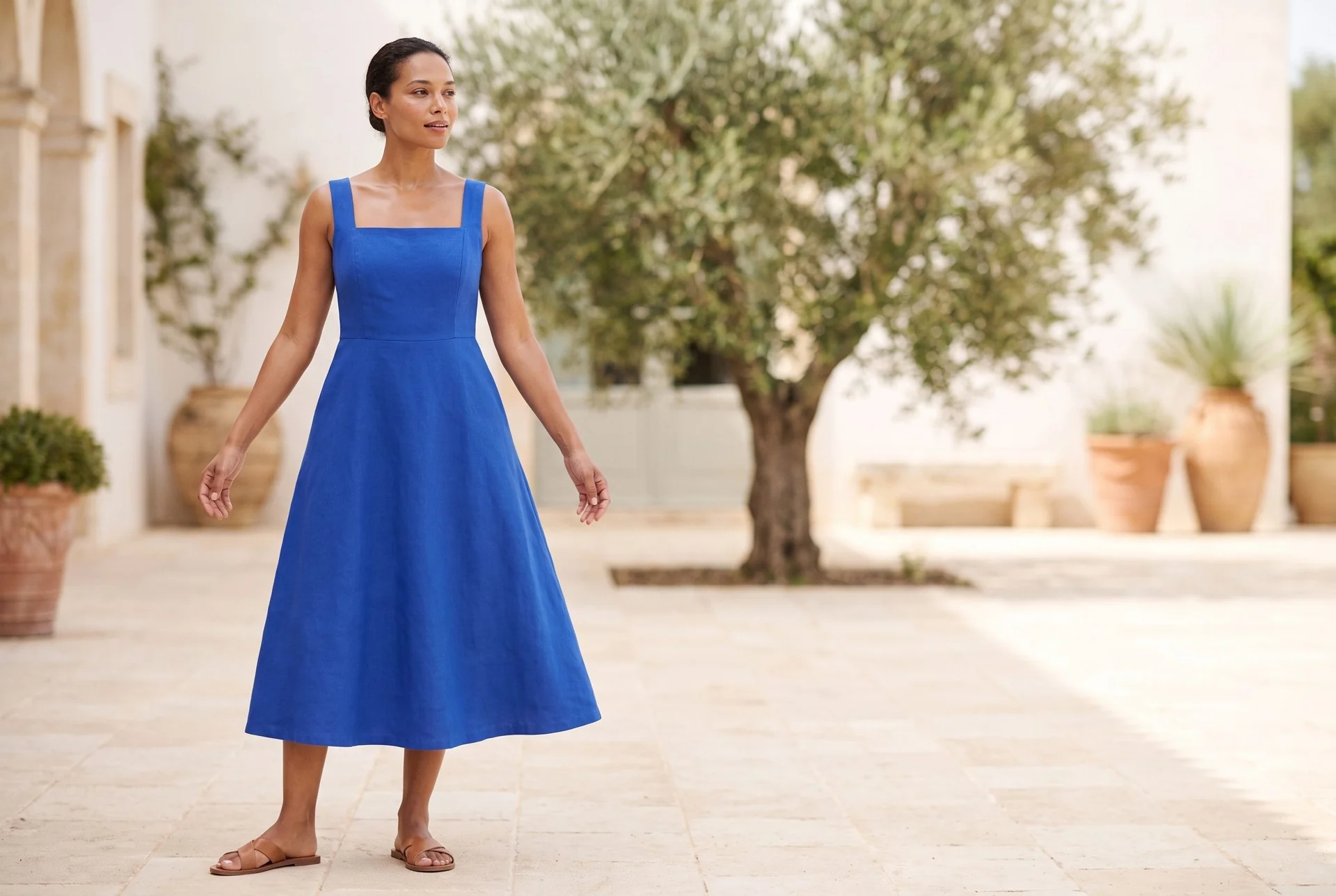
A dress flat lay becomes a courtyard image, with the square neckline, broad straps and hem visible.
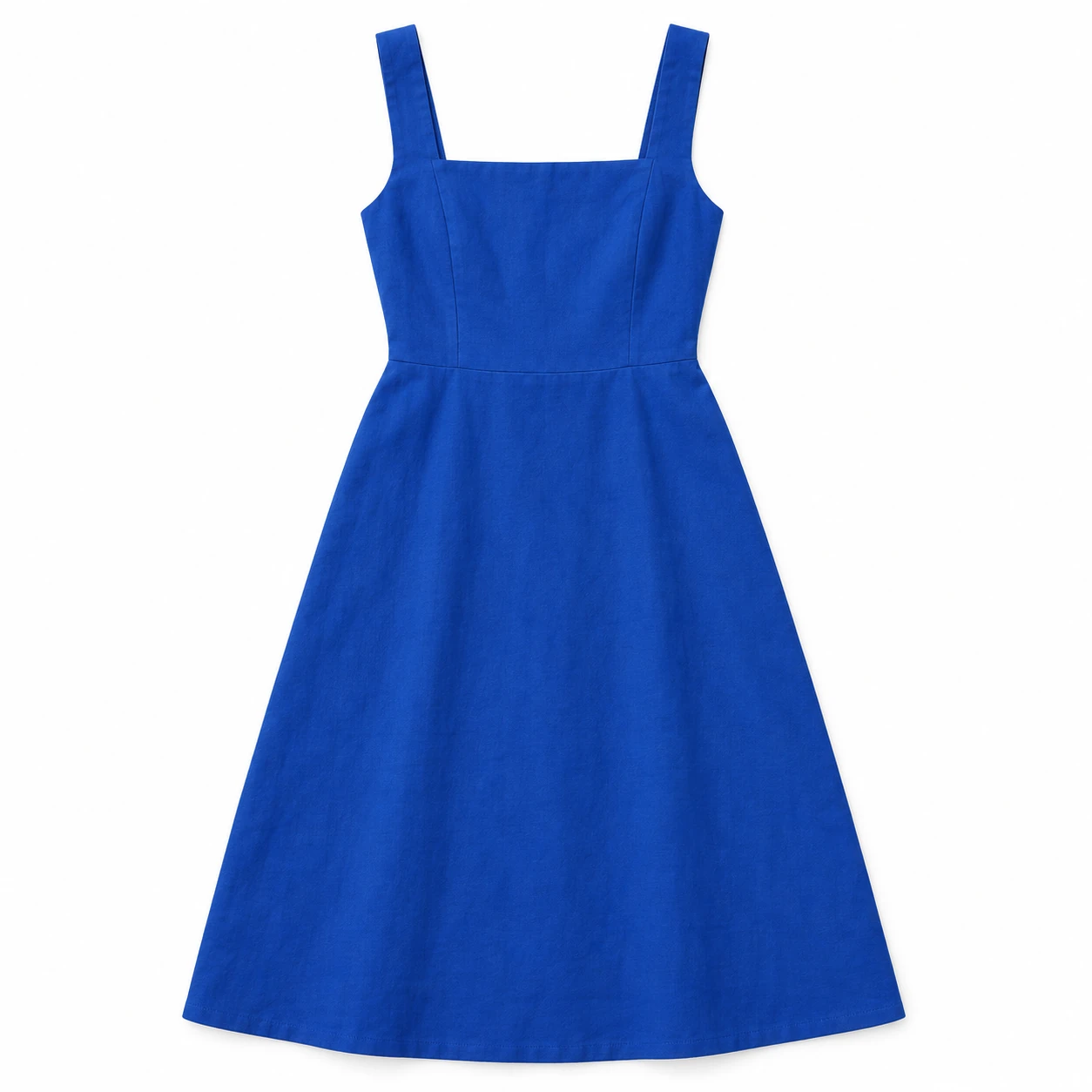
From the product reference
The courtyard frame includes the full model and dress, with square neckline and broad straps visible. The rejected alternative clipped most of the head. Generated drape and apparent fit require garment review.
Plan this product shoot
A dress launch with a matching accessory
Separate product sources
The retained demonstration starts with a cobalt square-neck midi dress. Record broad straps, neckline and hem. A separately sold bag is a proposed extension, with its own source, hardware and scale requirements.
Apparel and accessory frames
The accepted courtyard frame includes the full model and dress. A rejected candidate clipped most of the head. That makes complete framing part of approval, alongside the garment itself. No bag frame or motion result is demonstrated here.
Separate approval tasks
Judge the dress's construction before atmosphere. Generated drape and apparent fit still require comparison. For a later bag scene, inspect the closure, handle and scale independently; for a Botika correction, record the issue and confirm eligible service terms.
Our recommendation for this brief
Choose Fotogenic AI to create and refine the full dress scene. Choose Botika when source-pose retention, apparel casting or contracted human correction is required.
The clothing catalog guide supplies a separate source-linked garment example. Use the bag campaign guide to plan the accessory extension. The Shopify image workflow records genuine jeans results and manual assignment, not a completed dress-and-bag launch.
What are you creating next?
Flat lays need a complete launch treatment
Choose Fotogenic AI to direct a new wearing scene and refine it for the merchant's placement.
Choose Botika when separate model and pose selection, or its eligible correction process, is central. FASHN provides another source-specific comparison.
A dress launch also features accessories
Choose Fotogenic AI for a dress scene and separately referenced bag composition when that creative route fits the brief.
The displayed dress does not demonstrate an accessory set. Keep Botika when its apparel controls or human retouching decide the production process.
Supplier photographs already show the right pose
Choose Botika's existing-model route when the garment presentation works and only the person or background needs changing.
Its source-pose promise is relevant to this focused task; inspect the result rather than assuming the promise establishes fidelity.
From garment source to approved imagery.
Fotogenic AI
Prepare the product sources
Keep the garment and any separately sold accessory tied to their own photographs and required image roles.
Create the scene or set
Direct the supported product scenes with the references, template or custom instructions.
Review and deliver
Inspect each item against its source, download the approved images and check their destination crops.
Botika
Choose the source route
Upload a flat lay for new on-model production, or an existing-model photo when its pose should remain.
Choose the presentation
Select a model and background. The flat-lay route also provides pose selection before generation.
Review and correct
Inspect the garment and framing before export. Use eligible human retouching only under the selected plan and confirmed delivery terms.
A closer look at Botika.
Start with the photograph you already have
Botika offers different routes for different sources. Its flat-lay workflow starts with a garment photo and model, pose and background choices. Its on-model workflow changes the person or background while retaining the source pose and size.
- Existing model photography can preserve an established presentation.
- A flat lay requires more of the wearing context to be created.
- Separating flat lays, mannequin shots and model photos avoids treating unequal sources as equivalent.
When Fotogenic AI fits the work
Choose Fotogenic AI when the merchant wants to direct a dress scene, inspect the full garment and refine the selected composition. The retained courtyard result demonstrates that task with the neckline, straps and hem visible. The WooCommerce workflow adds reviewed product-image updates.
A separately sold bag can use the same campaign mood, but it needs its own source and approval. Botika also creates apparel campaigns and supports footwear in qualifying flat-lay workflows. A broader shot list alone is not proof that one service is better.
When Botika fits the work
Botika deserves weight when apparel casting, backgrounds and correction support drive the purchase. The flat-lay route offers pose selection; the existing-model route describes retaining the source pose.
- Its pricing page separates model/background access, resolution, collaboration and retouching by plan.
- Access to the required cast or corrections may matter more than the lowest subscription price.
Retouching and the production calendar
Botika lists retouch rounds and delivery windows on qualifying plans. Those services belong in the production calendar alongside source preparation, generation, review and export.
- Plan eligibility, correction scope and turnaround determine whether support fits a launch deadline.
- A request such as “the left cuff has lost its button” gives the reviewer a concrete correction to approve. Retaining the request alongside the returned file lets the reviewer assess that specific fix.
- Generation time and time to final approval measure different parts of delivery.
Fashion video and the launch brief
Botika's fashion video workflow starts from an on-model, flat-lay or mannequin photo. It describes selecting motion styles and changing the model or background. A fashion launch with motion therefore has an overlapping option, rather than a still-image-only specialist.
Fotogenic AI also offers product video generation on qualifying plans. Choose that route around the approved image and the movement your placement needs. The still-image demonstration on this page does not measure either service's motion quality, video credit cost or garment stability through movement.
Moving accepted assets into a store
A finished image still needs the correct product association, dimensions and gallery placement. Check whether your chosen route exports files, writes to a store or requires a separate publishing step. Do not infer a particular integration behavior from a testimonial or a platform logo.
Fotogenic AI documents WordPress and WooCommerce source selection, review and image updates. This provides a connected handoff after the apparel and accessory assets are approved.
Keep originals and previous accepted images available. During a trial, use draft products or an otherwise controlled review process. The ability to reverse an unsuitable image update is part of a reliable workflow, especially when multiple products share similar names or colors.
Pricing: credits and correction support
Fotogenic AI
$20.00 / month
Starter in USD: 220 monthly credits. Weekly: $7.00 with 60 credits. Images only; video plans differ.
Plan allowances and terms
Fotogenic AI's plans offer weekly and monthly credit cycles without rollover. That gives a short launch a different commitment period, while Botika's active-subscription rollover can matter to intermittent apparel production. Compare your actual production calendar and chosen operation, including rejected results, rather than calling either credit allowance cheaper by default.
Botika
US$55 / month
Pro includes 50 credits in the monthly view. Listed retouch rounds are yearly-only.
Plan allowances and terms
On October 20, 2026, Botika's rendered monthly pricing view showed Pro at US$55 for 50 credits per month and Advanced at US$120 for 100. The public FAQ states one credit per photo. Both plans advertise rollover while the subscription remains active. On cancellation, rollover credits expire immediately; current-cycle credits remain available until that cycle ends. The annual view contains conflicting figures, so monthly amounts should not be converted into an annual quote.
The Botika FAQ distinguishes model and background access, resolution and correction service. Its pricing cards label the listed retouch rounds as yearly-only benefits. Pro lists two rounds and two-day delivery; Advanced lists three rounds, but its one-day label conflicts with a 48-hour tooltip. Confirm the contracted deadline when correction support decides the purchase. A self-serve regeneration in Fotogenic AI and a human retouch request are different deliverables.
Switching from Botika to Fotogenic AI
- Retain flat lays, mannequin views and existing-model photographs as separate source sets, plus accepted files and outstanding correction requests.
- Recreate the dress direction and approve neckline, straps and full framing before moving to another color. Use the apparel photography page to define necessary views.
- Arrange correction and delivery ownership. Self-serve regeneration does not replace contracted human retouch rounds. Export needed assets and account for rollover-credit expiry before cancelling Botika.
Sources and review method
Written by Fotogenic AI. Official product and pricing sources were checked October 20, 2026. The retained dress scene is a Fotogenic AI result from a concept garment reference. No accessory set, video or contracted retouching is demonstrated. Botika annual figures and conflicting Advanced retouch timing were not converted into a reliable quote. Recommendations are editorial judgments. No matched competitor generation test or purchase was performed.
- Botika flat-lay route
- Botika existing-model route
- Botika pricing, retouching and credit terms
- Botika fashion video
- Fotogenic AI store workflow
- Fotogenic AI review and assignment guide
- Fotogenic AI current plans
Read Fotogenic AI vs FASHN for another apparel-focused decision or Fotogenic AI vs Photoroom for editing and store workflow. Return to the comparison hub for the wider shortlist.
Continue your comparison.
FAQ
Questions about Fotogenic AI and Botika
Not for every workflow. Its flat-lay product page describes creating on-model images from garment photographs. Its existing-model workflow is a separate route with different starting assumptions.
Create with Fotogenic AI
Create the complete dress scene.
Keep the neckline, straps and hem visible while directing the setting.