Fotogenic AI vs Mokker / soona
Compare Fotogenic AI with Mokker's move to soona. Separate current membership, legacy access and physical production.
Our pick
Room scenes from product references
Mokker / soonaSpecialist fit
Soona shoots and creator production
Mokker announces a move to soona. Confirm legacy account continuity and assess current soona membership separately from physical shoots, talent and creator production.
The differences that change your choice.
Compare new room scene creation with soona production and confirm what happens to existing Mokker work.
Account continuity
Choose by task Confirm the active account
- Fotogenic AI
- Start the next image brief from retained product and environment files.
- Mokker / soona
- Mokker announces soona; the legacy application still exposes a login route.
Production method
Both tools Choose the production method
- Fotogenic AI
- Generate a new product setting from visual references.
- Mokker / soona
- Combines AI tools with physical photography, talent and creator production.
Full job cost
Choose by task Separate membership and shoot
- Fotogenic AI
- Use workflow credits for the planned production period.
- Mokker / soona
- Charges membership separately from ordered assets, talent and services.
Scene direction
Both tools
- Fotogenic AI
- Separate product identity from the environment reference.
- Mokker / soona
- Legacy Moodboard combines inspiration, written direction and props.
Collection continuity
Mokker / soona
- Fotogenic AI
- Carry retained sources and direction into separate product runs.
- Mokker / soona
- Legacy Product Replace uses a base scene with another product.
Accepted-file delivery
Both tools
- Fotogenic AI
- Use reviewed WooCommerce image updates or manual Shopify assignment.
- Mokker / soona
- Evaluate the current soona integration and actual listing-delivery behavior.
The appliance and the room have different roles
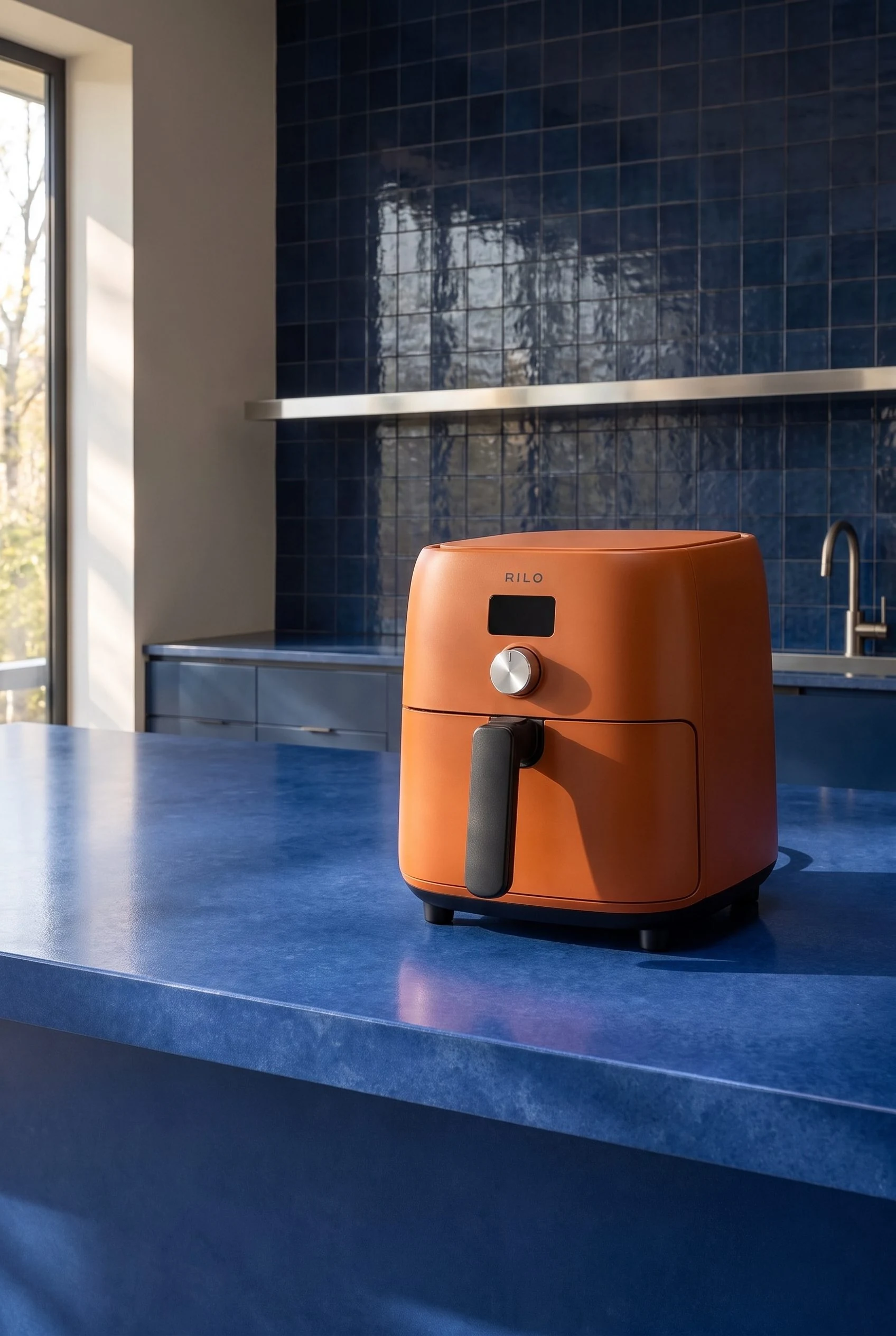
Product and kitchen references guide a wider placement and closer composition, showing the appliance at different distances.
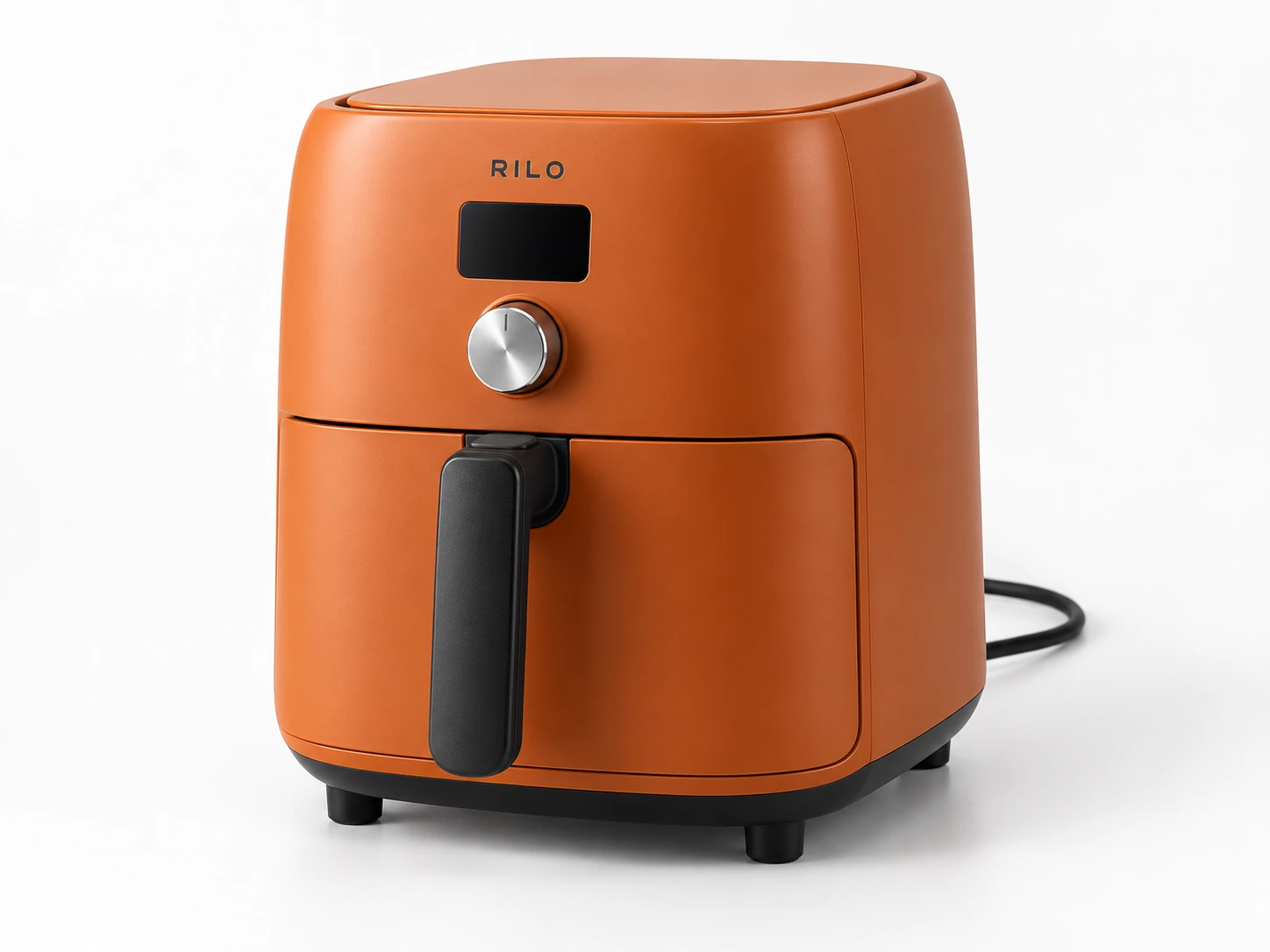
From the product reference
The wider kitchen frame keeps the full appliance visible. Dial, screen, feet, drawer handle, counter scale and cord treatment still need comparison with the source; the environment reference does not establish exact product preservation.
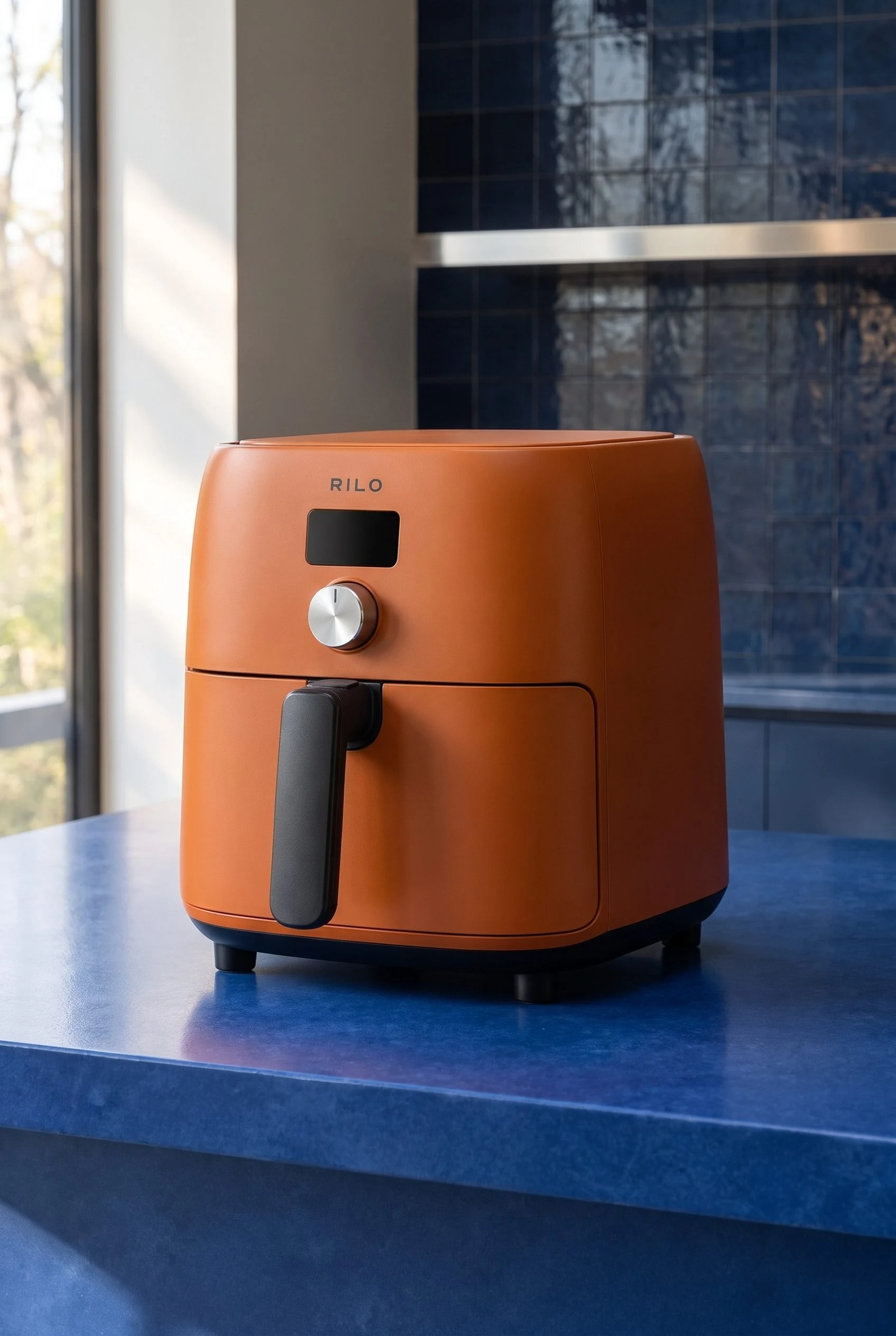
The closer frame gives the screen, dial and handle more attention, offering a detail-focused alternative to the wider kitchen composition.
Plan this product shoot
An air fryer in a wider view and a closer view
Kitchen context
Use the wider result to establish the cobalt kitchen around the complete orange air fryer. The product source defines the screen, dial, feet and drawer handle; the environment reference defines the room direction.
Product emphasis
Use the closer result when the appliance needs more attention. Compare its body proportions and controls with the product source, rather than approving it because the color and room are recognizable.
Lighting and contact review
Check the base contact, cord treatment and reflections in both frames. Select a view for its placement only after that check. A pleasing environment does not approve a changed appliance.
The room-reference guide retains both references and genuine Fotogenic AI results. These demonstrate a scene brief, not Mokker output, soona physical production or account transfer.
What are you creating next?
Create a new room setting from references
Choose Fotogenic AI.
Keep the product source responsible for appliance details and the room source responsible for environment.
Book physical samples, talent and styling
Choose soona production services.
Include ordered assets and services in the quote beyond platform membership.
Continue an existing Mokker workspace
Confirm the account route first.
Check the actual projects, exports and billing rather than assuming the transition transferred them.
Reference scenes or physical production
Fotogenic AI
Prepare product and environment
Use the product master and a room reference with separate roles in the brief.
Direct and inspect the scene
Review proportions, controls, contact and reflections before choosing the composition.
Retain and assign
Keep the accepted master with its product and review its destination placement.
soona
Scope the physical shoot
Choose assets, talent and styling, with membership separate from production charges.
Provide the sample and review selects
Use the platform’s documented shoot process and collaborate on the selected frames.
Order and retain assets
Purchase the chosen photos or clips and complete the destination handoff after delivery.
A closer look at Mokker / soona.
Choose the current workflow, not an old plan description
Choose Fotogenic AI when the immediate job is a new setting around your product, guided by product and environment references. Its creative workflows support that brief and related campaign views.
Mokker's current site announces its move to soona. Existing customers should establish their account and export route; new buyers should evaluate soona's current offer. Choose soona when physical shoots, talent or creator production belong in the job. Those services and a self-directed scene-generation task are different purchases.
What the move to soona changes
The acquisition explanation describes bringing Mokker generation into soona software. The legacy application still exposes a login route; its existence does not establish the current terms for a new customer or continuity for a particular old account.
Do not assume logins, balances, projects or subscriptions transfer automatically. Before replacing a paid process, confirm where that workspace's originals, accepted results and billing now live. No authenticated migration was performed for this comparison.
Moodboard direction and a specific environment
Mokker's Moodboard guide combines inspirational images, written direction and props to communicate scene style. This reference-led approach helps specify a palette or setting beyond a generic background.
- Fotogenic AI's room-reference walkthrough separates product and environment inputs, using an orange air fryer and cobalt kitchen.
- References guide atmosphere; product scale, counter contact, reflections and lighting still need approval.
Reusing a scene across products
Mokker's Product Replace documentation describes replacing the item in a base photo while retaining scene direction, useful for collection continuity.
- Shared framing must still leave room for each product's handles, lids and controls.
- Fotogenic AI's catalog guide carries retained references and direction into separate product runs, within a wider launch and reviewed store workflow.
- Neither route establishes pixel-identical settings or exact fidelity in every result.
Why the older Mokker prices need context
The legacy Mokker pricing page still shows Starter at US$19.99 monthly or a US$13 annual monthly equivalent, Team at US$45 or US$29 per user, and Organization at US$99 or US$83.25 per user. Starter lists 500 monthly photos; upper tiers advertise unlimited photos. Team describes three seats, Organization starts at five. These are legacy figures, not verified current soona entitlements.
The homepage advertises forty free photos while pricing lists twenty once. No registration resolved that difference. The custom AI model is labelled Coming soon. Neither the larger allowance nor that future feature should determine a current purchase.
The broader soona production option
soona combines professional photography and video, AI tools, models, creator content and asset management. Its AI workflow includes moodboard references, templates, props, shadows, resizing, and Shopify and Amazon listing insights.
Choose soona when the job requires physical samples photographed, human talent booked or creator production managed together. Those services complement a generation brief rather than describing the same purchase.
Choose Fotogenic AI for product-reference scenes, campaign sets and short product motion. Its environment-led workflow expands the launch around source photography; native WooCommerce delivery helps place accepted images afterward.
Pricing: membership and production costs
Fotogenic AI
$20.00 / month
Starter in USD: 220 monthly credits. Weekly: $7.00 with 60 credits. Images only; video plans differ.
Plan allowances and terms
Fotogenic AI's current plans use weekly/monthly workflow credits. Budget the image roles and production period required. Physical-shoot assets, platform membership and AI generation have distinct costs, so compare the complete brief.
Mokker / soona
US$16 / month
Current soona Basic membership. Physical production is charged separately.
Plan allowances and terms
The current soona pricing page separates membership from production. Basic is US$16 monthly and Standard US$71; the annual equivalents are US$13 and US$49 per month, billed annually. The feature table lists 20 and 84 monthly AI Studio generations respectively. Another FAQ uses unlimited wording, so the explicit allowance needs confirmation at purchase rather than an unlimited guarantee.
Professional production is additional: the published base prices include US$39 per photo and US$93 per video clip, with model, styling and other services affecting the job. The non-member Studio pass is listed at US$149 per booking. Membership alone is therefore not a complete quote for a physical shoot.
Store delivery and switching from Mokker
- Confirm the active account route and retain masters, accepted exports and reusable direction. Resolve any legacy subscription or balance directly; the acquisition announcement does not migrate them for you.
- Recreate the next product scene in Fotogenic AI. Proprietary scenes and private project settings do not automatically transfer with exported files.
- Connect the approved file to its product. Fotogenic AI documents reviewed WooCommerce image updates; its Shopify guide covers manual assignment. soona's listing tools and integrations need their own delivery evaluation.
Sources and review method
Written by Fotogenic AI. Mokker’s transition banner, legacy login route, acquisition explanation and current soona pricing were rechecked October 20, 2026. Legacy allowances are not current soona entitlements. The air-fryer pair is retained Fotogenic AI work. No authenticated migration, competitor generation, booking or purchase was performed.
- Mokker transition announcement
- soona acquisition explanation
- Current soona membership and production pricing
- Mokker moodboard documentation
- Mokker Product Replace documentation
Read Fotogenic AI vs Pebblely for product scenes or Fotogenic AI vs Kive for brand assets and a shared workspace. Return to the comparison hub for the full library.
Continue your comparison.
FAQ
Questions about Fotogenic AI and Mokker
No. The website announces the move to soona and the legacy application still exposes a login route. Neither observation establishes the status or transfer terms of a particular customer account.
Create with Fotogenic AI
Place your product in its next setting.
Use product and environment references to direct the scene.