Fotogenic AI vs Kive
Compare shared brand libraries and training with Fotogenic AI's product-led creation and store handoff.
Our pick
Product imagery for store campaigns
KiveSpecialist fit
Shared brand assets and collaboration
Choose Kive to keep shared assets, collaboration, qualifying brand training and assistant access in one team workspace. Both services create campaigns.
The differences that change your choice.
Compare product direction, shared brand assets and the handoff from kettle scene to listing.
Workspace ownership
Kive Shared workspace
- Fotogenic AI
- Create and review merchant imagery from product references.
- Kive
- Keep shared products, library assets and creative work in a team workspace.
Reusable direction
Kive Brand training option
- Fotogenic AI
- Refine photographic direction through references, lighting and composition.
- Kive
- Use presets, references and qualifying brand training across creators.
Store delivery
Fotogenic AI Reviewed assignment
- Fotogenic AI
- Review WooCommerce updates or use manual Shopify delivery.
- Kive
- Advertises Shopify product import and accepted-image export.
Image roles
Both tools
- Fotogenic AI
- Create product-led and roomier scene compositions from the source.
- Kive
- Create product, lifestyle, social and video assets under shared direction.
Quality and capacity
Choose by task
- Fotogenic AI
- Weekly or monthly workflow credits refresh without rollover.
- Kive
- Draft, Premium and Max change capacity; unlimited Pro top-ups are yearly-only.
Assistant access
Both tools
- Fotogenic AI
- Use documented product-creation operations through compatible assistants.
- Kive
- Access shared assets and generation through MCP connections.
One product, two composition choices
One kettle reference becomes a closer kitchen composition, with the complete spout, handle and lid inside the frame.
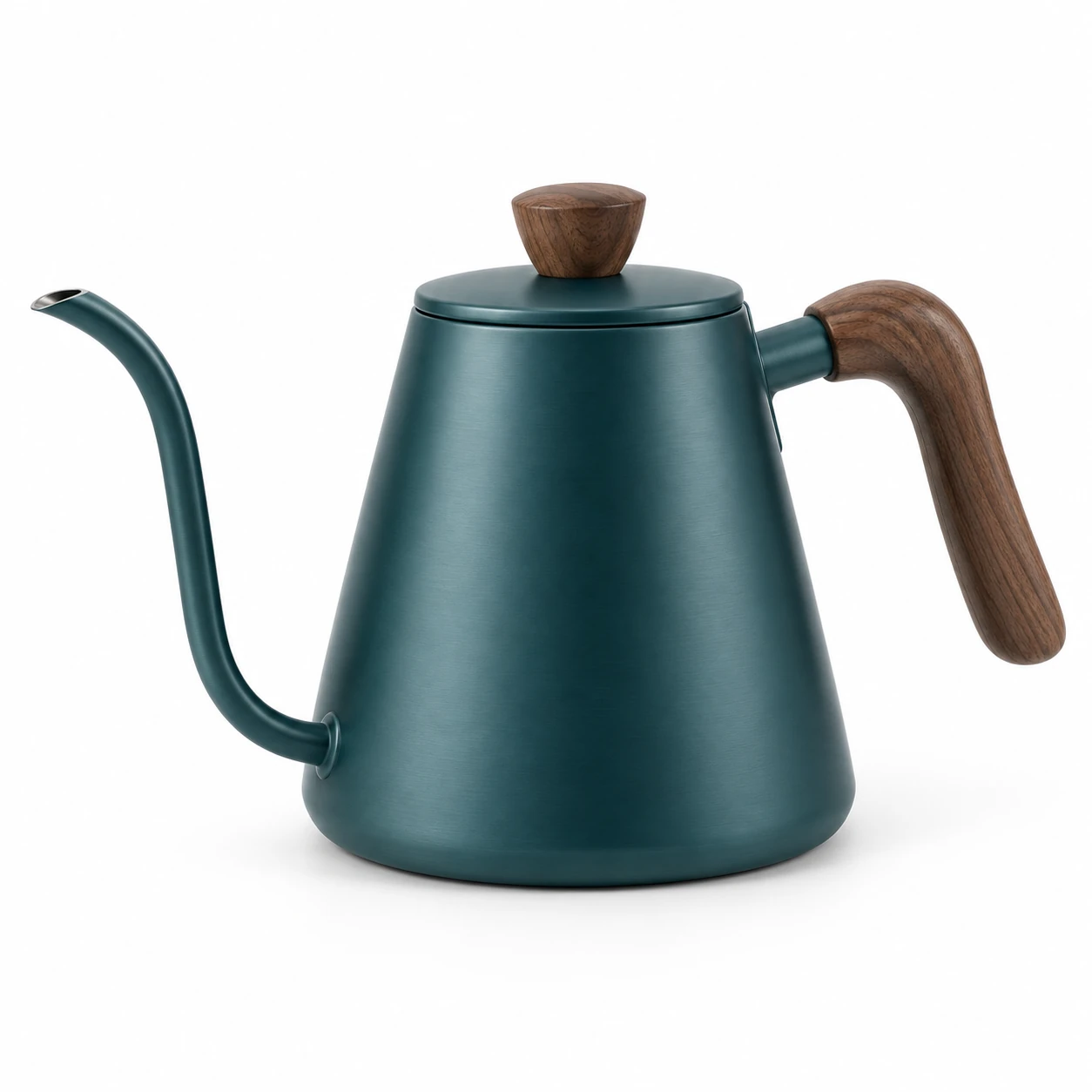
From the product reference
The close kitchen frame shows the curved spout, walnut handle and lid fitting, with less room for advertising copy. Wood grain, lighting and apparent color differ from the source.
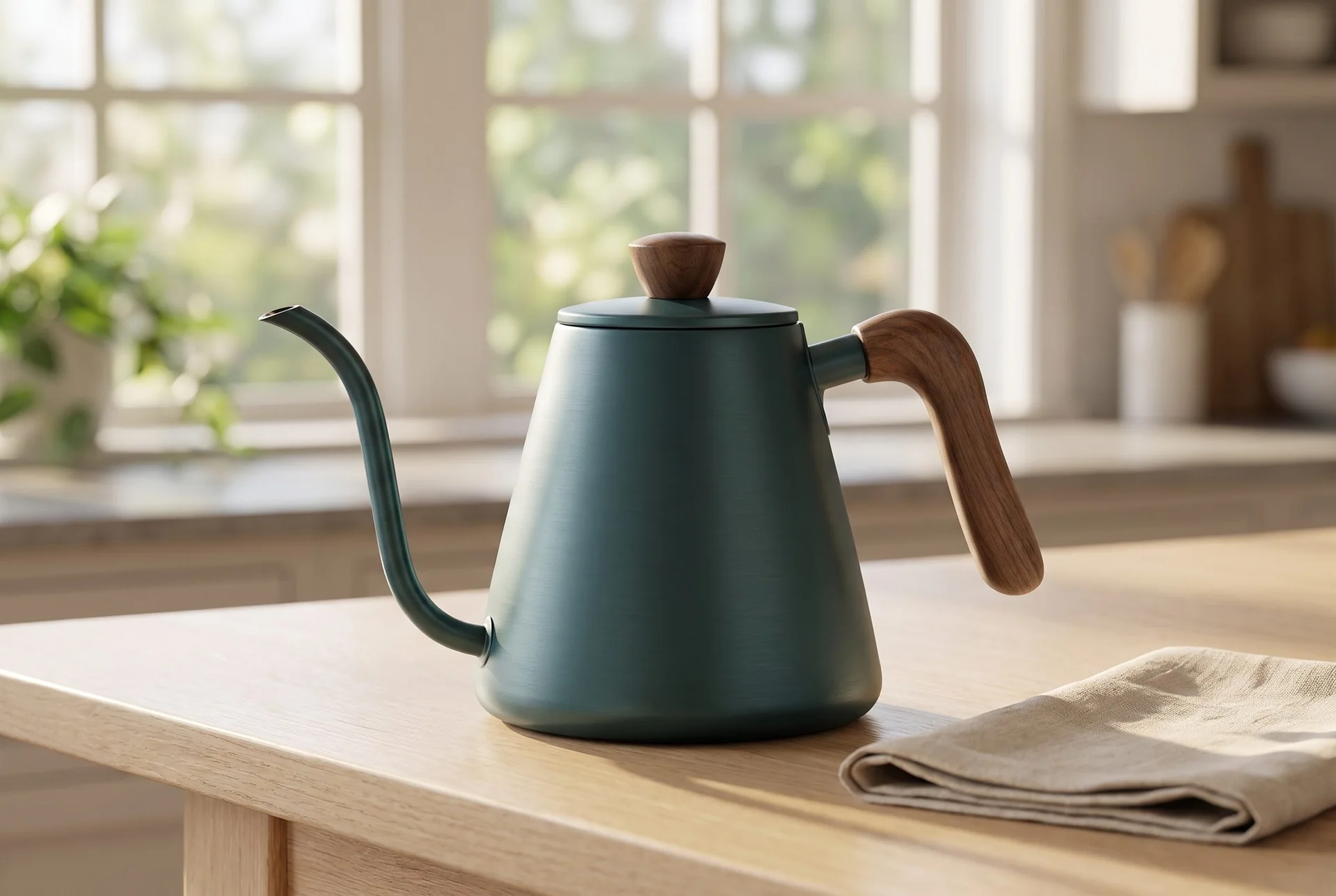

The same kettle appears with more surrounding kitchen space, offering a wider placement option. This is not a measured comparison with Kive.
Plan this product shoot
A kettle launch with three distinct image jobs
Product-page view
The teal gooseneck kettle reference fixes the spout, walnut handle, lid fitting and proportions. A product-page image needs the complete silhouette and enough detail to identify that item independently of the kitchen styling.
Campaign and advertising frames
The closer retained scene makes the kettle prominent but leaves little headline space. The roomier kitchen alternative gives context and a different crop option. Inspect changes to wood grain and apparent teal color before using either. A finished advertisement is a proposed placement, not a demonstrated ad or sales result.
Kive can also make these scenes. Its additional value is retaining shared product and brand assets across creators. Decide who owns the source, who can alter direction and who approves the export before comparing the tools only on the images they can generate.
Our recommendation for this brief
Choose Fotogenic AI for the merchant's reference-to-review image task. Choose Kive when shared libraries, collaboration or trained brand direction are essential to repeat production. Keep a separate final listing owner whichever service creates the asset.
The product-photography prompt guide shows how purposeful direction changes a scene. Use composition and lighting variations to refine one decision. Compare Fotogenic AI MCP access separately if an assistant will operate the creative workflow.
What are you creating next?
Create and assign a kettle scene
Choose Fotogenic AI for the merchant reference-to-review task.
Direct the setting, inspect the spout and handle, then complete reviewed WooCommerce assignment or a defined export handoff.
Share assets across creators
Choose Kive when shared libraries and trained direction are essential.
Count the real creators, training access and retained assets. The workspace responsibility is the deciding requirement.
Plan 120 Max-quality attempts
Kive Pro covers this advertised capacity; Basic alone does not.
Basic lists 100 Max images and Pro 250. Reserve credits for other operations; capacity does not predict 120 approved results.
Create the assets or manage the workspace.
Fotogenic AI
Add the product and direction
Use the product source with the scene, lighting and image roles the brief requires.
Create related imagery
Generate the composition or Campaign Set, then refine selected variations.
Review and retain
Compare each product with its source. Download accepted masters for the shared library and publishing workflow.
Kive
Bring products and references
Add product assets and brand references to the shared production workspace.
Apply direction and generate
Choose a curated preset or personal references and generate the required campaign assets.
Review and export
Keep approved outputs with the shared assets, then export for product pages or campaigns. Verify store assignment separately.
A closer look at Kive.
Start with the workspace your team needs
Choose Fotogenic AI when a merchant needs to direct product imagery, review it and complete the listing handoff. Its product-image workflow and Campaign Set support the creative work; reviewed WooCommerce updates support delivery.
Choose Kive when the workspace itself is a purchase requirement. Its catalog production route combines products and generation with shared assets. Kive also creates product shots, lifestyle scenes, social crops and video, so campaign breadth alone does not distinguish these tools.
Brand direction and product identity are separate
Kive's branded-campaign workflow uses curated presets or personal references across product shots, lifestyle scenes, social crops and video. Paid plans also distinguish brand-training access.
- Style sets lighting, palette and visual character.
- Product identity concerns the item itself: a kettle's spout, handle, lid and proportions.
- Fotogenic AI's composition and lighting guide explains revising a direction. A coherent style still needs accurate product details.
Shared assets and the catalog handoff
Store import is not the same as store assignment
Kive's enterprise FAQ describes importing Shopify products, generating imagery and exporting for product pages or campaigns. That establishes a catalog-production route, without establishing automatic featured-image or variant replacement.
- Fotogenic AI documents native WooCommerce reference selection and reviewed updates.
- Its public Shopify integration is labelled Coming soon. The manual Shopify gallery and variant guide covers download, upload and assignment.
- If Shopify write-back decides the purchase, the exact Kive account and plan need to support that action.
AI-assistant access is another production surface
Kive's MCP page presents access to brand assets and generation through AI tools, including ChatGPT and Claude. Its current pricing also advertises an agent and MCP integrations. This can matter to a team that already develops briefs and retrieves assets through an assistant.
Fotogenic AI also has an MCP access route. Compare the workflows exposed through that route separately from the merchant Studio. Advanced brand and content functions should not be assumed to exist under identical controls on every surface.
For assistant-led production, define the product reference, approval owner, saved result and publishing step. This review researched the access routes; no assistant integration or vendor-account generation was run.
Pricing: plans and quality tiers
Fotogenic AI
$20.00 / month
Starter in USD: 220 monthly credits. Weekly: $7.00 with 60 credits. Images only; video plans differ.
Plan allowances and terms
Fotogenic AI's current plans offer weekly and monthly credit cycles without rollover. Compare the selected workflow and actual commitment period. A recurring short launch, a shared year-round studio and an annual discounted subscription are different purchases even when their headline prices are expressed per month.
Kive
US$40 / month
Basic on monthly billing. Draft, Premium and Max consume different allowances.
Plan allowances and terms
On October 20, 2026, Kive's rendered pricing page listed Basic at US$40/month for 2,000 credits and Pro at US$100/month for 5,000. Yearly selection displayed US$30 and US$75 monthly equivalents, billed US$360 and US$900 yearly. These are different purchase commitments.
The quality tiers change capacity. Basic listed 400 Draft, 200 Premium or 100 Max images; Pro listed 1,000, 500 or 250 respectively. These are alternative uses of the allowance, not additive totals. The page lists rollover up to twice the plan and labels unlimited Pro top-ups as a yearly-plan benefit. Basic includes up to 2 users; Pro up to 10 and brand training.
For 120 generation attempts at Max quality, Basic's listed allowance of 100 would not cover the brief on its own. Pro's allowance of 250 would, before other operations consume the credits. That is a plan-capacity calculation, not a prediction that 120 attempts produce 120 accepted images.
Switching from Kive to Fotogenic AI
- Export approved files and retain original packshots, permitted references and written direction. A Kive board, trained brand or product representation is not a promised automatic import.
- Recreate one kettle direction in Fotogenic AI, then approve the spout, handle, color and crop before moving the range.
- Keep ownership of shared assets and publishing explicit. The WooCommerce workflow supports the store handoff; an image generator does not automatically replace the team's whole asset library.
Sources and review method
Written by Fotogenic AI. Official product and pricing sources were checked October 20, 2026. The retained kettle pair demonstrates Fotogenic AI composition choices from a concept reference. It does not test Kive collaboration, brand training, asset migration or store publishing. Recommendations are editorial judgments. No matched competitor generation test or purchase was performed.
- Kive enterprise product workflow
- Kive branded campaigns
- Kive pricing, quality and team limits
- Kive MCP access
- Fotogenic AI store workflow
- Fotogenic AI review and assignment guide
- Fotogenic AI current plans
Read Fotogenic AI vs Flair AI for canvas staging or Fotogenic AI vs VOVV.AI for another broad studio decision. Return to the comparison hub for the complete library.
Continue your comparison.

FAQ
Questions about Fotogenic AI and Kive
Kive is a production workspace with catalog generation, branded campaigns, product assets, brand training and AI-assistant connections. Its shared library supports those workflows rather than defining the whole offer.
Create with Fotogenic AI
Create around your product reference.
Direct the setting and approve the image for the place it will be used.