Fotogenic AI vs Modelia
Compare outfit controls, active references and asset retention with Fotogenic AI's product-led creative workflow.
Our pick
Garment views and editorial campaigns
 ModeliaSpecialist fit
Outfit, pose and casting controls
Choose Modelia for Outfit Generator, Repose, casting slots or active catalog capacity. Include workspace retention and cancellation terms in your decision.
The differences that change your choice.
Compare garment direction, outfit controls and the workspace needed to keep your collection moving.
Outfit and pose controls
Modelia Outfit and repose
- Fotogenic AI
- Reuse references and photographic direction across reviewed garment runs.
- Modelia
- Use distinct conversion, Outfit Generator and Repose tools.
Active workspace
Choose by task Check active capacity
- Fotogenic AI
- Retain product sources and accepted direction for later image briefs.
- Modelia
- Count active references, casting slots, seats and channels independently.
Merchant delivery
Both tools Match the store route
- Fotogenic AI
- Review selected WooCommerce images; use manual Shopify assignment.
- Modelia
- Advertises store-photo production and Shopify publishing or download.
Garment image roles
Fotogenic AI
- Fotogenic AI
- Create a clear wearing view and a separate editorial composition.
- Modelia
- Supports fashion creation with specialized outfit and pose changes.
Studio and API budget
Choose by task
- Fotogenic AI
- Use workflow credits on weekly or monthly cycles.
- Modelia
- Inclusive Studio has fair use; higher-tier APIs use separate balances.
Switching and retention
Choose by task
- Fotogenic AI
- Recreate direction from retained sources and approved exports.
- Modelia
- Cancellation deletes saved workspace assets and catalog; projects and generated images remain.
One bomber, two photographic roles
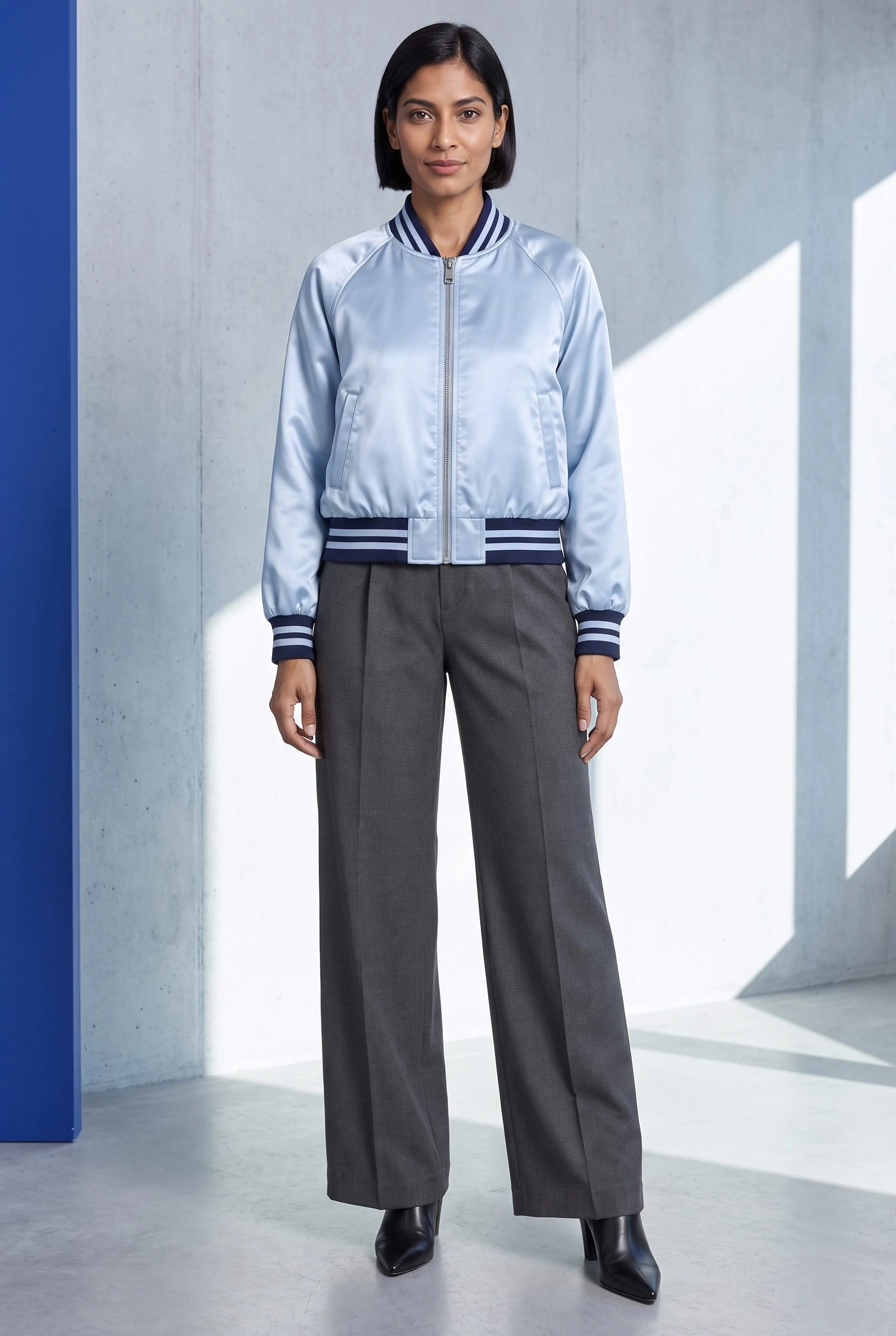
One satin bomber appears in a seated editorial frame and front-facing portrait, giving each image a different role.
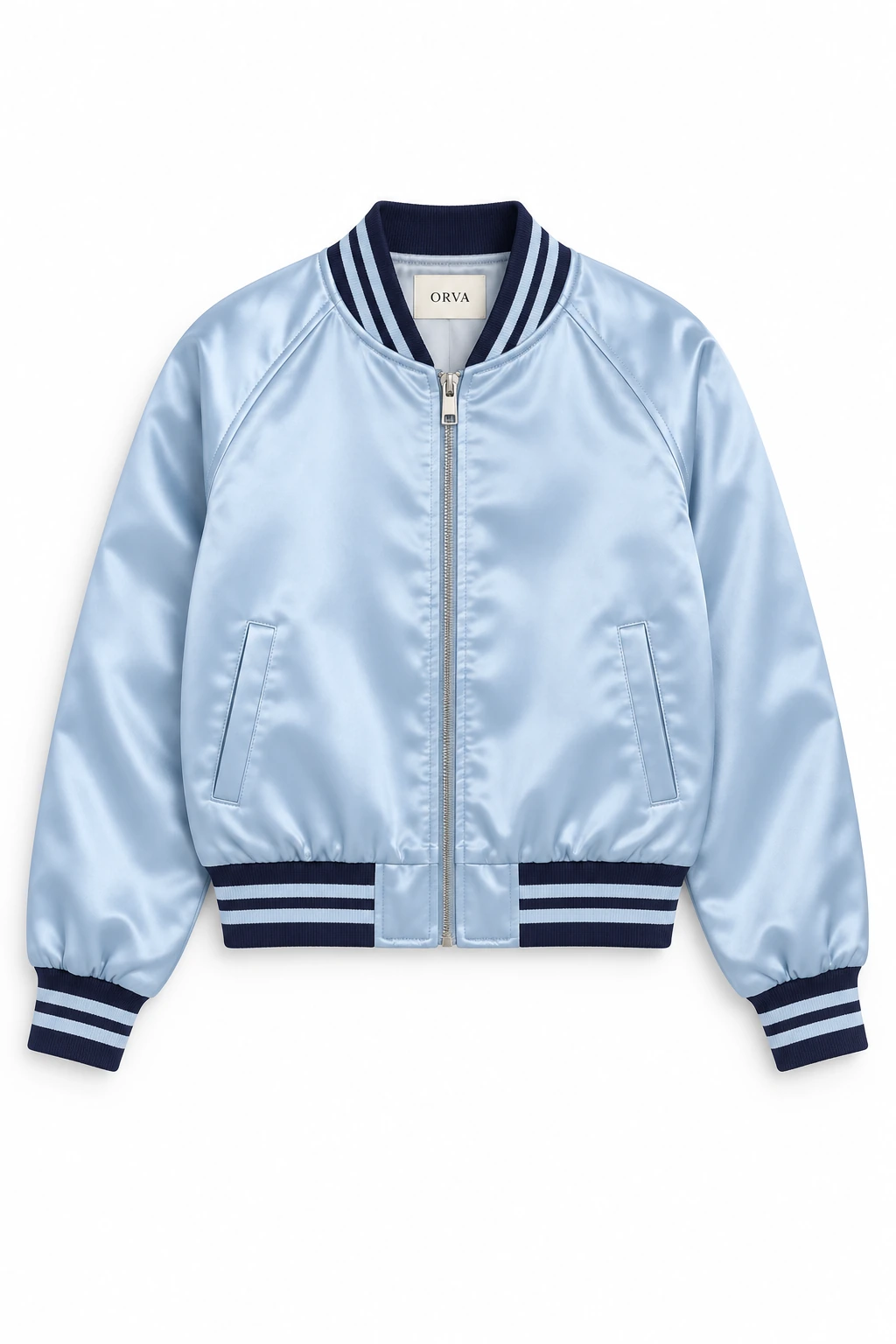
From the product reference
The seated frame keeps the full head and jacket visible, including the zip and striped edges. Sitting changes the drape and hides part of the garment length; the front view shows the overall silhouette.
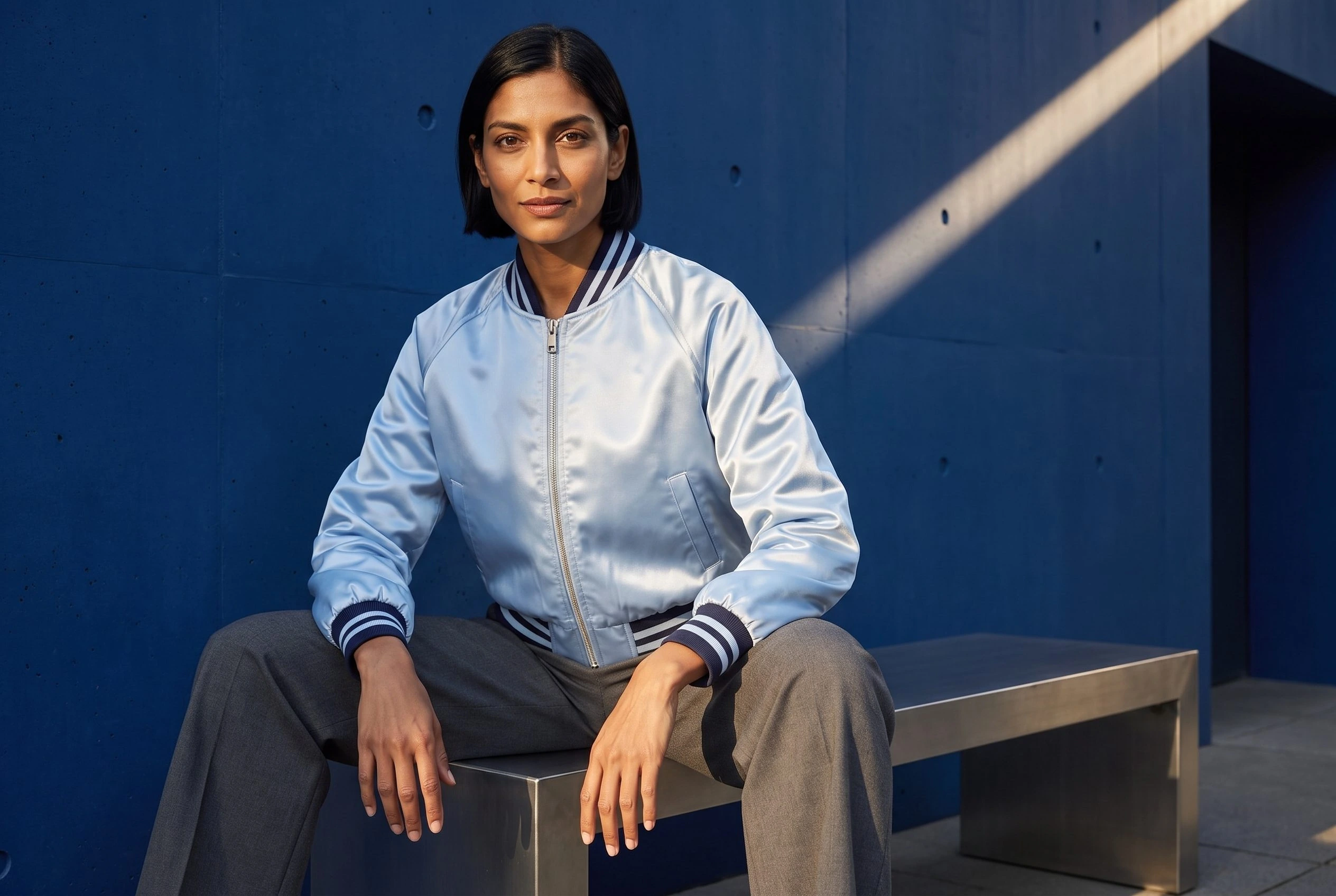
The portrait shows the full head, jacket, trousers and shoes. Different camera distance and lighting mean these frames are not a locked photographic set.
Plan this product shoot
A satin-bomber collection brief
Product-gallery wearing view
Use the satin-bomber reference for a clear wearing view. Check the collar, zipped closure, striped edges, cuffs, pockets, hem and silhouette before approving the image for a product gallery.
Editorial campaign frame
Create a separate composition with space and framing for the collection campaign. The catalog walkthrough records actual portrait and seated landscape results, each serving a different placement.
The seated image supports editorial use; a complete front view better communicates length and construction. Use the Image Variations guide for a controlled revision. Modelia's Outfit Generator and Repose address more specialized outfit and pose changes.
Our recommendation for this brief
Choose Fotogenic AI for a bomber wearing view and separate editorial composition from the product reference. Choose Modelia when outfit changes, repose, recurring casting or managed fashion-catalog capacity is the central production requirement.
What are you creating next?
Create gallery and editorial views
Choose Fotogenic AI for the directed merchant brief.
Use the clear front view for silhouette review and the seated composition for editorial context. Approve each against the bomber source.
Keep a fashion workspace active
Choose Modelia when outfit, casting and active catalog controls are required.
Count references, seats, channels and casting independently. A tool upload is not automatically an active catalog reference.
Move after the collection launch
Export and confirm the destination before cancelling Modelia.
Cancellation is immediate and removes saved workspace assets and the catalog. Projects and generated images remain, under the reviewed terms.
From references to collection imagery.
Fotogenic AI
Prepare the garment references
Keep the approved bomber photograph and intended appearance with the required composition roles.
Generate the related views
Use the source and creative direction to create the scenes, then refine a selected result if needed.
Review and retain the images
Compare the full silhouette and construction, download accepted masters and use the chosen store route.
Modelia
Choose the garment task
Start from a supported product source and select the appropriate conversion, outfit or repose tool.
Generate within the workspace
Use the references and casting needed for the task, observing the plan’s active capacity and Studio fair use.
Review and deliver
Review the results before download or the advertised Shopify publishing route. Preserve needed assets before changing or cancelling the workspace.
A closer look at Modelia.
Match the purchase to the collection
Choose Fotogenic AI when the merchant wants to direct garment scenes from product references, refine a composition and review selected store images. Its Campaign Set and documented WooCommerce route support that production brief.
Modelia's fashion tools include Flatlay to Model, Mannequin to Model, Model to Model, Outfit Generator and Repose. Its casting slots, active references, seats and channels also determine how much of the collection can remain in the workspace. Evaluate those requirements before comparing broad launch promises.
Garment source, casting and pose are separate controls
Garment source, casting and pose answer different needs. A flat lay identifies clothing; a model photo also supplies wearing and pose information. Modelia provides distinct routes, plus outfit and repose tools.
- Fotogenic AI's clothing catalog guide records reusing a model reference and direction across separate garment runs.
- Its satin-bomber example still requires review of camera distance, lighting, collar stripes, zipper, cuffs, pockets and hem.
- A recognizable face does not establish accurate garment construction.
Active references are not every uploaded photograph
Modelia defines an active reference as a garment or accessory deliberately added through Add to catalog. Uploading a photograph inside a generation tool does not automatically create one. Archived and deleted references do not count toward the active total, according to the current FAQ.
That distinction changes capacity planning. A brand with 180 current products cannot compare its catalog to Atelier's 100-reference limit by counting image uploads alone. It needs to decide which products must remain active and whether archiving is practical for the production calendar. Modelia says archived references cannot be used for generation, publishing or measurement. They can return within twelve months if the plan has room; after that they are permanently deleted. Archiving is an operational decision, not an invisible way around the allowance.
Casting slots, channels and seats are separate limits. A model reference, a product reference and a connected destination do different jobs. Check all of them before treating a reference allowance as the only boundary on a collection workflow.
Fair use and API billing need separate budgets
Modelia explicitly says inclusive Studio generation is not unlimited. Its FAQ explains that usage far beyond the profile associated with the plan can move new generations into a longer queue and eventually block generation. It says the catalog, library, publishing and API remain unaffected by that Studio limit.
The API is also a separate commercial calculation. Creator uses the same credit balance as its plan. Atelier, Brand and House use an API balance that must be topped up separately. Inclusive Studio generation does not cover API consumption. A team evaluating automation should not quote its Studio fee as the full API budget.
This is a useful difference to surface before purchase. A large seasonal collection needs predictable references, seats and turnaround as well as creative controls. Neither a fair-use label nor a credit balance establishes how quickly a real batch will finish under the team's operating conditions.
Store connections and final review
Modelia's Shopify page describes starting with store photos, generating sets or video, then publishing or downloading results. This verifies an advertised Shopify workflow. It does not establish the exact permissions, variant behavior or successful update of a particular store.
Fotogenic AI's native Shopify integration remains publicly Coming soon. Its manual Shopify workflow covers approved-file delivery. For WooCommerce, the native product-image route connects product references and reviewed updates.
Choose Fotogenic AI when the merchant needs a directed garment scene, a controlled composition revision and reviewed store imagery. Modelia's connected fashion workspace suits work driven by outfit, repose and catalog-capacity controls. Native WooCommerce delivery adds a reviewed handoff, preserving originals until product, image order and variant assignments are confirmed.
Pricing: current plans and capacity
Fotogenic AI
$20.00 / month
Starter in USD: 220 monthly credits. Weekly: $7.00 with 60 credits. Images only; video plans differ.
Plan allowances and terms
Fotogenic AI's pricing page owns its current weekly and monthly plans. Compare the operations and working period of your launch with Modelia's reference and workspace capacity. Choose Fotogenic AI when the merchant needs to direct, refine and review product scenes. This comparison establishes no measured cost-per-accepted-image winner.
Modelia
US$30 / month
Creator. Active references, casting slots and workspace access vary by plan.
Plan allowances and terms
The actual rendered pricing page reviewed October 20, 2026 lists free Starter, Creator at US$30 per month, Atelier at US$109, Brand at US$385 and quoted House. Self-serve plans are monthly; the page says annual contracts are available through House. Older Project, Basic and Pro offers are not used in this comparison.
Starter lists 20 monthly credits, one seat, watermarked output up to 2K and up to two images per generation. Creator lists 150 monthly credits, three model casting slots, one active channel and clean 4K output. Its current FAQ prices a standard image at three credits at either 2K or 4K, so 150 credits represents 50 such operations if used entirely for that purpose. It does not represent 50 guaranteed approved images.
Atelier lists 100 active references, ten casting slots, three seats and three channels. Brand lists 350 references, 20 casting slots, ten seats, ten channels and one PIM or DAM connector. The important capacity distinction is inclusive Studio generation subject to fair use, rather than an unrestricted promise of unlimited production.
Switching requires an export plan before cancellation
- Retain and export original product photos, permitted model references, approved downloads and written direction. Modelia says projects and generated images remain after cancellation; saved models, backgrounds, poses and the catalog are deleted.
- Prepare any downgrade by fitting the smaller reference, casting, seat, channel and connector limits first. Modelia says a confirmed change starts a new monthly cycle and charges the full new price immediately, with no credit for unused days.
- Confirm the destination handoff before cancellation. The reviewed terms move the account immediately to Starter, disconnect channels, remove other team access, forfeit credits and revoke API keys. No saved-workspace import into Fotogenic AI is established.
Sources and review method
Written by Fotogenic AI. Official product and pricing sources were checked October 20, 2026. The retained AI-created bomber source and genuine Fotogenic AI results come from our catalog guide. They demonstrate distinct photographic roles, not Modelia outfit, repose, cancellation or connected-store behavior. Recommendations are editorial judgments. No matched competitor generation test or purchase was performed.
- Modelia fashion tools
- Modelia pricing, capacity and cancellation terms
- Modelia Shopify workflow
- Fotogenic AI store workflow
- Fotogenic AI review and assignment guide
- Fotogenic AI current plans
Read Fotogenic AI vs FASHN for product-to-model and try-on distinctions, or Fotogenic AI vs Botika for correction support. Return to the comparison hub for the complete library.
Continue your comparison.
FAQ
Questions about Fotogenic AI and Modelia
Those are older offers. The reviewed page shows Starter, Creator, Atelier, Brand and House. Confirm the current rendered offer before purchase.
Create with Fotogenic AI
Give the garment two useful image roles.
Create the wearing view and editorial frame, then approve each for its placement.