Fotogenic AI vs Caimera
Start with the product stage. Compare digital design work with Fotogenic AI's imagery for an existing product.
Our pick
Campaign imagery for finished products
CaimeraSpecialist fit
Sketches, prints and technical packs
Choose Caimera when sketch rendering, print development or technical packs are part of the job. Its catalog and editorial tools also cover finished products.
The differences that change your choice.
Decide whether you need to develop the product or create campaign imagery for its approved version.
Product stage
Both tools Choose by product stage
- Fotogenic AI
- Create campaign imagery for an existing product reference.
- Caimera
- Explore sketches, prints and technical packs as well as catalog imagery.
Starting asset
Caimera Photos or concepts
- Fotogenic AI
- Use photographs and references of the product to be marketed.
- Caimera
- Accepts sketch, CAD and vector inputs with material and print direction.
Catalog operation
Both tools Choose the image job
- Fotogenic AI
- Direct garment and campaign roles from the approved reference.
- Caimera
- Separates Catalog, Editorial and Model Swap with different vendor recommendations.
Seats and usage
Choose by task
- Fotogenic AI
- Use weekly or monthly workflow credits for the production period.
- Caimera
- Charges per user; Catalog and automation remain distinct from unlimited direct-app modes.
Technical documents
Caimera
- Fotogenic AI
- Create marketing visuals after the product specification is approved.
- Caimera
- Builds technical packs with a separate first-export cost for each version.
Store delivery
Both tools
- Fotogenic AI
- Connect accepted images to reviewed WooCommerce updates or manual Shopify assignment.
- Caimera
- Offers collaboration and plan-dependent API access, with delivery scoped separately.
One clutch, a product scene and a wearing context
One clutch reference becomes a product scene and model-supported frame. The complete bag remains visible in both images.
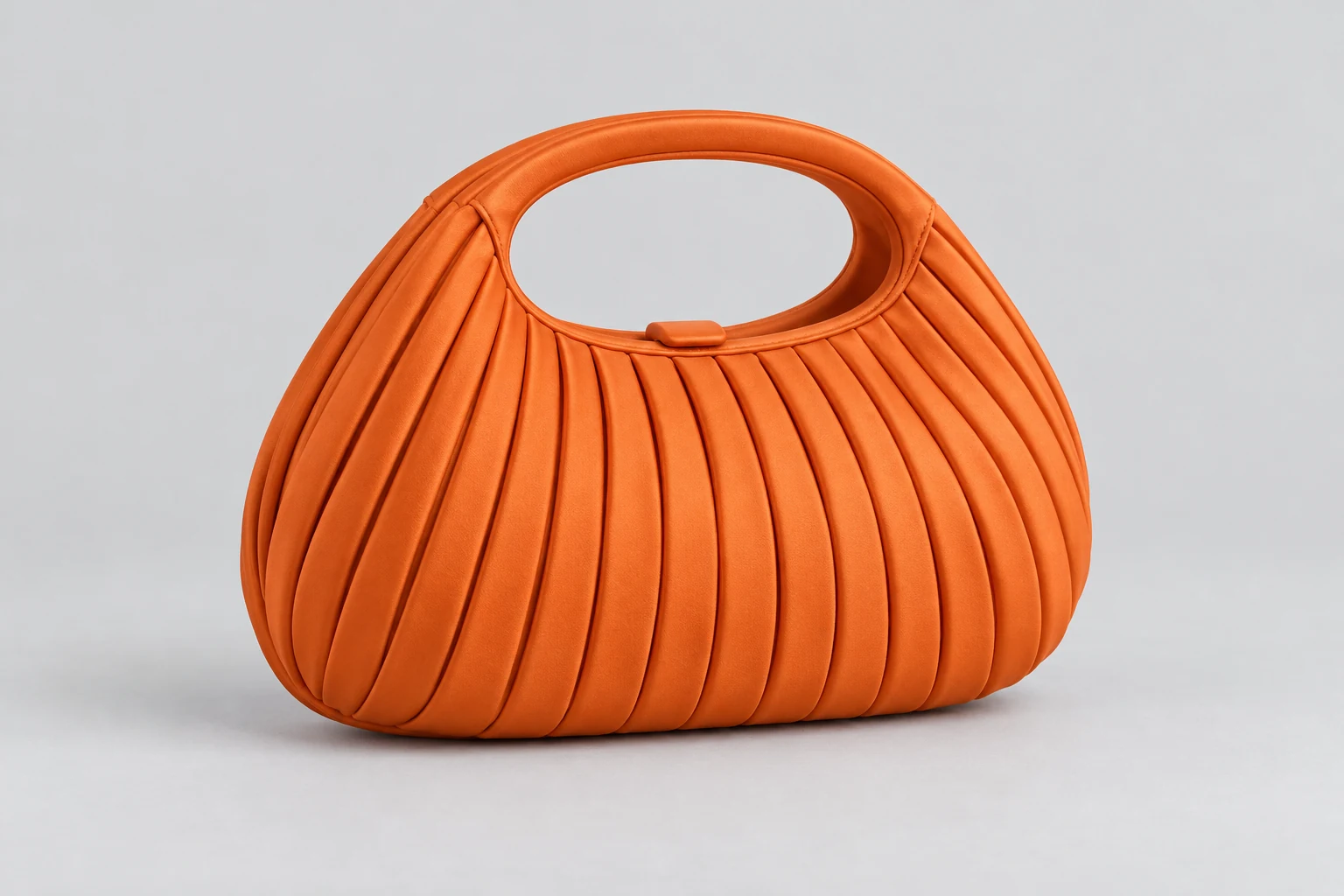
From the product reference
The main scene shows the oval handle, pleats and rounded bag silhouette. Lighting changes perceived material and color, while the precise pleat geometry still needs comparison with the source.
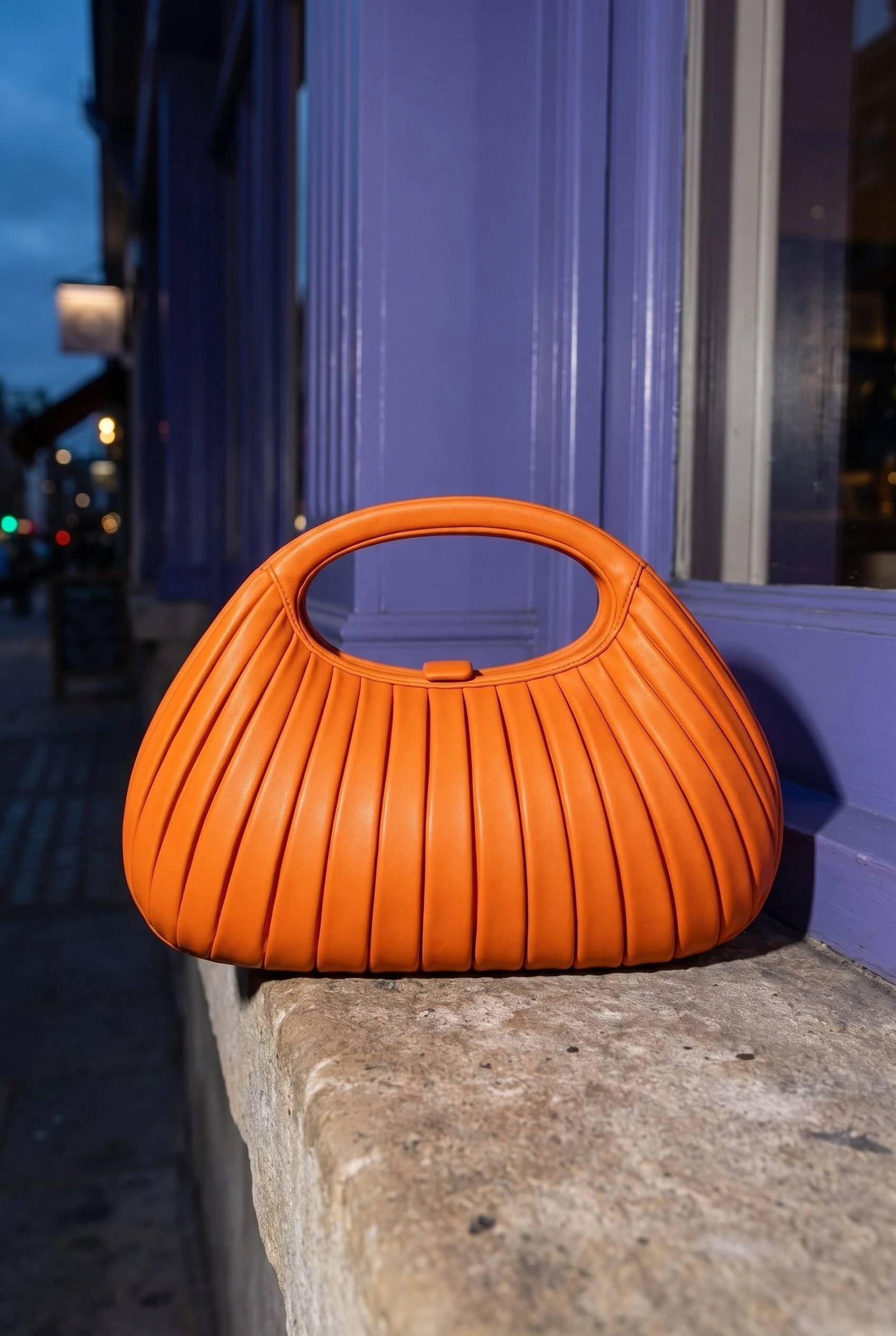
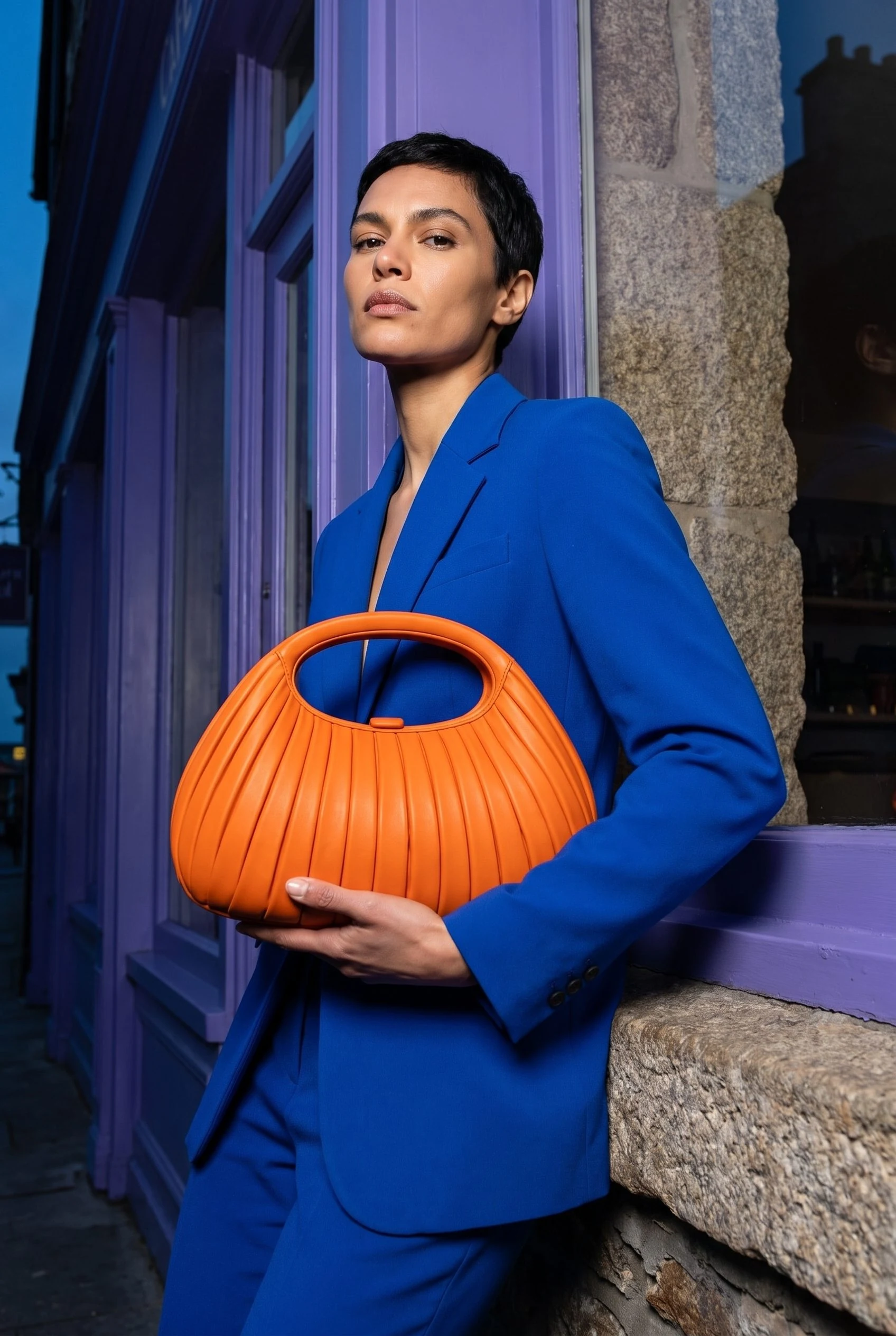
The full head and clutch remain visible, but the model supports the bag underneath instead of holding its oval handle as requested.
Plan this product shoot
A clutch campaign with two distinct roles
Product-only scene
Show the complete clutch on the stone ledge. Compare the oval handle, pleat geometry and rounded silhouette before using this clear object composition as part of the campaign.
Model context
Use the full model frame to give the clutch a wearing context. The retained Fotogenic AI result shows the model supporting it underneath rather than holding its handle as requested.
Detail approval
Compare the handle, pleats, color and material with the source. Lighting changes their appearance, so retain a factual product photograph for placements where exact construction needs to be shown.
The bag campaign walkthrough retains the orange clutch reference and genuine Fotogenic AI Campaign Set results. These are not Caimera outputs or a matched material-fidelity test.
What are you creating next?
Market an approved physical product
Choose Fotogenic AI.
Use the product reference to direct the scene, model context and complementary image roles.
Explore a design before samples arrive
Choose Caimera for design-stage tools.
Keep the visual proposal distinct from specifications and manufacturing validation.
Budget a recurring Catalog batch
Evaluate Caimera by seats and Catalog operations.
Unlimited direct-app modes do not remove Catalog, batch or agent credit use.
Existing product or design development
Fotogenic AI
Prepare the finished-product source
Keep the approved product version and required listing or campaign roles together.
Direct related imagery
Create the scene or campaign views from that reference, with the intended context and composition.
Review and deliver
Compare construction and material, retain accepted files and assign them through the store route.
Caimera
Choose the design-stage input
Start from a sketch, CAD or vector input with material and print direction.
Develop the visual proposal
Explore the concept and use the appropriate design, Catalog or Editorial tool for the next deliverable.
Approve the separate deliverables
Keep technical validation, versioned tech-pack export and marketing-image acceptance distinct.
A closer look at Caimera.
Start with the product stage you actually own
Choose Fotogenic AI when the item exists and the next job is a product scene, wearing image or coordinated campaign set. Start with the actual product reference, then use its product-image workflow or Campaign Set to develop the required placements.
Choose Caimera when sketch rendering, prints or technical packs belong in the purchase. Caimera also creates catalog, editorial and video assets, so existing-product photography overlaps. The useful boundary is whether you need to develop the product or create marketing imagery for an approved version.
Sketch visualisation and product photography
Caimera's Sketch to Image tool accepts sketch, CAD and vector inputs with material and print direction. It supports design exploration before a finished product exists.
- Concept approval establishes a direction, rather than the manufactured item's appearance or fit.
- For products on sale, Fotogenic AI's apparel guide shows why readable lettering alone cannot establish print accuracy: the drawing can still drift.
- Listing approval needs the actual product's construction and approved references. Concept imagery can guide a design without representing what a customer will receive.
Editorial, Model Swap and Catalog solve different jobs
Caimera's credits and plans FAQ recommends Model Swap for complex prints and product-page accuracy, Editorial for lifestyle work and simpler prints, and flat-lay Catalog for solid colors. These are vendor recommendations.
- Flatlay to Catalog offers model, pose and background choices, outfit folders and repeating completed jobs with their settings.
- Fotogenic AI's catalog guide coordinates different garments; Campaign Set develops related views of one product. Choose by the image role and SKU scope.
Unlimited direct generation is not unlimited automation
Caimera's Credits Usage guide limits unlimited generation to the direct application. Batches and AI-agent runs still consume credits, so individual creative work and recurring collection production have different budgets.
Max is described as native 1K or 2K; a 4K request is generated at 2K before upscaling. Select the operation for the final placement rather than treating larger dimensions as additional product detail.
Catalog corrections have bounded allowances. Pricing and help differ on the exact edit count, so this comparison uses their common ten-credit base price without promising either correction entitlement.
Technical packs and creative approval
Caimera's Tech Pack workflow takes a product image, templates and measurement/grading sheets, and advertises material-library and PLM connections. The public page does not establish self-serve access to every connection or factory validation of inferred measurements.
Current help prices the first PDF or AI export of each version at 50 credits. Creating or editing is separate; an edit creates a new version, while repeated downloads of the same version are free.
Choose Fotogenic AI once specification work is complete and the task is a product campaign. Keep Caimera's technical-pack functions in the development workflow when they are required.
Motion belongs in a separate production brief
Caimera's VooDoo video workflow advertises templates, storyboarding, brand text and logos, audio and assembled video. Its operations need a separate budget from Catalog and unlimited direct-app modes.
Fotogenic AI's product-video workflow extends the clutch brief with a short reveal. Keep the oval handle and pleated body visible, then review those features and any hand contact throughout the motion.
Team handoff and the route into the store
Caimera advertises collaboration and asset sharing, with seats and API access varying by plan. Assign image approval, master-file retention and product delivery to named roles.
Fotogenic AI's WooCommerce integration connects references and reviewed updates. This supports the visual-production choice when the campaign also needs new listing images. Native Shopify integration remains publicly Coming soon; the manual Shopify guide covers current delivery.
The bulk image workflow helps keep SKUs and files organized through that handoff.
Pricing: seats and Catalog operations
Fotogenic AI
$20.00 / month
Starter in USD: 220 monthly credits. Weekly: $7.00 with 60 credits. Images only; video plans differ.
Plan allowances and terms
Fotogenic AI's plans use weekly and monthly cycles without rollover. Compare seats, operations and campaign timing rather than treating a larger balance as directly equivalent value.
Caimera
US$15 / user / month
Mini on monthly billing. Catalog generation is a separate ten-credit operation.
Plan allowances and terms
The actual rendered pricing page lists monthly Mini at US$15 with 120 credits, Starter at US$45 with 350 and Pro at US$117 with 1,000, per user. Its yearly toggle shows US$12, US$36 and US$93 monthly equivalents, billed yearly. Those displayed figures are used here instead of recalculating the advertised discount.
Starter advertises unlimited Fast 1K generation; Pro adds Pro 1K. The visual plan marks include custom models and API access on Pro and exclude them on Mini and Starter. Catalog images remain a separate ten-credit operation. A 350-credit balance therefore represents 35 base Catalog generations if spent entirely on that operation, not an unlimited catalog or 35 guaranteed approved images.
The free offer lists 20 one-time credits and public, watermarked output. Credits roll over while a paid subscription remains active.
Moving from Caimera to Fotogenic AI
- Retain actual product references, accepted images and versioned design documents. Keep technical-pack files separate from campaign references.
- Rebuild the finished-product scene and related image roles in Fotogenic AI. Keep Caimera or another technical owner for specifications, grading and design work that the campaign route does not replace.
- Export before changing access. Caimera's cancellation help says paid access continues to cycle end, when accumulated credits are lost; cancelling a trial ends access immediately. Its privacy policy provides no fixed retention window relied on here.
Sources and review method
Written by Fotogenic AI. Caimera public pricing, credit usage and cancellation help were rechecked October 20, 2026. The prior October 18 rendered-toggle review supplies annual prices and inclusion marks; this refresh did not repeat those browser controls. Correction allowances remain qualified. The clutch pair is retained Fotogenic AI work, not a Caimera test.
- Caimera pricing and seats
- Caimera operation costs and limits
- Caimera sketch inputs
- Caimera technical-pack workflow
- Caimera cancellation and credits
Read Fotogenic AI vs Modelia for collection capacity or Fotogenic AI vs Kive for shared creative assets. Return to the comparison hub for the full library.
Continue your comparison.
FAQ
Questions about Fotogenic AI and Caimera
No. Qualifying direct-app modes are separate from Catalog, higher-resolution operations and automation. Catalog has a ten-credit base operation, so the unlimited label does not remove that production cost.
Build imagery for your finished product.
Create a scene, model context and related views from its reference.