Fotogenic AI vs VModel
Compare Fotogenic AI's creative workflow with VModel's browser and API operations, result retrieval and ownership.
Our pick
Product scenes with campaign direction
VModelSpecialist fit
Specific generation and editing operations
Choose VModel when a specific generation, editing or try-on model fits. Browser tools and API share prepaid billing; unattended use needs orchestration.
The differences that change your choice.
Compare a directed product campaign with individual model operations, result handling and store assignment.
Buying unit
Both tools Brief or operation
- Fotogenic AI
- Direct a product scene and related imagery through defined creative workflows.
- VModel
- Select individual generation, editing, try-on or video operations.
Browser and API access
Both tools Browser tools are available
- Fotogenic AI
- Use the documented browser, store or assistant surface for the workflow.
- VModel
- Offers browser forms and playgrounds with billing shared across web and API.
Result handling
Choose by task Own each delivery state
- Fotogenic AI
- Keep the source, accepted master and intended product role connected.
- VModel
- API completion, retrieval, storage, approval and assignment are separate states.
Try-on sources
VModel
- Fotogenic AI
- Direct apparel campaign imagery from suitable product references.
- VModel
- Its try-on operation requires garment and human images with category controls.
Intermittent usage
VModel
- Fotogenic AI
- Use weekly or monthly credits that refresh without rollover.
- VModel
- Offers non-expiring prepaid balance across model-specific operations.
Retention and request limits
Choose by task
- Fotogenic AI
- Retain accepted files independently for their planned destinations.
- VModel
- Documents one-hour default API task-data retention and request-based rate limits.
Review the tin before assigning the result
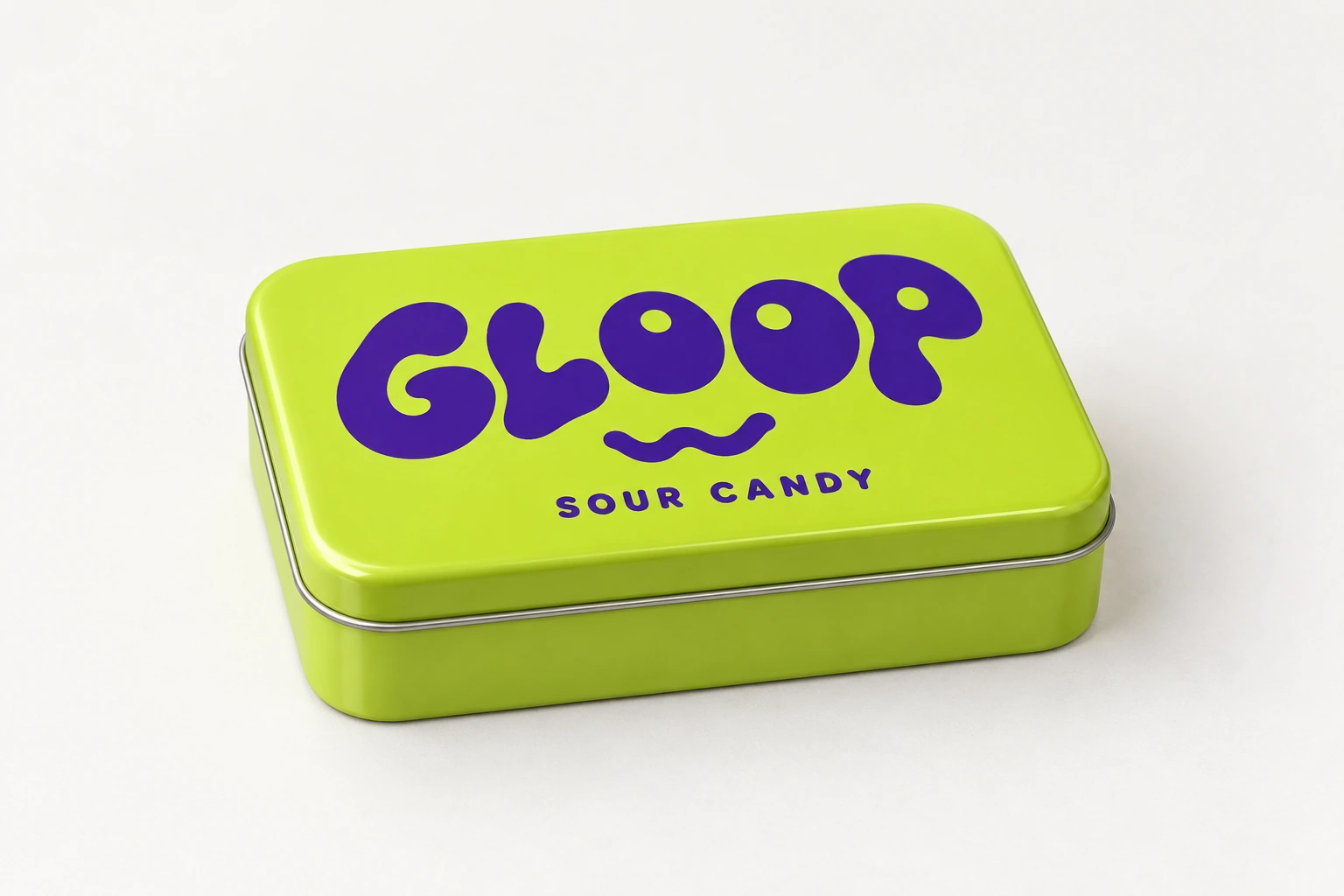
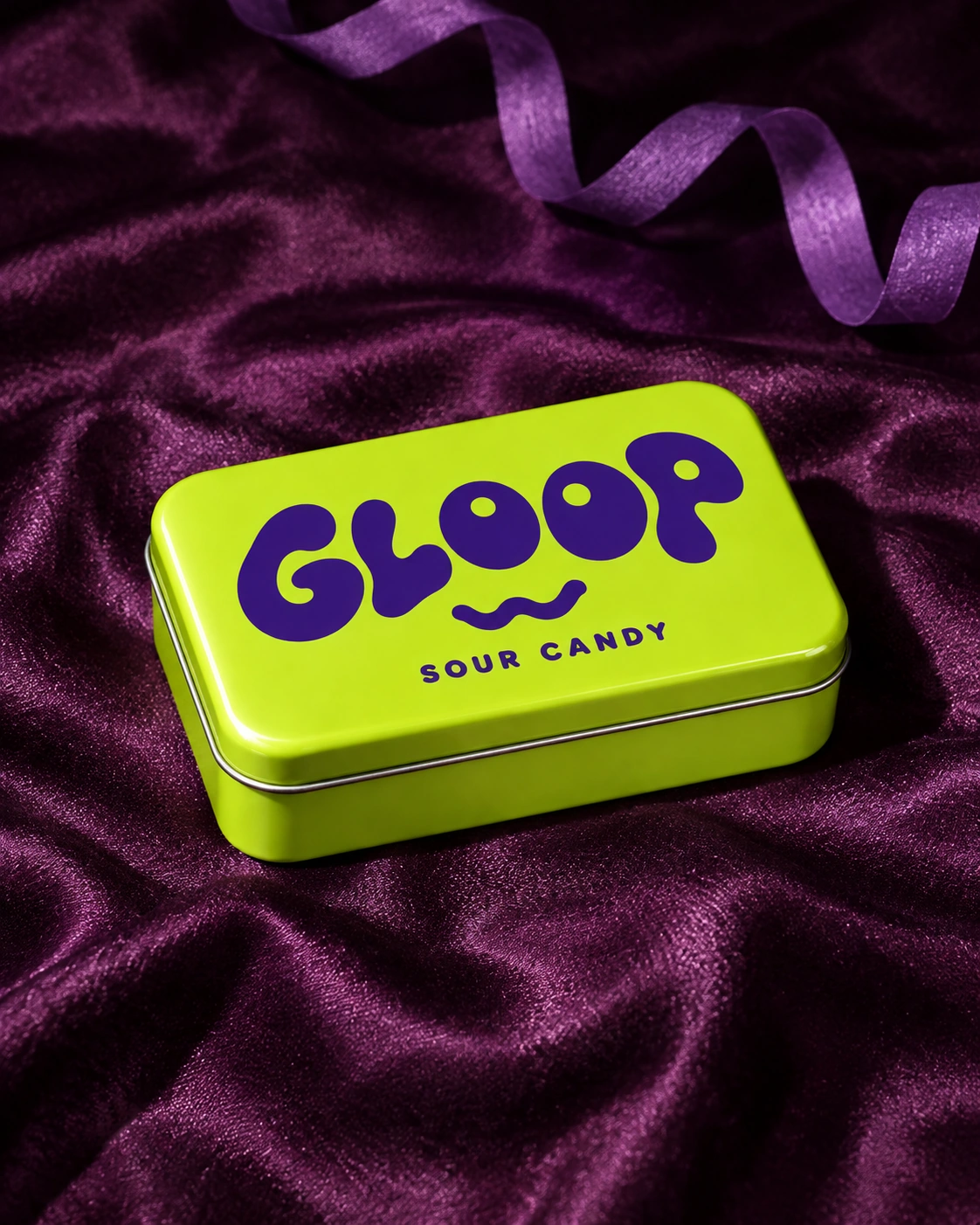
A packaging reference becomes a flash-style campaign scene, bringing the lettering, lid seam and metal geometry into focus.
From the product reference
The flash-style scene emphasizes lettering and metal geometry. The GLOOP wordmark, SOUR CANDY line, lid seam, corner radius and depth still need source comparison; lighting and reflections do not establish exact correspondence.
Plan this product shoot
The candy-tin example shows why the review step matters
Flash-style product scene
Place the lime GLOOP tin on purple satin under flash-style light. Use the contrast to give the package a defined campaign setting while retaining the complete visible product.
Packaging-detail review
Compare the GLOOP wordmark, smaller SOUR CANDY line, corner radius, lid seam and depth against the source. Inspect lettering at the intended placement size rather than only in a thumbnail.
Accepted-file handoff
Retain the approved result with its product reference and intended gallery role. The scene demonstrates a Fotogenic AI creative task; it does not establish VModel quality or measured API latency.
The food-product image guide retains the source and genuine Fotogenic AI result.
What are you creating next?
Create a directed product campaign scene
Choose Fotogenic AI.
Review packaging and geometry before retaining the image for its actual placement.
Use a specific model in the browser
Choose VModel when its operation fits.
Match inputs, unit price and output requirements without assuming an API integration is necessary.
Run unattended model jobs
Use VModel with owned result handling.
Task success must be followed by retrieval, retained storage, image approval and destination assignment.
Directed imagery or a model operation
Fotogenic AI
Prepare the product and role
Keep the product reference with its identifier and intended scene or gallery placement.
Create and approve the image
Direct the composition and inspect geometry, packaging and lettering at the required size.
Retain and assign the file
Use the documented reviewed store route and keep the approved master with its product.
VModel
Choose the model and inputs
Use the browser form or the API model version with the required operation-specific source files.
Retrieve the result
For API jobs, handle success or failure and retrieve output before temporary task data is removed.
Store, approve and deliver
Retain the file, review product accuracy and implement the required destination assignment.
A closer look at VModel.
Model access and merchant production are different purchases
Choose Fotogenic AI when the task is a product scene or coordinated campaign imagery from your references. Its creative workflows help direct the image role, review the result and prepare accepted files for delivery.
Choose VModel when a particular try-on, editing or generation model solves the task. Browser forms and playgrounds are available alongside the API, with shared prepaid billing. You can use a browser operation without building an integration; an unattended API pipeline adds its own retrieval, storage and review responsibilities.
Try-on needs two appropriate sources
VModel's try-on documentation requires garment and human images, a clothing category and optional masking/cropping controls. It recommends a 3:4 human view or cropping, with upper-body, lower-body and dress choices.
- Garment and person references have separate roles. A supplier photo, standalone garment and desired person image are not interchangeable inputs.
- An unseen back or side remains unverified; approval needs print, closure, sleeve and hem details.
- Fotogenic AI's apparel page and catalog walkthrough connect product references to creative direction. Neither service's generated wearing image establishes measured shopper fit.
A successful task is not yet an accepted product image
VModel's task documentation describes creating an API job with a model version and model-specific inputs. The returned identifier lets the client check completion or failure and retrieve the output.
Keep five states separate: the task succeeded, its output was retrieved, the file was retained, the image was approved, and the listing was updated. A success response establishes only the first. An API integration must also carry the product identifier and intended image role through those states.
Fotogenic AI's WordPress workflow documents source references and reviewed store assignment. That is a concrete delivery option when the task includes a WooCommerce gallery update.
Retrieve and retain results before task data disappears
VModel says API-created input parameters, output values and logs are removed after one hour by default. That wording describes task data rather than establishing the same expiry for every underlying image file.
Retrieve completed output promptly and retain approved files with their product associations. The catalog should keep enough job information to resolve failed downloads and assignment questions after the provider's task record disappears.
Webhooks and request limits do not prove throughput
VModel's webhook guidance covers notifications, retries and duplicate events. Its rate-limit documentation defines request limits rather than accepted-image throughput.
The integration owner handles failed jobs, inaccessible results and repeated completion events before updating a product. Model operations supply the generation step; the team owns review and orchestration.
For a fashion-production workspace, read the Uwear comparison. For enterprise creative or infrastructure, use the Bria comparison.
Pricing: model-specific operation rates
Fotogenic AI
$20.00 / month
Starter in USD: 220 monthly credits. Weekly: $7.00 with 60 credits. Images only; video plans differ.
Plan allowances and terms
Fotogenic AI's current plans use weekly or monthly cycles, with refreshing workflow credits and no rollover. Compare the operations, production calendar and work needed to reach accepted results. Keep the integration and review effort visible rather than calling the lowest API rate a complete production cost.
VModel
US$0.12 / photo
Try-on operation. Clothing changer and background removal have different rates.
Plan allowances and terms
The actual rendered VModel pricing table lists try-on at US$0.12 per photo, clothing changer at US$0.06 and background removal at US$0.04. Other image and video operations use their own units. Do not present a face-swap rate as the cost of every product image, or compare a per-second video rate with one still-image operation.
Its one-time recharge options run from US$10 to US$1,000, with non-expiring balance. That can suit irregular operation use. The current Sign in offer and public billing material disagree about free signup credit, so neither amount is promised as a verified account entitlement here.
Store assignment and switching remain owned work
- Retrieve accepted outputs and retain the product reference, model/job record and intended gallery role. Keep the master independently of temporary provider history.
- Recreate the product brief in Fotogenic AI from reusable files. VModel parameters, private tasks and prepaid balances do not automatically transfer.
- Assign the approved image to its product and variation. Fotogenic AI's native WooCommerce route supports reviewed updates; the Shopify guide covers manual assignment while native integration remains publicly Coming soon. An API integration supplies its own store-update logic.
Sources and review method
Written by Fotogenic AI. VModel public pricing, unified web/API billing, task retention and request-limit documentation were rechecked October 20, 2026. The October 18 rendered model table supplies the quoted operation rates; it was not rerun as a browser test today. The candy-tin image is retained Fotogenic AI work. No VModel request, generation, purchase or store update was performed.
- VModel pricing and prepaid balance
- VModel web/API billing
- VModel try-on inputs and browser form
- VModel task completion and retention
- VModel request limits
Read Fotogenic AI vs Bria for production infrastructure or Fotogenic AI vs Uwear for a fashion-production engine. Return to the comparison hub.
Continue your comparison.

FAQ
Questions about Fotogenic AI and VModel
No. Its catalog covers image generation, editing, try-on and video through individual models. Browser forms and playgrounds also make those operations available without an API-only purchase.
Create with Fotogenic AI
Create your next product scene.
Direct the image and retain the approved file for its placement.