Fotogenic AI vs Bria
Compare Fotogenic AI's merchant workflow with Bria's product-preserving operations, editable creative and production infrastructure.
Our pick
Product scenes with reviewed delivery
BriaSpecialist fit
Layered ads and enterprise pipelines
Choose Bria Product Shots for product operations, Create for editable layered ads, or the platform for API access and enterprise deployment.
The differences that change your choice.
Compare product scene creation, editable advertising and who owns the processing and store delivery.
Production purchase
Fotogenic AI Choose the Bria route
- Fotogenic AI
- Direct merchant product scenes and related campaign imagery.
- Bria
- Separates Product Shots operations, layered Create assets and platform infrastructure.
Product treatment
Bria Bria for source operations
- Fotogenic AI
- Generate a new portrayal of the product in the chosen scene.
- Bria
- Documents source-product preservation for Product Shots surroundings.
Editable advertisements
Bria Bria Create for layers
- Fotogenic AI
- Create product-led ad imagery without promising editable layered documents.
- Bria
- Create advertises separate editable layers, recomposition, localization and animation.
Pipeline ownership
Bria
- Fotogenic AI
- Use documented creative and reviewed WooCommerce workflows.
- Bria
- Integrate operations, endpoint completion, storage and assignment in owned software.
Usage budget
Choose by task
- Fotogenic AI
- Use the pricing helper’s weekly or monthly workflow plans.
- Bria
- Lists lifestyle generation at US$0.032 and cutout or shadow at US$0.018 each.
Enterprise scope
Bria
- Fotogenic AI
- Create merchant visuals without an equivalent self-hosting or indemnity claim.
- Bria
- Offers plan-specific protection and selected Enterprise deployment pipelines.
One product, two scene decisions
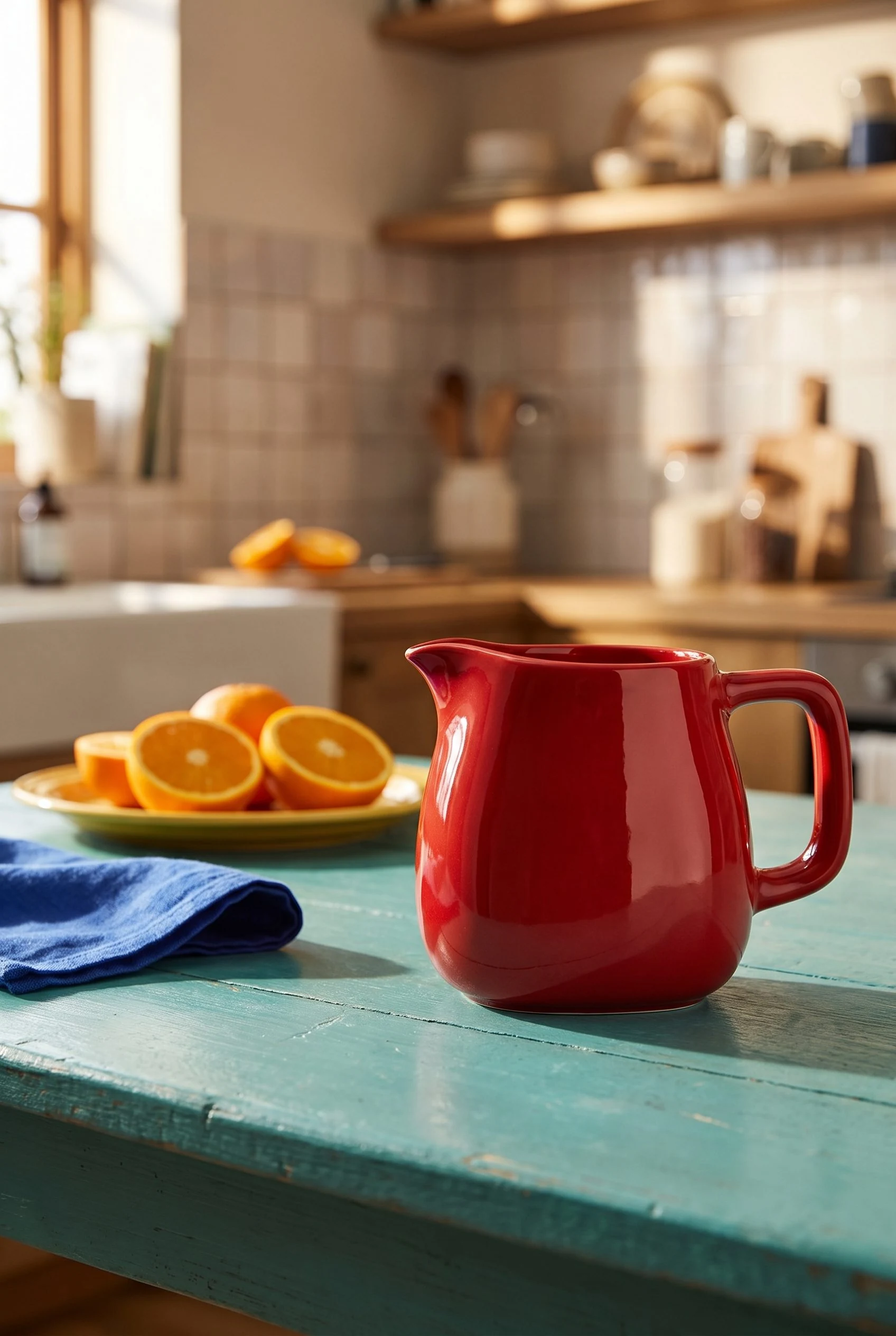
One pitcher appears in two everyday settings, changing the surrounding scene while keeping the complete product visible.
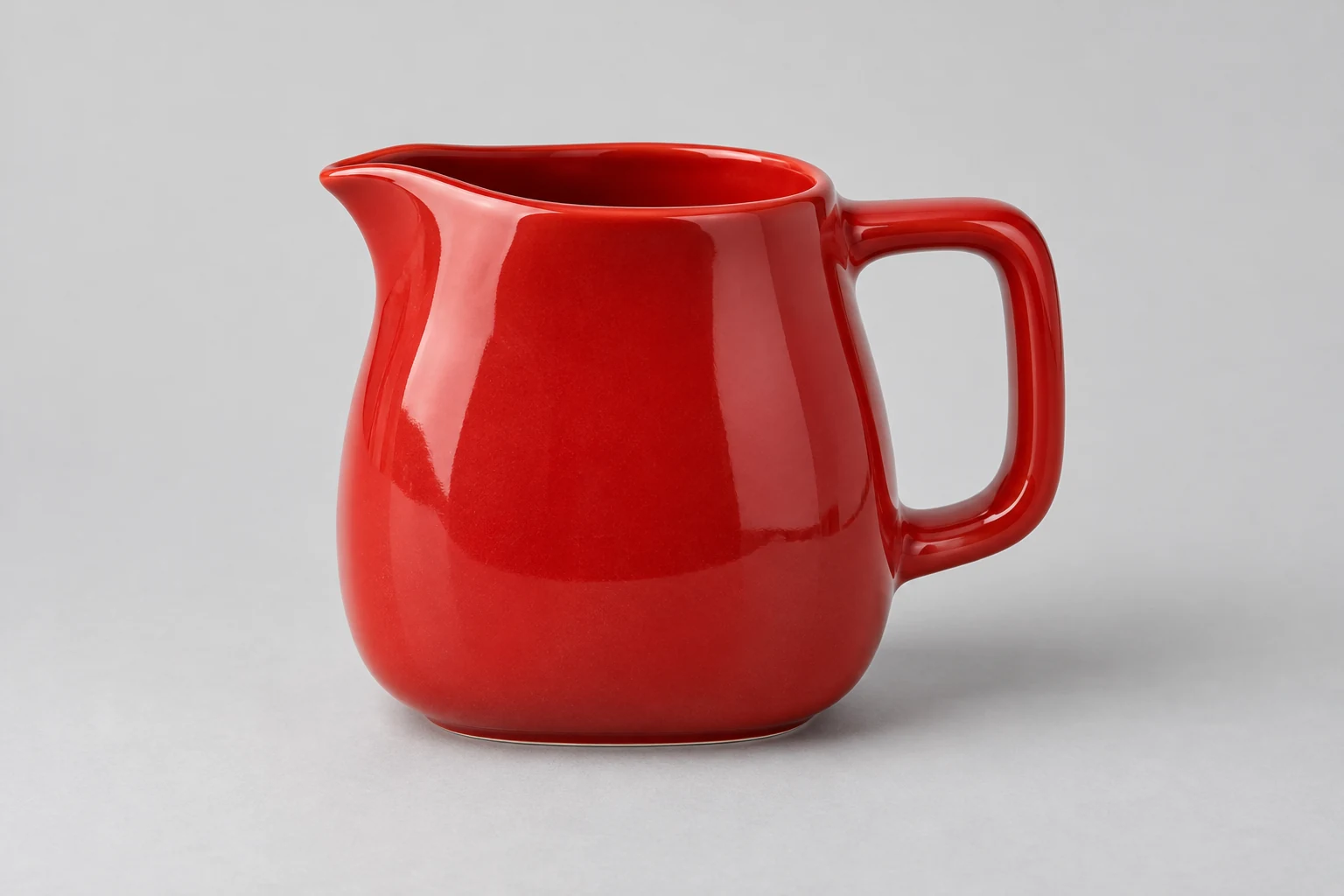
From the product reference
The breakfast scene keeps the pouring lip, handle and red glaze visible. Reflections and lighting change the surface appearance; handle proportions, opening and body still need comparison. Pixel-identical preservation is unverified.
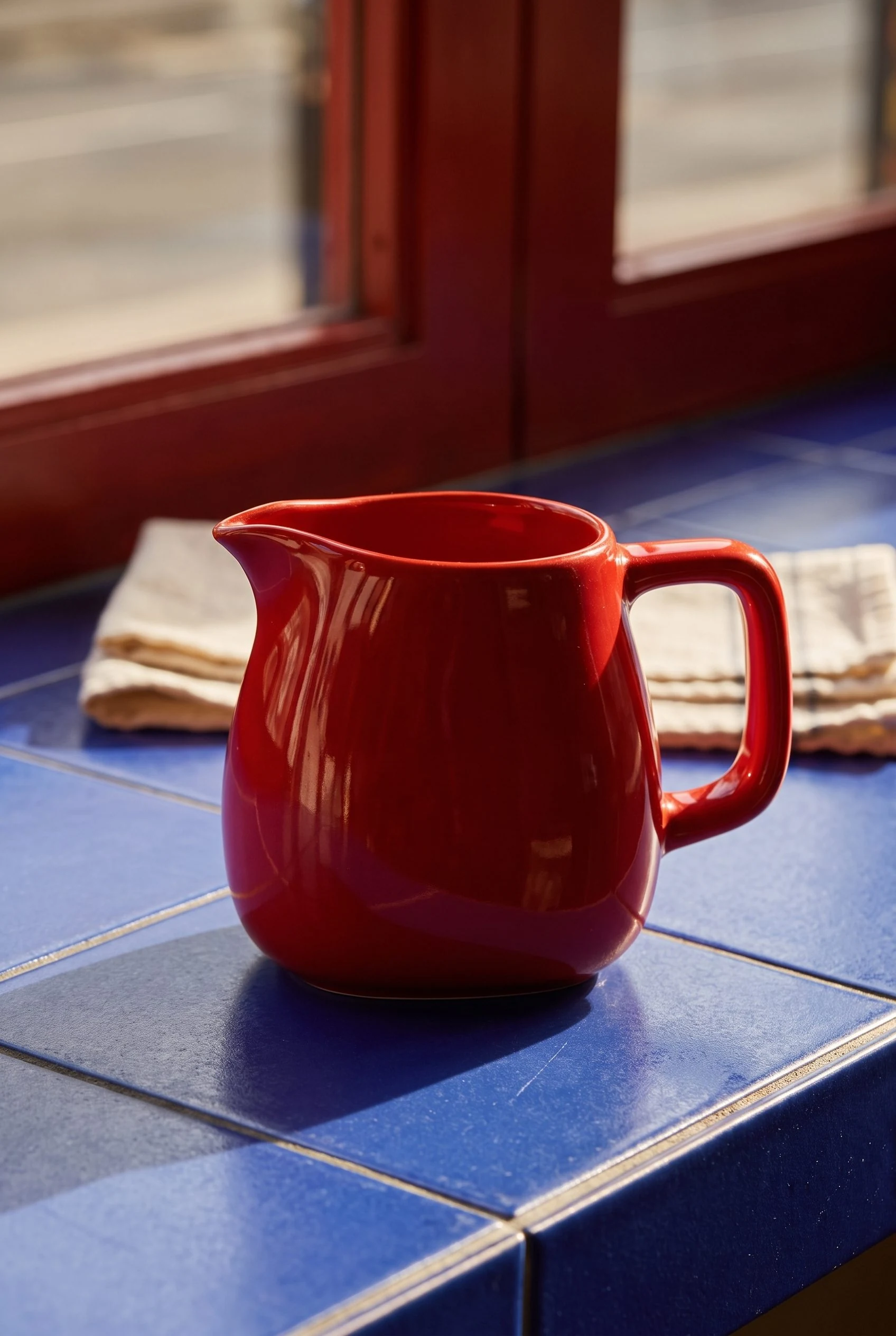
The tiled table and directional window light create another setting while keeping the full pitcher visible, including its lip and handle.
Plan this product shoot
A pitcher brief that separates product and setting
Breakfast setting
Place the complete red pitcher on the green counter with oranges and warm window light. Use this frame for campaign atmosphere while keeping the pouring lip and handle visible.
Cafe composition
Give the same pitcher a cooler tiled-table setting. The changed surface and light alter the glaze's appearance, so compare color and reflections against the source before approval.
Product review
Check the opening, handle, pouring lip and body proportions in each frame. Select by placement after that review; the two results came from separate generations rather than one Campaign Set.
The prompt walkthrough retains the source and genuine Fotogenic AI results. No Bria output or matched preservation test is shown.
What are you creating next?
Create a merchant product-scene campaign
Choose Fotogenic AI.
Develop the visual brief and approve product portrayal before store or campaign delivery.
Revise offers inside editable ad layers
Evaluate Bria Create.
Confirm demo access, editable output format and price rather than using an API operation rate.
Build product operations into a platform
Evaluate Bria Product Shots and platform terms.
Own endpoint handling, storage, review and product assignment as part of the implementation.
Merchant scenes or a scoped Bria pipeline
Fotogenic AI
Prepare product and scene direction
Keep the product reference with the intended image role, setting and composition.
Create and review portrayals
Generate options and compare shape, material, lettering and reflections against the source.
Retain and deliver
Keep accepted masters and use the chosen store or campaign assignment route.
Bria Product Shots
Prepare the source operation
Choose the cutout, packshot, shadow or lifestyle operation needed by the product source.
Run the selected pipeline
Supply text or image direction and handle completion according to that endpoint.
Download and approve
Retrieve results within their retention window, review edges and placement, then store and assign the accepted file.
A closer look at Bria.
Match the purchase to the production owner
Choose Fotogenic AI when the brief is to create merchant product scenes and related campaign images, then review and place the accepted files. Its product-image workflow and Campaign Set keep that creative task in focus.
Identify the Bria purchase before comparing it. Product Shots provides product-oriented operations, Bria Create advertises editable layered ads, and the platform supplies APIs and enterprise deployment. These overlap with visual production but have different deliverables, access routes and operating responsibilities.
Bria Create is different from an API endpoint
Bria Create advertises editable layered creative from a brief or flat ad, plus recomposition, localization, animation and a canvas. Current access is demo-led; public pricing and self-serve availability are not established for every feature.
- Editable text and product layers matter when approved headlines, offers or languages change. The exported format determines whether those elements remain available for revision.
- Fotogenic AI's Ad-ready Visuals and scene-direction guide support product-led imagery and message approval, without promising Bria Create's layered documents or localization system.
Preserve an existing product or generate a new portrayal
Bria's Product Shots covers cutouts, shadows, packshots and reference- or text-directed lifestyle scenes. Its best-practice guide describes preserving the source product while generating its surroundings, a useful distinction for packaging and detailed items.
- Source preservation still leaves cutout edges, transparent areas, reflections and placement to approve.
- Fotogenic AI's retained red-pitcher images illustrate breakfast and cafe settings. They show scene direction without establishing an identical preservation algorithm or comparative logo accuracy.
Keep the pipeline and approval responsibilities visible
Bria's API suits platform teams integrating source preparation, generation, storage and product assignment into existing software. The workflow needs to carry the correct file and approval state through each step.
- The API reference separates legacy v1 endpoints, synchronous by default, from newer asynchronous v2 product-editing endpoints. Completion and failure handling must match the endpoint.
- Fotogenic AI's WooCommerce workflow already documents product references, generated files and reviewed updates. Bria's PIM/DAM positioning alone does not establish that native store behavior.
Trial and contractual protection are plan-specific
Bria's pricing advertises one hundred free calls or generations; its Product Shots FAQ still mentions one thousand. Signup entitlement remains unresolved because no trial account was created here.
Bria markets licensed training and indemnification. Pricing distinguishes capped pay-as-you-go protection from advertised unlimited Enterprise protection, subject to the buyer's agreement.
Choose the relevant Bria contract when those protections determine procurement. Fotogenic AI's recommendation concerns visual production and does not establish equivalent indemnification, certification or deployment terms.
Download the result before its hosted URL expires
Bria's retention documentation says default hosted images expire after three days; legacy /v1/product/* outputs have a one-hour window. Organization policies and other products can differ. These windows describe result URLs rather than every data category.
Download approved images into the catalog's own storage and retain their product association. A completed generation can still leave a listing without its asset if the store saves only the expiring URL.
Enterprise deployment has its own scope
Bria's deployment guidance offers selected Enterprise pipelines in the buyer's cloud or on-premises infrastructure. The package does not necessarily include every cloud feature. Its attribution agent transmits generated-output embeddings to Bria.
The contract must define the pipeline, hardware, updates, commercial permissions and data flow. Downloadable weights alone do not establish unrestricted commercial use.
Choose Fotogenic AI for product-scene creation when operating that infrastructure is outside the brief. Its MCP access adds an assistant production surface, without establishing equivalent self-hosting or enterprise controls.
Pricing: operations and production costs
Fotogenic AI
$20.00 / month
Starter in USD: 220 monthly credits. Weekly: $7.00 with 60 credits. Images only; video plans differ.
Plan allowances and terms
Fotogenic AI's current pricing owns its weekly/monthly plans and workflow credits. Compare the complete creative job and commitment. No measured cost advantage is claimed for the proposed ten-image job.
Bria
US$0.032 / image
Platform Product Shots lifestyle-generation rate. Bria Create needs a separate quote.
Plan allowances and terms
Bria's platform price list separates lifestyle generation by text or image at US$0.032 per image from product cutout and shadow at US$0.018 each. The US$0.018 headline does not price every finished lifestyle scene, and API rates do not establish a Bria Create subscription price.
Budget only the necessary operations: a cutout may be reused, while another endpoint may already blend the shadow. Add retries, storage and integration where the chosen pipeline requires them.
Switching with files and responsibilities intact
- Retain product masters, accepted outputs and reusable visual direction. For an API migration, also retain the job-to-product mapping and download stored results within the documented retention window.
- Rebuild the product-scene brief in Fotogenic AI. Keep layered-ad, contract or deployment work with its existing owner until the replacement delivers those requirements.
- Assign accepted files to their product and gallery role. Fotogenic AI's WooCommerce workflow documents reviewed delivery; its Shopify guide covers manual gallery and variant assignment. Downloaded images do not transfer enterprise terms or infrastructure.
Sources and review method
Written by Fotogenic AI. Bria pricing and the demo-led Create offer were rechecked October 20, 2026. Product Shots lifestyle rates now show US$0.032 per image. API, retention and deployment descriptions are documentation evidence, not an exercised integration. The pitcher scenes are retained Fotogenic AI results; no Bria generation, deployment or contract review was performed.
- Bria API prices and plan protections
- Bria Create deliverables and demo access
- Bria Product Shots
- Bria result-retention documentation
- Bria enterprise deployment documentation
Read Fotogenic AI vs Claid AI for catalog processing or Fotogenic AI vs Vmake for social-video production. Return to the comparison hub for the full library.
Continue your comparison.

FAQ
Questions about Fotogenic AI and Bria
No. Bria Create advertises editable layered creative, while Product Shots and APIs cover other production routes. Current Bria Create access is demo-led rather than verified universal self-service.
Create with Fotogenic AI
Direct your next product setting.
Create product-led scenes and complementary campaign imagery.