Fotogenic AI vs Lalaland / Browzwear
Compare campaign imagery from garment photographs with Browzwear's digital-garment, model and creative tools.
Our pick
Garment campaigns from product photographs
Lalaland / BrowzwearSpecialist fit
Digital garments and commissioned models
Lalaland redirects to Browzwear Sell for technical digital garments or commissioned model assets. Stylezone also offers creative tools guided by references.
The differences that change your choice.
Compare garment campaigns with digital garment development, model assets and final listing delivery.
Starting asset
Both tools Photos or digital garments
- Fotogenic AI
- Use garment photographs to direct campaign scenes and details.
- Lalaland / Browzwear
- Uses digital garments and compatible avatars for technical development.
Current offer
Choose by task Follow the current offer
- Fotogenic AI
- Create on-model and related imagery from approved product references.
- Lalaland / Browzwear
- Lalaland redirects to Browzwear Sell rather than an old standalone signup offer.
Commissioned models
Lalaland / Browzwear Browzwear for commissions
- Fotogenic AI
- Direct a person and setting through reusable photo references.
- Lalaland / Browzwear
- Separates in-product models from custom commissions with compatibility and pose limits.
Creative overlap
Both tools
- Fotogenic AI
- Create scenes, related Campaign Set images and selected variations.
- Lalaland / Browzwear
- Whiteboard supports reference-led generation, Photoshoot and animation.
License budget
Choose by task
- Fotogenic AI
- Use workflow credits for the weekly or monthly production period.
- Lalaland / Browzwear
- Publishes DPC licenses with separate custom-model and enabled-capacity questions.
Product approval
Choose by task
- Fotogenic AI
- Review visual correspondence and the image’s intended placement.
- Lalaland / Browzwear
- Supports technical garment versions and collection review in Stylezone.
Campaign context and construction detail have different roles
A wider portrait places the jacket in campaign context. A closer hooded frame draws attention to its upper construction.
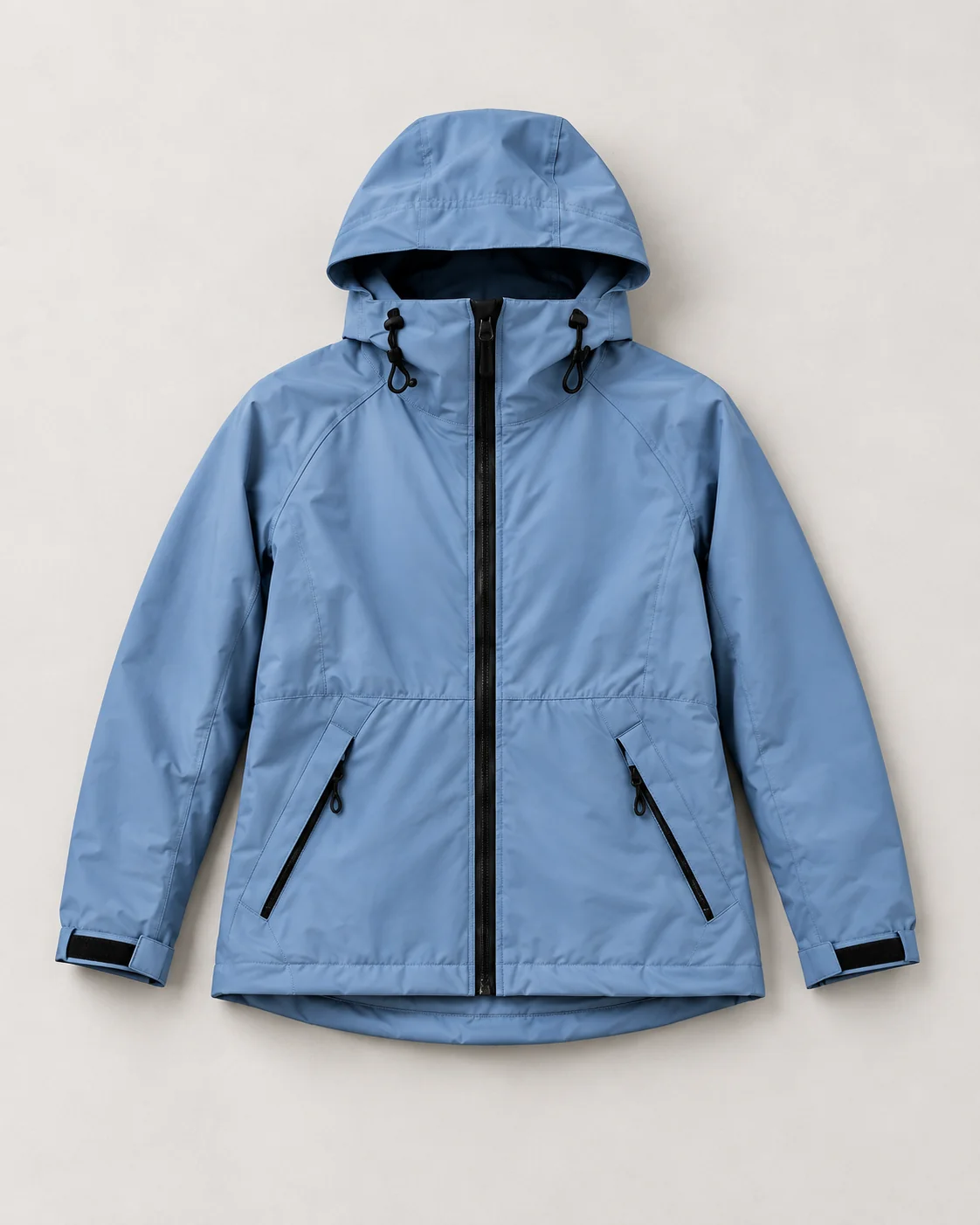
From the product reference
The wider portrait shows the jacket body, pockets, cuffs and hem. Those details and the upper fastening need source comparison; the generated model and outdoor scene do not establish technical fit or waterproof performance.
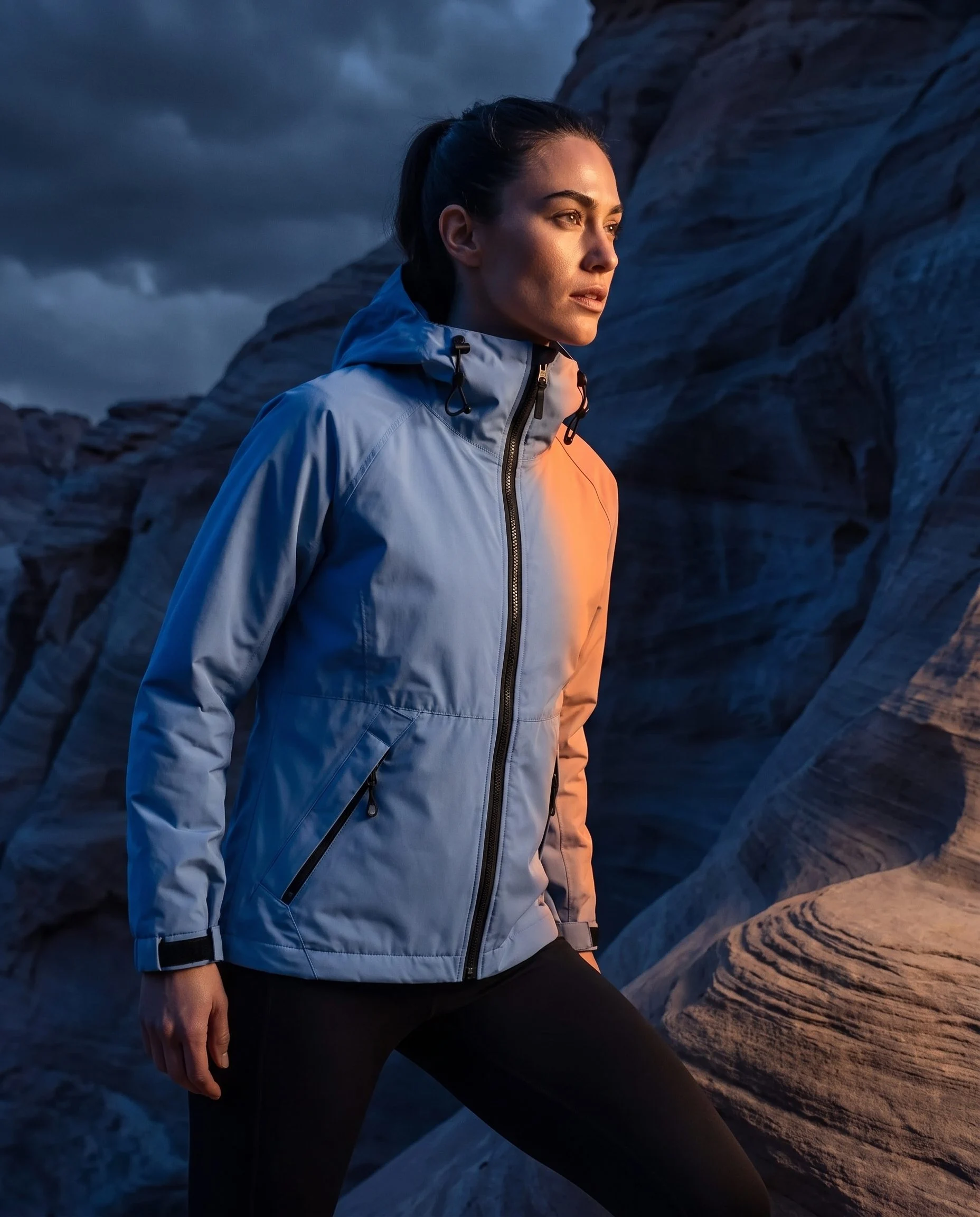
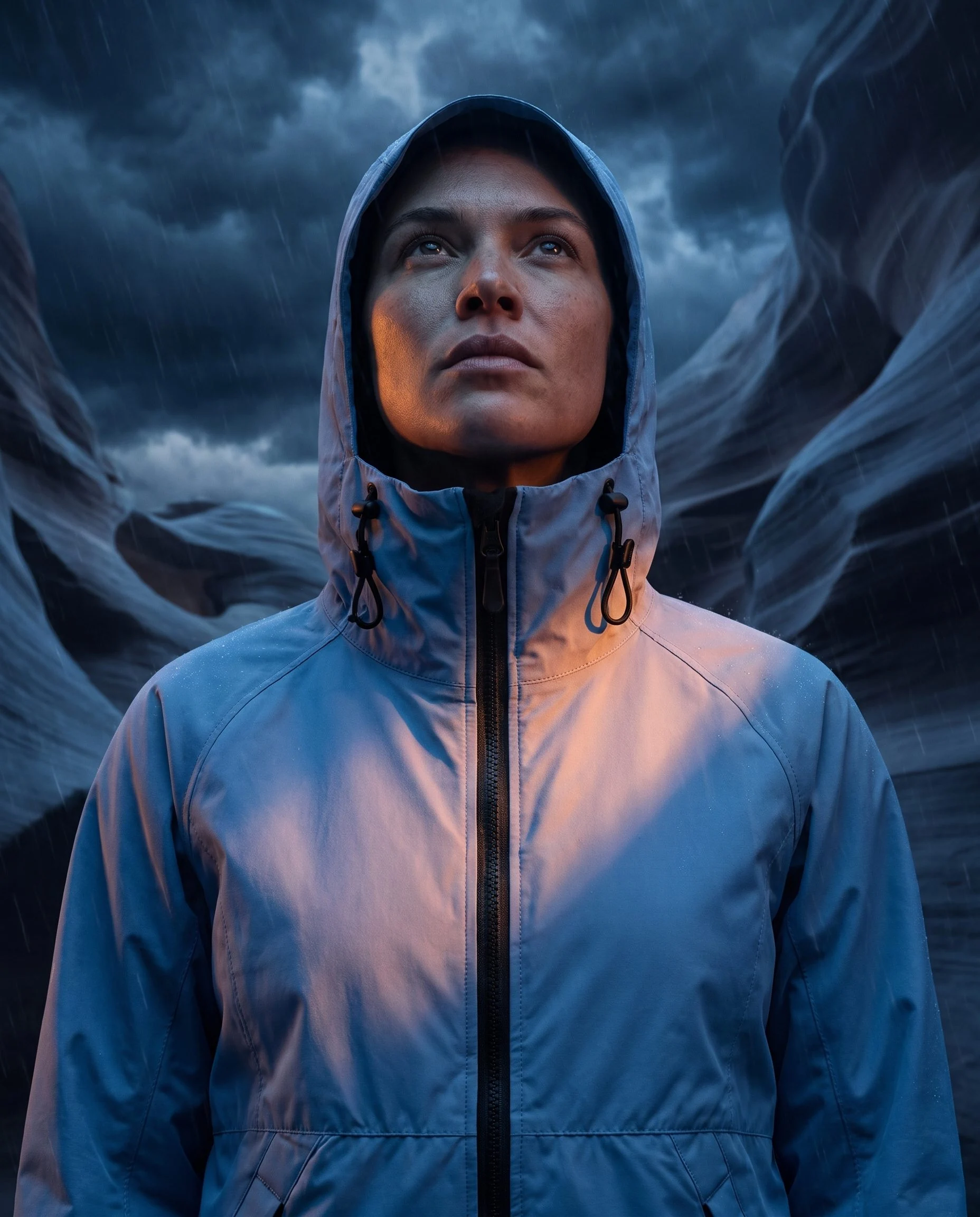
The closer hooded view emphasizes the hood, collar and zip while excluding the full hem; the wider frame shows more of the jacket.
Plan this product shoot
The blue-jacket example is campaign imagery, not fit simulation
Outdoor campaign portrait
Show the blue jacket on a model in the rocky setting. Use the wider view for launch context while keeping pockets, cuffs and hem visible for source comparison.
Hood and fastening detail
Use the closer hooded frame to emphasize the collar, hood and upper zip. It excludes the full hem, so keep the wider portrait alongside it when reviewing the garment.
Product-version review
Compare the zipper line, pocket openings, cuffs, hood and hem with the approved reference. Accept the campaign image separately from technical fit approval or sign-off on a digital garment.
The WooCommerce image walkthrough retains the source and genuine Fotogenic AI results. These campaign images do not demonstrate waterproof performance, physical fit or 3D simulation. No Browzwear output was produced here.
What are you creating next?
Create campaign images from garment photographs
Choose Fotogenic AI.
Direct the wearing view and supporting detail from the approved physical-product reference.
Develop and review digital garments
Choose Browzwear.
Match technical files, software, compatible avatars and collaboration requirements.
Commission a reusable model asset
Scope the Browzwear model purchase.
Confirm the quote, poses and compatibility rather than inferring inclusion from a DPC license.
Garment photos or digital development
Fotogenic AI
Prepare the garment photo
Use the approved physical-product reference with a defined campaign role.
Direct the wearing scene
Carry model and visual references into the scene, keeping the garment readable.
Review and assign
Accept visible construction separately from fit claims, then retain and place the file.
Browzwear
Prepare the digital garment route
Use the required VStitcher version and compatible garment/avatar assets.
Dress, pose and select the model
Follow the documented compatible-avatar and approved-pose requirements.
Publish for collaboration
Send the compatible output to Stylezone; technical review and final commerce delivery remain separate.
A closer look at Lalaland / Browzwear.
The current Lalaland destination is Browzwear
Choose Fotogenic AI when an existing garment photograph is the starting asset and you need campaign scenes, wearing views and supporting details. Its apparel workflow connects that source to a merchant creative brief.
Lalaland.ai currently redirects to Browzwear Sell. Evaluate Browzwear when you need digital garment development, compatible avatars or commissioned model assets. Its Stylezone photo-reference tools also overlap with creative generation, so choose by required assets and workspace rather than assuming every Browzwear task starts from 3D.
A product photograph and a digital garment are different starting points
A product photograph supplies a visible view. A digital garment can hold patterns, materials and construction data for development. Generating a campaign interpretation does not validate that technical asset.
- VStitcher covers patterns, fabric simulation, avatars and fit development.
- Its AI-model workflow requires compatible avatars, dressing and posing before Stylezone publication.
- Fotogenic AI suits campaigns for existing products; pattern grading, fabric measurement and technical fit remain development responsibilities.
Library and custom models have different access requirements
Browzwear's release notes separate six in-product models from custom models commissioned through an account manager. Reusable model assets therefore bring specific access and pose requirements.
- VStitcher 2025.2.1 or later and compatible sharing are required; custom models have five approved poses.
- Custom hair support is currently limited to short styles above the jawline. A standard license does not establish inclusion of a particular commissioned identity or pose.
- Fotogenic AI campaign direction does not confer a commissioned model asset or validate body-size representation.
Browzwear also supports photo-reference generation
Browzwear's Stylezone AI guidance includes reference-led Whiteboard Concepts and Photoshoot generation for on-model, outfit and flat-lay work. Generation does not yet automatically follow brand DNA.
- Whiteboard model options cover images and animation, with administrator-selected Lite/Pro access and different credit use.
- Browzwear places these tools within design collaboration; Fotogenic AI connects merchant imagery to launch production and reviewed store delivery.
Collaboration must keep product versions clear
Stylezone supports collection sharing and review. Technical product versions need to remain connected to the corresponding model assets and approved visuals.
For a Fotogenic AI campaign, retain the current product reference and identifier with the brief. The clothing catalog guide shows how reusable direction carries across distinct garments.
Technical approval selects the product version; creative approval selects the image. Keeping both records clear prevents a superseded design from entering the launch.
From accepted imagery to the correct listing
- Retain the approved garment version, technical originals and accepted visual exports. A campaign photograph does not replace the digital garment, commissioned avatar or fit approval.
- Recreate the required photo-led scene in Fotogenic AI from reusable references. Keep technical development and collaboration with the owner who supplies those deliverables.
- Assign accepted images through reviewed WooCommerce delivery or the manual Shopify guide. Native Shopify integration remains publicly Coming soon. Browzwear exports and integrations need their own scoped handoff.
Pricing: DPC licenses and model quotes
Fotogenic AI
$20.00 / month
Starter in USD: 220 monthly credits. Weekly: $7.00 with 60 credits. Images only; video plans differ.
Plan allowances and terms
Fotogenic AI's current plans use weekly or monthly workflow credits with no rollover. Compare the production you need now with the software, development and asset-management requirements of a DPC license. A low image-generation entry price cannot be treated as the equivalent of a technical apparel-development platform.
Lalaland / Browzwear
US$75 / month
Browzwear Freelancer DPC license. This is not a standalone custom-model fee.
Plan allowances and terms
The public Browzwear pricing page lists digital-product-creation licenses. Freelancer is US$75 monthly or US$750 yearly; Freelancer Plus is US$150 monthly or US$1,500 yearly. Teams is US$3,950 yearly, including up to three named users at one site and 100 styles per year. Enterprise is custom.
These prices are not verified standalone custom-AI-model fees. The Teams table also labels limited AI, rendering and upload-generation capacity. Confirm the actual enabled tools, commissioning work and usable credit allocation rather than adding every similarly labelled row into one entitlement. A learner license is a separate, pre-approved non-commercial offer.
Sources and review method
Written by Fotogenic AI. The Lalaland-to-Browzwear redirect and DPC pricing were rechecked October 20, 2026. Current technical and Whiteboard help supplies the described requirements; no software workflow or custom commission was exercised. Jacket imagery is retained Fotogenic AI work and supplies no fit or waterproof-performance evidence.
- Current Lalaland redirect
- Browzwear DPC licenses
- Browzwear AI-model requirements
- Stylezone creative tools
- Whiteboard generation and animation options
Read Fotogenic AI vs Caimera for generative design-to-catalog work or Fotogenic AI vs Rawshot AI for photographic controls. Return to the comparison hub.
Continue your comparison.

FAQ
Questions about Fotogenic AI, Lalaland and Browzwear
No. The inspected domain redirects to Browzwear Sell. The current decision concerns Browzwear software, model access and any commissioning work rather than an old Lalaland signup offer.
Create with Fotogenic AI
Create a campaign from your garment.
Develop on-model scenes and supporting details from the approved reference.