Fotogenic AI vs Rawshot AI
Compare shoot controls and output provenance with Fotogenic AI's reference-led creation and reviewed delivery.
Our pick
Garment campaigns from product references
Rawshot AISpecialist fit
Explicit casting and shoot controls
Choose Rawshot AI for explicit casting, lighting, framing and pose controls, or advertised signed content credentials. Both services also cover fashion accessories.
The differences that change your choice.
Compare reference direction, explicit photographic controls and the requirements for garment approval and delivery.
Shoot direction
Rawshot AI Controls or references
- Fotogenic AI
- Direct the image through product references and written creative instructions.
- Rawshot AI
- Select visible casting, lighting, frame, view, pose and expression controls.
Provenance requirement
Rawshot AI Rawshot AI for credentials
- Fotogenic AI
- Review the product portrayal and retain the source and accepted file.
- Rawshot AI
- Advertises synthetic casting, signed credentials and AI-labelled output.
Merchant creative brief
Fotogenic AI Fotogenic AI for the brief
- Fotogenic AI
- Develop a product scene and related image roles from approved references.
- Rawshot AI
- Creates apparel and accessory imagery through the photographic studio.
Returning to a setup
Choose by task
- Fotogenic AI
- Retain the model reference, visual reference and brief for later runs.
- Rawshot AI
- The reviewed homepage distinguishes current-shoot variations from saving a later shoot.
Short product motion
Both tools
- Fotogenic AI
- Animate an approved product frame with directed movement.
- Rawshot AI
- Publishes image-to-video with duration-based token use.
Store handoff
Fotogenic AI
- Fotogenic AI
- Use reviewed WooCommerce updates or manual Shopify assignment.
- Rawshot AI
- Retain exports and carry the chosen shoot direction into the destination workflow.
Direct the photograph, then inspect the jacket
A leather bomber becomes a front-facing studio portrait, with the complete head, jacket and footwear inside the frame.
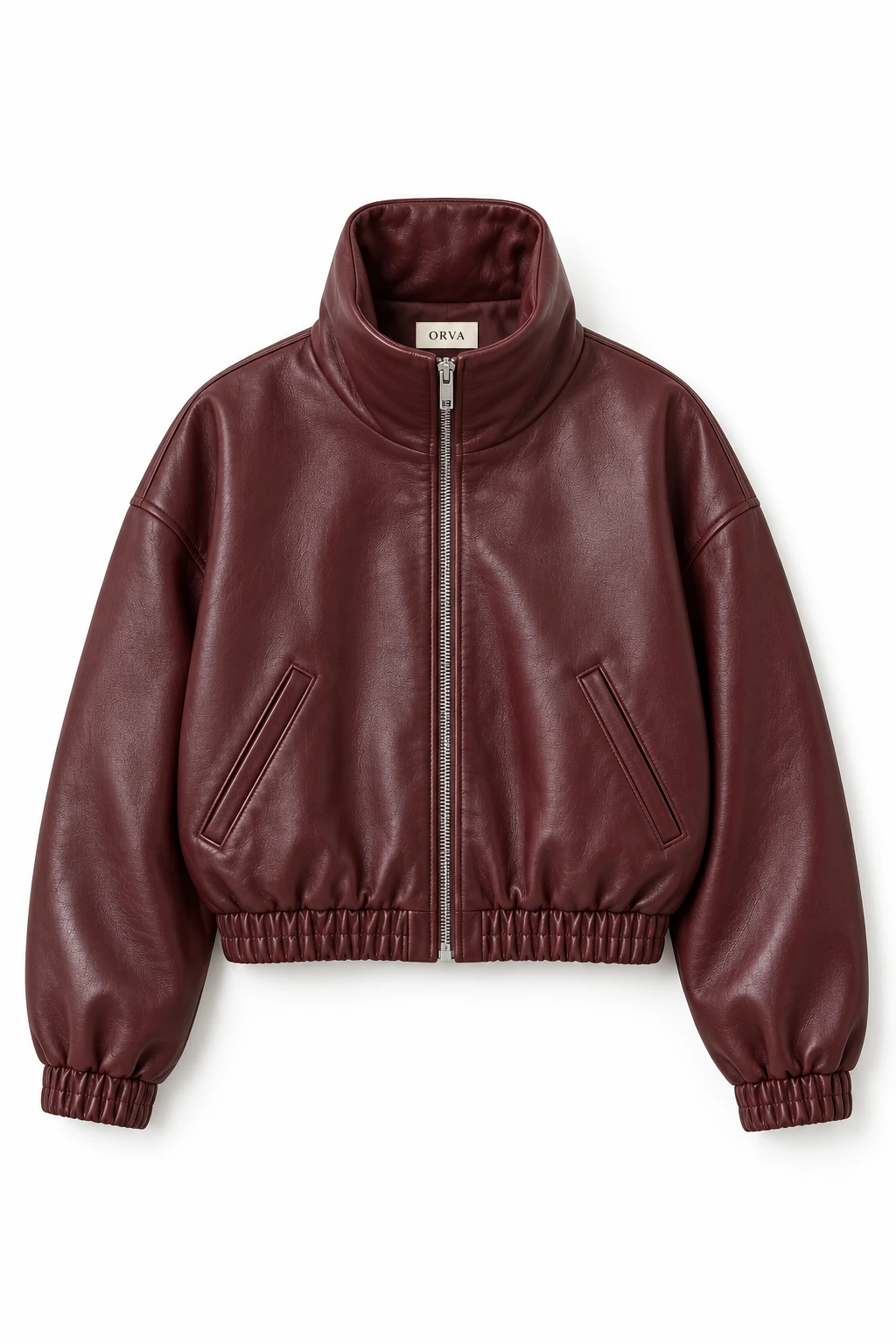
From the product reference
The collar, central zip and oxblood material remain recognizable. Pocket openings become more upright than the source’s diagonal openings, and the gathered hem changes in the worn view. Construction accuracy and physical fit remain unverified.
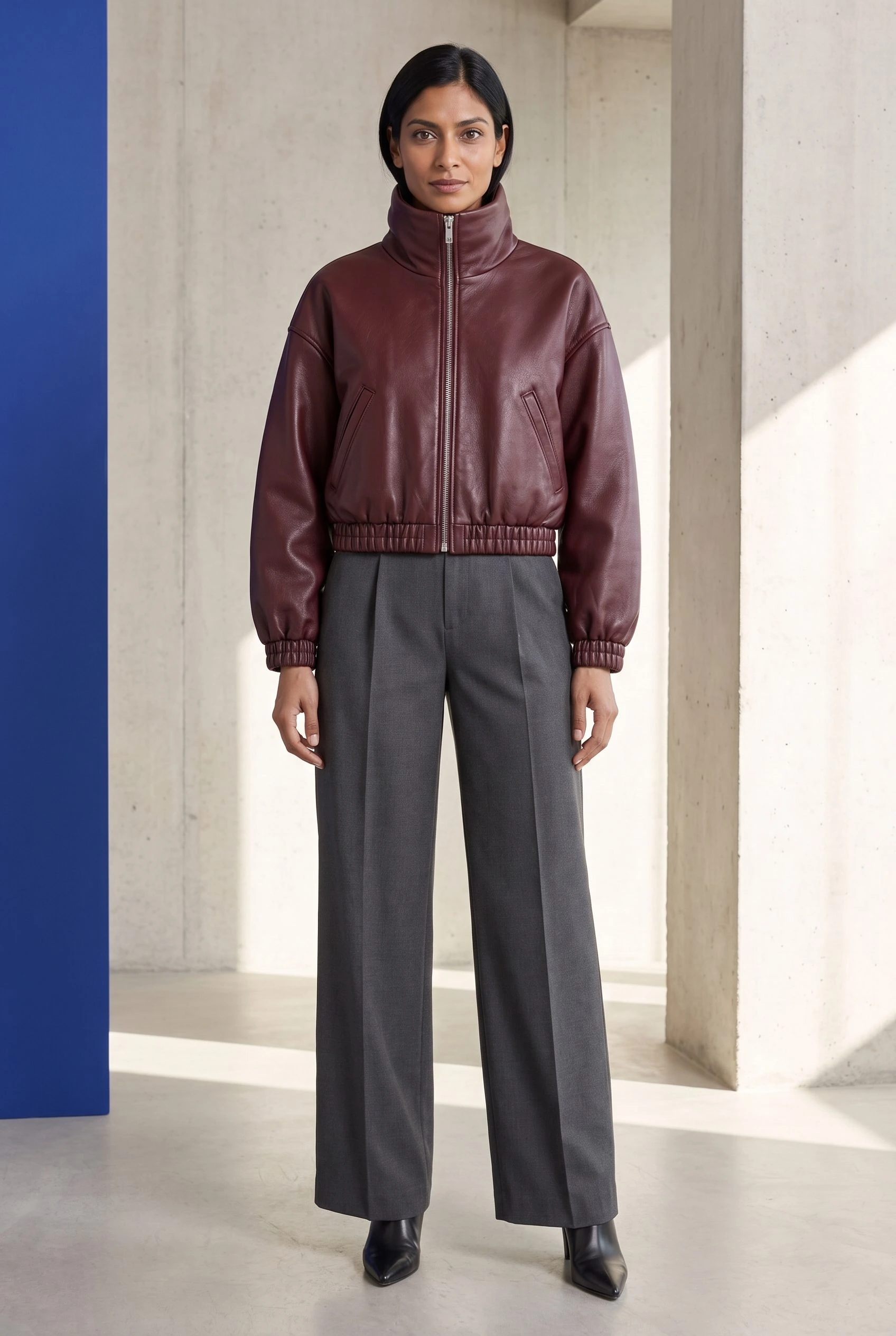
Plan this product shoot
A leather-bomber brief that can be reviewed
Campaign portrait
Use the retained full portrait for the complete styled look, with the head, jacket and footwear visible. The concrete setting and blue accent establish the campaign direction without making this a construction photograph.
Construction review
Check the funnel collar, central zip, pocket openings, gathered cuffs and hem against the source. The retained Fotogenic AI result makes the pockets more upright and changes the gathered hem. It is useful scene evidence, but those changes prevent treating it as exact construction proof.
Supporting products
A planned shoe or bag close-up needs that item's own reference and acceptance check. Only the bomber portrait is demonstrated here. Rawshot AI also supports accessories, so the decision remains photographic controls and provenance versus the reference-led production route.
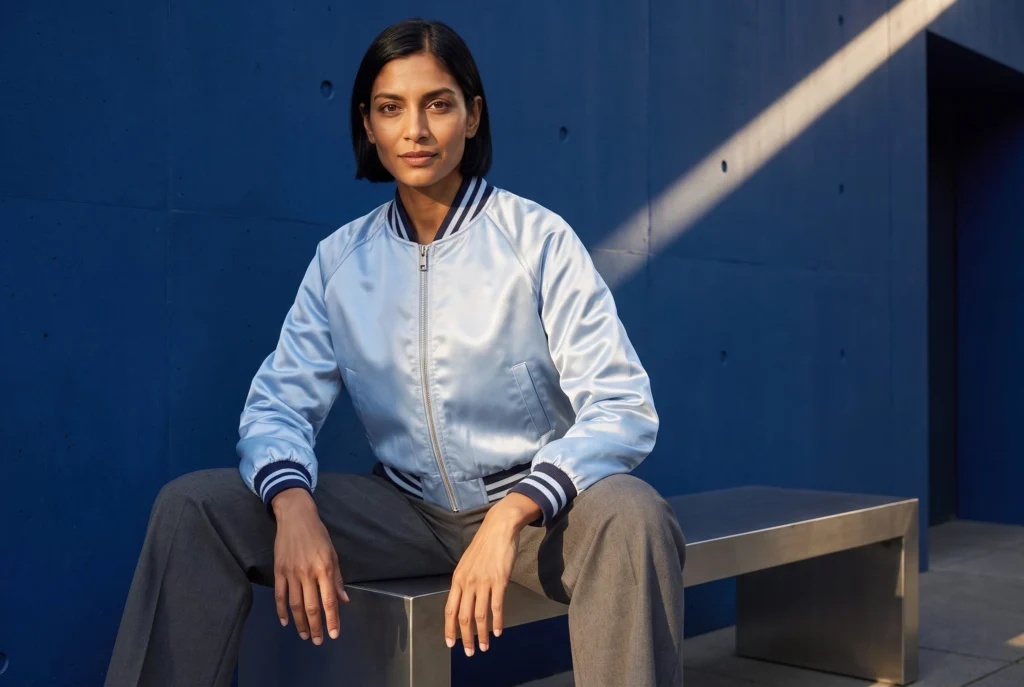
The catalog guide retains this leather source and result alongside a separate satin-bomber setup. The model-action guide helps define the framing and product role before production.
What are you creating next?
Direct a campaign from garment references
Choose Fotogenic AI.
Develop the scene and supporting roles, keeping visible construction changes in the acceptance decision.
Specify casting, lighting and pose controls
Choose Rawshot AI.
Its explicit shoot controls are the relevant purchase, including for supported accessories.
Require signed output provenance
Evaluate Rawshot AI and inspect the export.
Credentials concern production history. Product correspondence still needs source review.
References or photographic controls
Fotogenic AI
Prepare product and direction
Use the garment reference with the setting, framing and required image role.
Create and compare options
Review collar, pockets, closure and hem against the source before selecting the scene.
Export for its placement
Retain the approved master and use the actual store or campaign delivery route.
Rawshot AI
Import the product
Supply a supported photo, flat lay, mockup or technical sketch.
Set the shoot controls
Choose casting, lighting, frame, view and pose, then generate the required image.
Inspect and retain
Check garment construction and any required credentials, then retain the selected export.
A closer look at Rawshot AI.
Choose the workflow beyond the finished shot
Choose Fotogenic AI when your product references and written direction define the scene, supporting views and final placement. Its product-image workflow lets you develop that merchant brief and select the images that serve it.
Choose Rawshot AI when visible casting, lighting, framing, pose and expression controls are decisive. Its published range includes apparel and fashion accessories, and its pricing advertises signed content credentials. Both services create fashion imagery; neither category coverage nor an attractive result alone settles the control and procurement decision.
Explicit controls and a written product brief
Rawshot makes photographic choices visible before generation. Its product-import guidance accepts photographs, flat lays, mockups and technical sketches, with checks for unsuitable inputs.
- Fotogenic AI's model-action guide connects framing to the product's role, from accessory close-ups to full-body jacket images.
- A Back control cannot verify an unseen back panel. A sketch may supply construction while leaving material and color unresolved.
Consistency within a shoot and returning next week
Rawshot supports variations within a shoot, but its current homepage FAQ says configurations cannot yet be saved for a later shoot. Recurring collections therefore need a way to reconstruct direction between sessions.
- Retain source assets and casting, framing and lighting choices outside the session. A completed image may not preserve every setting needed to rebuild the shoot.
- Fotogenic AI's catalog walkthrough carries the same model reference, visual reference and brief across separate garment runs.
- Reused direction guides continuity without locking every face, pose or background pixel.
A technical failure is different from an unwanted result
Rawshot says tokens are returned when a technical failure prevents delivery. A delivered image with an unwanted pose or garment detail is a creative rejection and may require another paid attempt.
Current marketing advertises a seven-day trial with fifty tokens, while the linked Terms still state thirty. The actual signup entitlement needs confirmation; no trial or refund was tested here.
Keep failed delivery, rejected images and accepted files separate when budgeting either service. Selected gallery images alone do not establish an acceptance rate.
Provenance is separate from garment accuracy
Rawshot advertises synthetic casting, signed content credentials and AI-labelled output. These are relevant procurement features, although no generated file or signature chain was inspected here.
Credentials describe production history. Product review checks whether a pocket, zipper or mark matches the source. Fotogenic AI's retained leather-bomber scene demonstrates the creative brief and its visible limitation; it does not establish Rawshot-equivalent credentials or comparative fidelity.
From an approved still to a product clip
Rawshot's image-to-video workflow advertises two tokens per second, up to three five-second scenes, and 720p or 1080p output.
Fotogenic AI's product-video workflow adds motion to the launch brief. Start from the approved bomber frame and request restrained movement that keeps the zip, pockets and edges readable. A clip retains any construction change already present in its source; no comparative video quality or delivery time was measured here.
Pricing: tokens and image operations
Fotogenic AI
$20.00 / month
Starter in USD: 220 monthly credits. Weekly: $7.00 with 60 credits. Images only; video plans differ.
Plan allowances and terms
Fotogenic AI's current plans use weekly and monthly workflow credits without rollover. Compare the campaign period and mix of stills, supporting assets and motion. No accepted-image cost advantage has been measured.
Rawshot AI
US$9 / month
Starter includes 80 tokens. Image generation uses five tokens at either 2K or 4K.
Plan allowances and terms
The current Rawshot pricing page lists monthly Starter at US$9 with 80 tokens, Growth at US$39 with 400, Pro at US$89 with 960 and Business at US$179 with 2,000. Image generation costs five tokens for either 2K or 4K. Spent entirely on those images, the allowances represent 16, 80, 192 or 400 operations, rather than guaranteed approved photographs.
All plans advertise the same features. Top-ups require an active paid plan and are unavailable during the trial. Tokens roll over while subscribed; cancellation has a thirty-day restoration window before forfeiture. No annual discount is advertised, and the purchase-time offer and taxes determine the final bill.
Store delivery and switching from Rawshot
- Download approved masters and retain the product references plus casting, lighting and framing choices. Rawshot AI's privacy policy describes image retention until thirty days after account deletion or subscription expiry.
- Recreate the required direction in Fotogenic AI from reusable assets. A proprietary synthetic model or shoot configuration does not automatically transfer. Keep any required signed-credential process with its own owner.
- Assign the accepted file through the appropriate store workflow. Fotogenic AI documents reviewed WooCommerce updates; its Shopify guide covers manual delivery while native Shopify integration remains publicly Coming soon.
Sources and review method
Written by Fotogenic AI. Rawshot AI pricing, Terms and import guidance were rechecked October 20, 2026. The fifty-versus-thirty-token trial discrepancy remains unresolved. The retained bomber portrait is Fotogenic AI work. No Rawshot AI generation, purchase or credential verification was performed.
- Rawshot AI pricing and token rules
- Rawshot AI product inputs
- Rawshot AI Terms and trial conditions
- Rawshot AI privacy and retention
Read Fotogenic AI vs FASHN for fashion-source tasks or Fotogenic AI vs Modelia for workspace capacity and retention. Return to the comparison hub for the full library.
Continue your comparison.
FAQ
Questions about Fotogenic AI and Rawshot AI
Not according to the reviewed homepage. Variations can retain the current shoot's setup, but future shoots need retained source assets and recorded casting, framing and lighting choices.
Create with Fotogenic AI
Direct the garment scene.
Create campaign imagery around the product details that matter.