Fotogenic AI vs Vmake Labs
Compare product-image creation with presenter video and footage editing. Choose around the deliverable your campaign needs.
Our pick
Product portraits for campaign launches
Vmake LabsSpecialist fit
Presenters, speech and footage editing
Choose Vmake Labs for talking presenters, localized speech, captions or editing existing footage. Its image and product-showcase tools also support generation.
The differences that change your choice.
Separate missing product imagery from presenter, speech and footage editing needs before choosing your workflow.
Main deliverable
Both tools Choose the deliverable
- Fotogenic AI
- Create a missing product scene, holding pose or related image.
- Vmake Labs
- Creates talking social videos, avatars and product showcases alongside image tools.
Presenter or product pose
Vmake Labs Vmake Labs for speech
- Fotogenic AI
- Direct how a model holds or uses the item in still imagery.
- Vmake Labs
- Provides presenter workflows with scripts, voices and languages.
Existing footage
Vmake Labs Vmake Labs for footage
- Fotogenic AI
- Create a new visual source where the brief needs one.
- Vmake Labs
- Edits footage with captions, translation, enhancement and background tools.
Image-to-video
Both tools
- Fotogenic AI
- Create and approve the product still before directing short motion.
- Vmake Labs
- Turns product imagery into showcases and offers generation models.
Export specification
Choose by task
- Fotogenic AI
- Choose the image or clip for its intended placement.
- Vmake Labs
- Separates editing exports from video and image generation rows.
Store handoff
Fotogenic AI
- Fotogenic AI
- Use native reviewed WooCommerce image updates or manual Shopify assignment.
- Vmake Labs
- Ecommerce positioning and video exports require a separate destination check.
Recognition first, then the use gesture
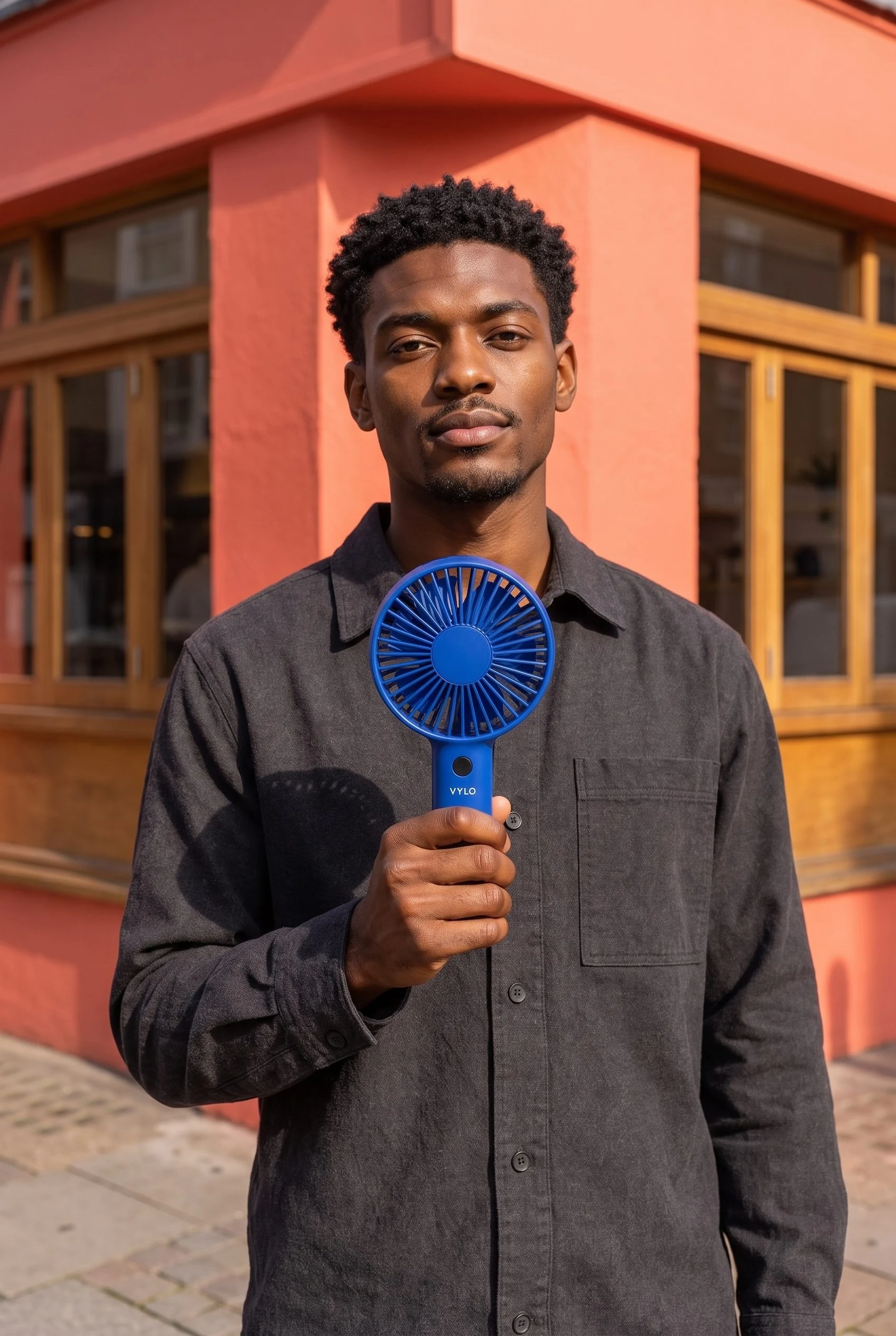
One fan, two product portraits: a clear grille facing the viewer and a second image showing the model using it.
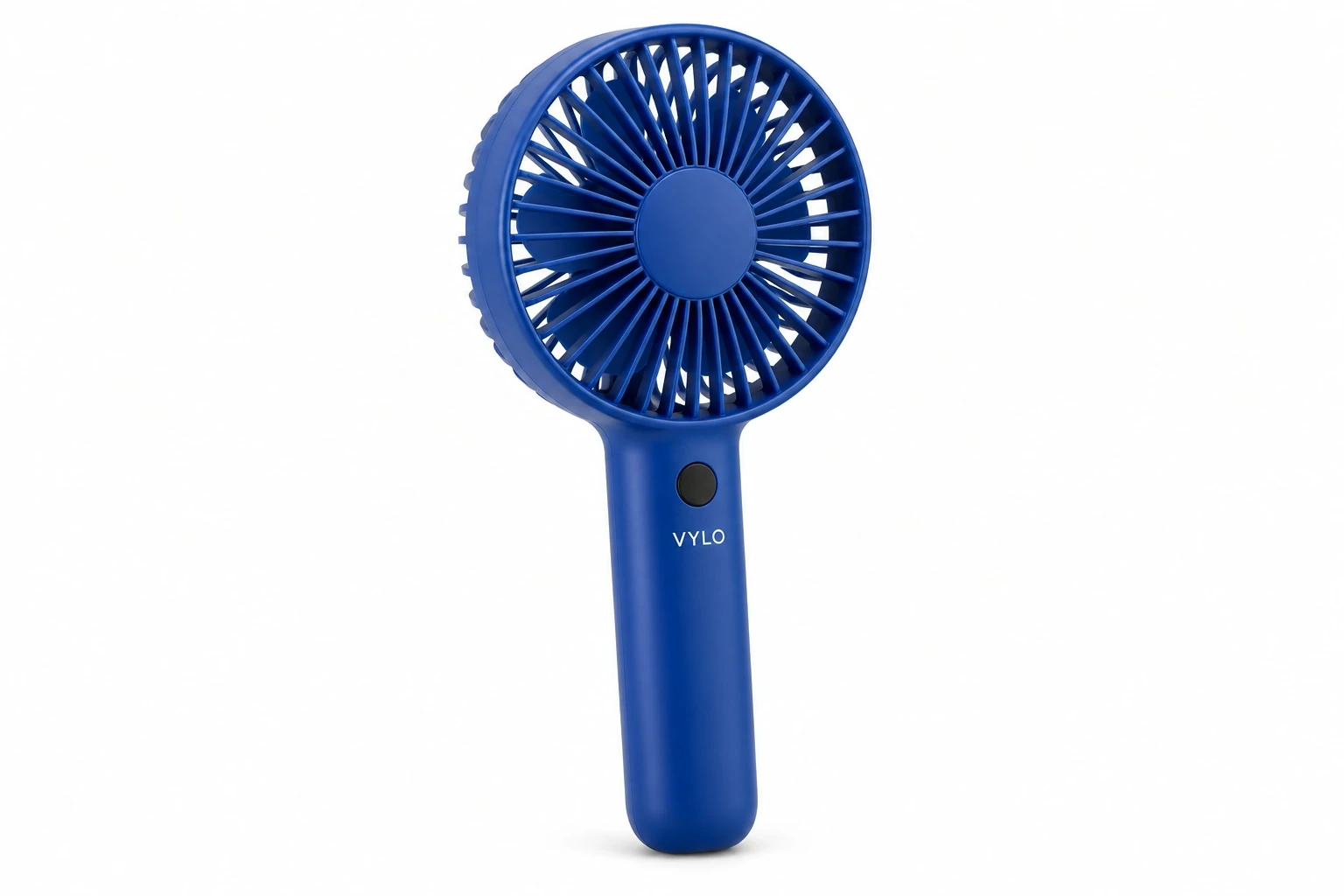
From the product reference
The recognition frame shows the full head and fan. Holding the lower handle leaves the grille clear, while grille geometry, button and wordmark still need comparison with the product reference.
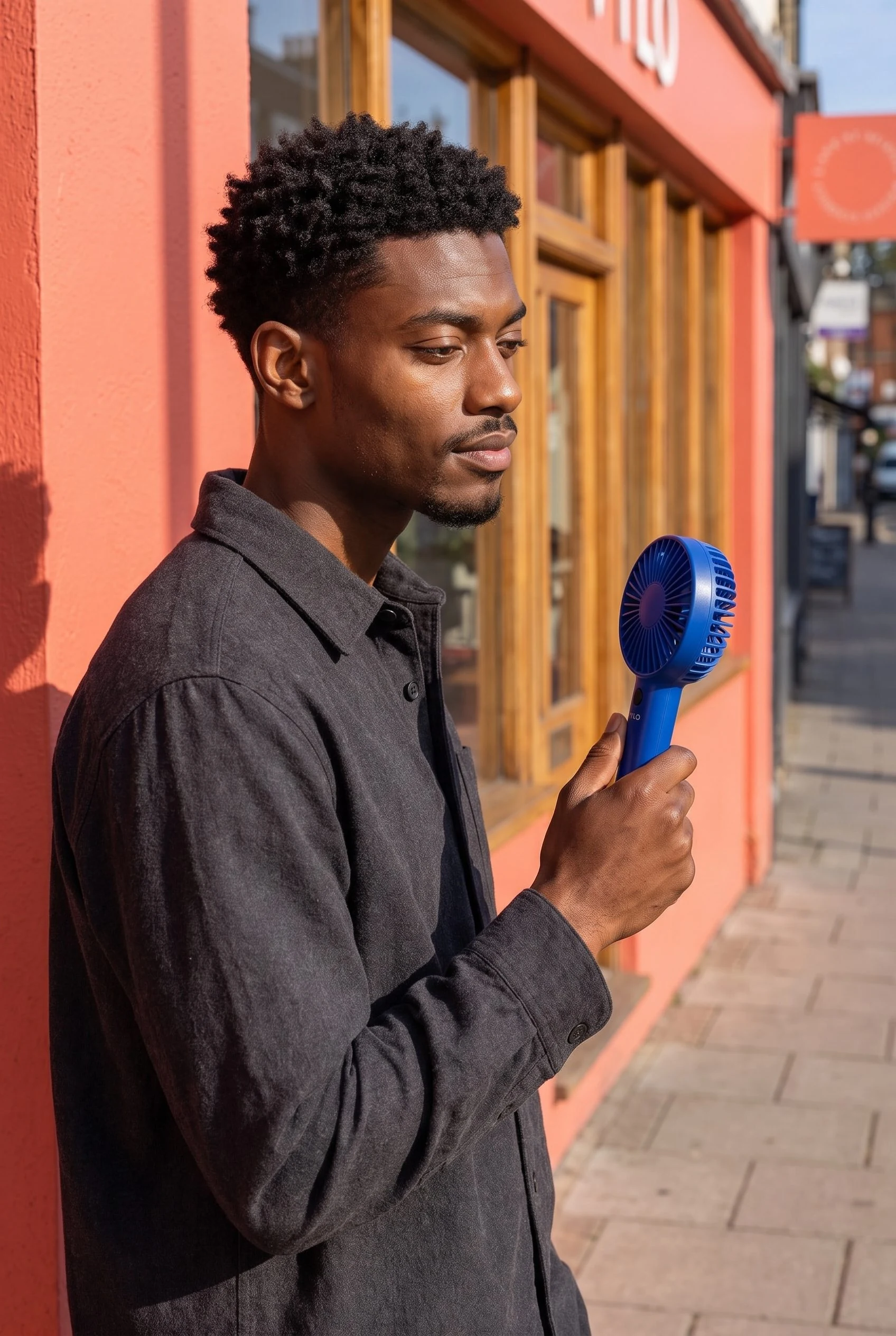
The side angle keeps the head, hand and fan visible and explains the gesture, while giving the front wordmark less prominence.
Plan this product shoot
A fan campaign with two distinct image roles
Recognition portrait
Direct the cobalt fan grille toward the viewer so the product has a clear introduction. Review the handle, fingers and grille before selecting this frame for a launch placement.
Use portrait
Turn the fan toward the model's cheek to show the use gesture. The side view gives the front wordmark less prominence, so pair it with the recognition portrait.
Motion starting frame
Choose the approved still whose grip and product details remain readable. Brief restrained movement, then review the complete clip; these retained examples demonstrate still-image roles rather than finished animation.
The photo-to-video guide connects source-image decisions with a proposed motion brief.
What are you creating next?
Create the product image missing from the ad
Choose Fotogenic AI.
Direct a setting or use pose, then approve the source before adding any motion.
Deliver a talking localized presenter
Choose Vmake Labs.
Scripts, voices and language are video requirements that the retained still images do not demonstrate.
Caption or improve existing footage
Choose Vmake Labs editing tools.
Check the operation-specific export instead of rebuilding a source image unnecessarily.
New imagery or presenter production
Fotogenic AI
Prepare the product reference
Define the product details, use gesture and placement the missing image must communicate.
Create and approve the still
Direct the scene and inspect product shape, grip and visible lettering.
Deliver or plan short motion
Retain the accepted image; use it for the placement or a separately reviewed product clip.
Vmake Labs
Prepare the presenter brief
Choose the documented UGC or avatar route and supply the product context and script.
Set voice and presentation
Select the required presenter, speech and language treatment for that video job.
Review and export the video
Check spoken claims, audio, captions, watermark and the export specification for the operation.
A closer look at Vmake Labs.
Choose around the assets your launch needs
Choose Fotogenic AI when the missing asset is the product image: a new setting, a model holding the item or related views for different placements. Its creative workflows begin with that product brief and can supply an approved still for short motion.
Choose Vmake Labs when the deliverable is a talking presenter, localized speech, captions or an edit of footage you already have. Its product showcases and image tools also overlap with generation work. A new generated still is useful only when that still is missing from the video brief.
Product imagery before the video treatment
Fotogenic AI's Campaign Set creates related product views for distinct placements. Clear item, contextual and detail images can each carry a different part of the launch.
- Vmake's product-video workflow turns product imagery into showcases, overlapping with Fotogenic AI's video generator.
- Approve the source before adding motion: a fan needs a readable grille and grip; clothing may need an unobstructed closure.
Presenting a product and presenting a person
Vmake's AI avatars and UGC video workflow cover presenter-led content, including scripts, voices and languages.
- Fotogenic AI's model-action guide directs how a person holds or uses an item in still imagery.
- The retained fan portraits demonstrate front-facing presentation and a use gesture. They are Fotogenic AI stills, not talking-avatar or Vmake results.
- Choose the still-image route for product placement and pose; choose the presenter route when the brief requires spoken delivery. Approve any scripted claims against the product information.
Editing an existing video is a separate purchase
Vmake's captions, translation, enhancement and background removal suit footage already produced. Keep that editing route when the brief calls for localized speech or a new video treatment.
Fotogenic AI is our choice when the missing asset is the product scene itself. Its campaign imagery can supply a new creative starting point, while captioning, avatars and video translation remain separate Vmake strengths.
Check the export row for the operation
Vmake separates AI video-editing exports from video-and-image generation exports. The current Pro editing row lists 1080p and 2K; video generation lists 2K and 4K, while image generation lists 2K. Resolution follows the operation and model.
Daily editing limits are separate from generation credits, and paid plans advertise commercial use. Plus lists thirty days of generation history. Retain accepted exports and references independently.
Check dimensions, duration, audio, captions and watermarks in the required export. No Vmake generation or paid download was tested here.
Pricing: monthly and annual commitments
Fotogenic AI
$20.00 / month
Starter in USD: 220 monthly credits. Weekly: $7.00 with 60 credits. Images only; video plans differ.
Plan allowances and terms
Fotogenic AI's current plans offer weekly and monthly periods, with credits refreshing without rollover. Match the commitment to the production calendar and required generation/editing work; no cost-per-approved-asset advantage has been measured.
Vmake Labs
US$9.99 / month
Plus on monthly billing. Paid credits remain valid for thirty days.
Plan allowances and terms
The rendered Vmake pricing page lists monthly Plus at US$9.99 with 1,000 credits and base Pro at US$29.99 with 4,500. Its actual yearly selection shows US$69.99 and US$209.99 billed annually, with monthly credit allowances. The comparison row displays monthly equivalents of US$5.83 and US$17.50. An annual equivalent is not a monthly cancellation-and-payment commitment.
The page lists twenty daily free credits valid for one day and paid credits valid for thirty days. Free output is watermarked and excludes commercial use. Model and setting choices determine consumption; the displayed “up to” examples are capacity estimates rather than accepted-ad totals.
Store delivery and switching from Vmake
- Retain accepted stills and clips, scripts, audio rights and reusable product references. A flattened export does not carry a proprietary avatar or editable video project into Fotogenic AI.
- Move the missing product-scene work into Fotogenic AI. Keep presenter, translation or footage-editing tasks with the service that provides the required deliverable.
- Assign accepted image files through the store's actual route. Fotogenic AI documents reviewed WooCommerce updates; the Shopify image workflow covers manual gallery and variant assignment while native integration remains publicly Coming soon.
Sources and review method
Written by Fotogenic AI. Vmake Labs public pricing allowances and export rows were rechecked October 20, 2026. Payment amounts and yearly-toggle figures retain the October 18 browser review basis. The fan portraits are retained Fotogenic AI stills. No Vmake account, generation, export, payment or talking video was tested.
- Vmake Labs pricing, validity and exports
- Vmake Labs product showcase
- Vmake Labs avatar workflow
- Vmake Labs UGC video workflow
Read Fotogenic AI vs VOVV.AI for a campaign-studio decision or Fotogenic AI vs Bria for production infrastructure and editable ads. Return to the comparison hub for the full library.
Continue your comparison.

FAQ
Questions about Fotogenic AI and Vmake
No. The reviewed yearly cards retain monthly allowances, and the table gives paid credits thirty-day validity. Annual billing changes the payment commitment, rather than creating one annual pool.
Create with Fotogenic AI
Create the product scene you need.
Direct product views and useful source frames for your campaign.