Best AI tools for furniture product photography
Build room scenes and coordinated campaigns from your existing furniture photos.
The short answer
Start with Fotogenic AI for furniture product scenes and coordinated room campaigns from your existing photos. Choose an interior direction, create useful views and reuse the look across a collection.
Try Fotogenic AIOur pick for furniture campaigns

Fotogenic AI
Create room scenes and a shared campaign direction across your collection.
Plans and buying checks
Starter includes product images and campaign sets for $20/month, with 220 credits.
Why choose Fotogenic AI
Create several useful views within one interior direction. Use measured photography or a 3D model when the task requires verified geometry or unseen construction.
Start with your product
Match upholstery seams, wood finish and dimensions to reference photos.
Clean product listings

Photoroom
Prepare an existing furniture photo for a listing.
Plans and buying checks
Photoroom Pro is $7.50/month with annual billing; Photoshop is $22.99/month with an annual commitment.
The tradeoff
Start with a complete product photo. Changing the setting is easier to check than reconstructing hidden legs or joins.
What to check
Compare visible supports, silhouette and proportions.
Styled room scenes

Claid
Choose fixed-angle placement or a more creative room view.
Plans and buying checks
Claid Essentials is $15/month for 500 credits; standard Photoshoot uses four per output. Pebblely Basic is $19/month for 200 images.
The tradeoff
Claid’s Precise mode retains position and angle; Creative mode can change the view. Room staging with generic furniture is a different purchase.
What to check
Check floor contact, perspective and scale.



Check construction and scale
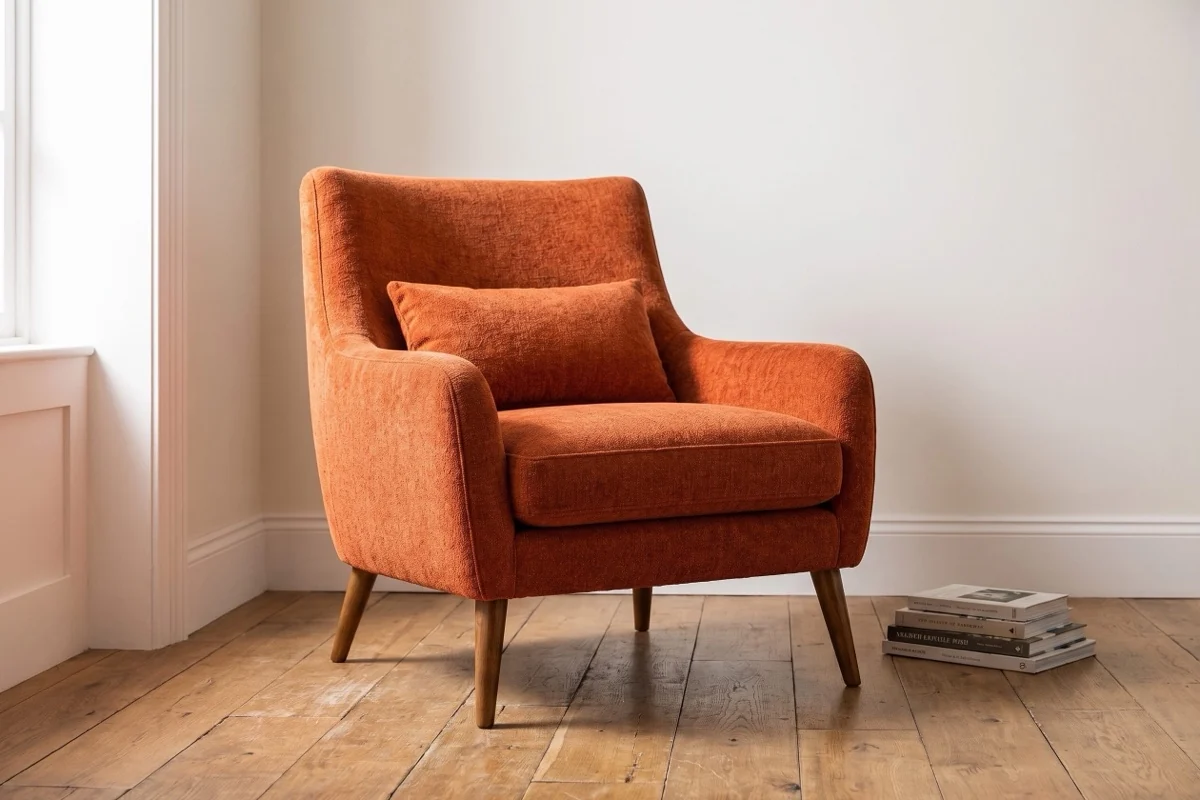
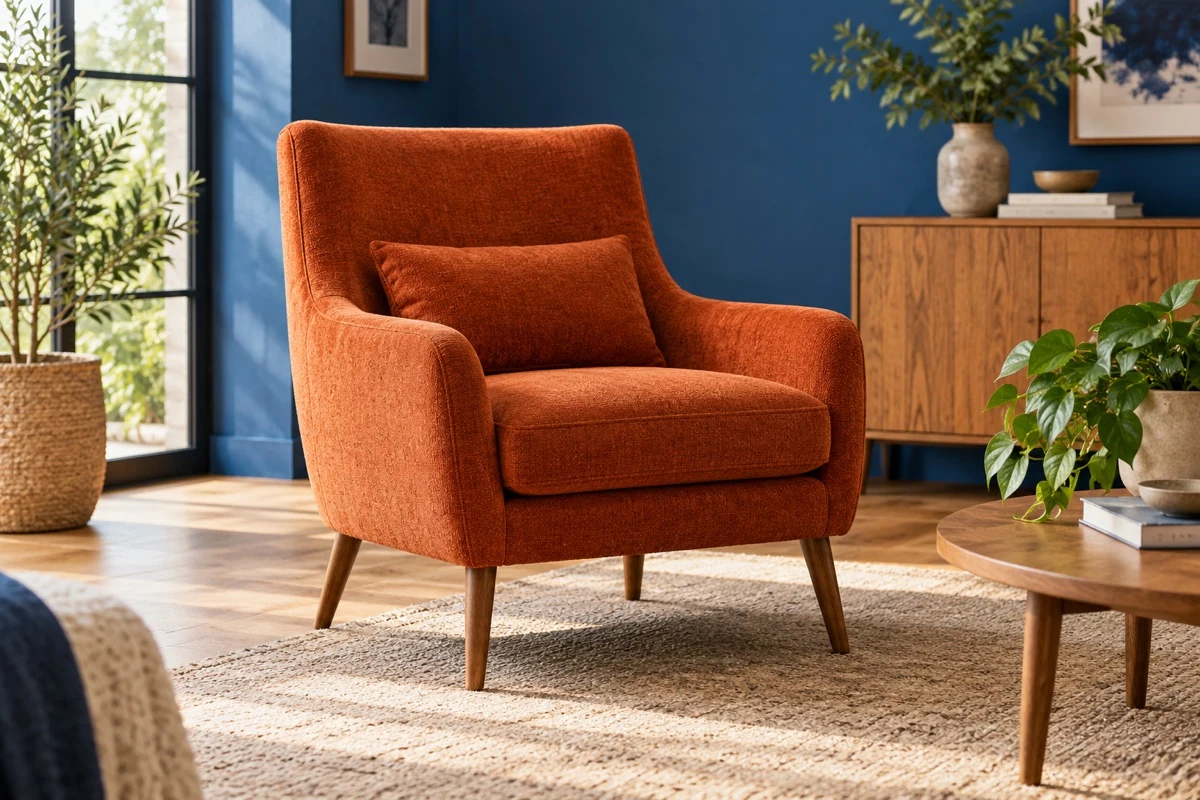
Compare the source image with the Fotogenic AI-generated scene at the top of the guide.
Check the arms, cushions and visible legs. The books and floorboards have no verified measurements, so they cannot establish the furniture’s physical size.
Give each image a clear job
Use an isolated view for shape and construction, a room scene for placement ideas, and a close-up for material and finish. Together they explain more than several similar room images.
Keep actual dimensions and detail photos with the listing. A generated back view from a front-only source cannot verify the real rear construction.
Three checks before you choose
Geometry
Proportions, legs and construction
Material
Upholstery, seams and finish
Room
Scale, perspective and support
Fotogenic AI
Furniture room scenes and campaign sets
Fotogenic AI builds furniture product scenes and room-image options from existing photographs. Start here for collection launches or seasonal campaigns, using one interior direction across product-page and marketing images while keeping each piece as the reference.
Strengths
- Room and product-scene options from existing furniture photos.
- Coordinated campaign sets for collection launches.
- Reusable lighting, background and crop directions.
- Choose studio, lifestyle or custom interior settings.
$20/month, Starter
220 monthly credits. Creator includes 520 credits for $40/month; Pro includes 1,200 for $80/month.
Product images and campaign sets are included on Starter. Video and ad-ready visuals start on Creator. Costs vary by operation; credits do not roll over.
Plan and billing detailsBefore you start
Supply measured dimensions and references for the views you need.
Review supports, proportions and upholstery; retain actual construction photos.
Try Fotogenic AIPhotoroom
Furniture listing preparation
Photoroom combines furniture cutouts, positioning, sizing and contextual scenes. Choose it when a collection needs both clean listing images and styled room views, with repeatable editing steps rather than a separate setup for every product.
Strengths
- Background removal, positioning and resizing in one editor.
- Furniture lifestyle scenes alongside clean product views.
Limitations
- Inspect legs, supports, upholstery edges and openings.
- A realistic room can still distort product proportions.
$7.50/month, Pro, annual billing
8,000 AI credits and 1,000 exports per month. Max is $20.99/month with annual billing, 25,000 credits, 3,000 exports and Shopify integration. Ultra starts at $82.50/month with annual billing.
Plan and billing detailsBuying details
Include product preparation and any manual corrections; the API wallet is separate from editor exports.
Editor, batch and Shopify saves share the export allowance. API usage is priced separately. Shopify integration requires Max or higher.
Flair
Directed room composition
Flair offers furniture scenes and a creative canvas for arranging a campaign. Choose it when you have a specific room style, product position and prop brief, and want more deliberate composition than a generic background replacement.
Strengths
- Furniture settings tailored to an interior style.
- Creative composition around the product and props.
Limitations
- Perspective and floor contact need checking.
- Scene controls do not verify physical scale or construction.
$10/month, Pro
Pro+ is $35/month with 80 generated images and three videos; Scale starts at $55/month with 150 images.
Plan and billing detailsBuying details
A 25-piece collection with three ordinary attempts each uses 75 images before retries or higher-cost modes.
The Pro card gives no image allowance. Instant image and ad generation use four times the image quota, so an action may cost more than one image.
Claid
Fixed-angle or creative room scenes
Claid generates room scenes from a product image. Precise mode keeps its position and angle with canvas and aspect-ratio controls; Creative mode can change the viewpoint or use a scene reference. Choose according to the view you need.
Strengths
- Precise mode retains the photographed position and angle.
- Creative mode supports viewpoint changes and scene references.
- Start with a transparent image or remove the background.
Limitations
- New viewpoints can invent unseen surfaces.
- Check supports, upholstery and scale against real references.
- A generated scene is not a measured furniture model.
$15/month, Essentials
500 credits per month; 2K output. Pro is $49/month for 2,000 credits with premium models and 4K options.
Plan and billing detailsBuying details
500 credits cover up to 125 standard Photoshoot attempts, rather than 125 approved room scenes.
The $9 and $35 rates require yearly billing. Standard Photoshoot and AI Fashion use four credits; Studio uses ten. API plans are separate.
Pebblely
Guided room-scene ideas
Pebblely’s room-oriented templates give an existing furniture photograph a new setting. Choose it for guided scene exploration from a clear source angle, especially when you want several styling ideas before deciding on a campaign direction.
Strengths
- Room-oriented templates provide a starting point.
- Basic and higher plans include bulk generation.
Limitations
- Room objects cannot verify the furniture’s size.
- Keep actual dimensions with the listing.
$9/month, Lite
30 images per month. Basic is $19/month for 200 images and bulk generation; Pro is $39/month for 500.
Plan and billing detailsBuying details
Lite suits a few scene ideas; Basic adds collection batches. Neither verifies unseen rear construction.
Bulk generation requires Basic or higher. Allowances count attempts, not guaranteed publishable images.
Adobe Photoshop
Precise edits around real furniture
Photoshop lets an editor keep the photographed furniture on a separate layer while changing its setting. Choose it for complex construction, distinctive upholstery or finish details that need selective correction and a carefully controlled composite.
Strengths
- Separate product layers help protect joins and seams.
- Selective edits around verified product photography.
Limitations
- Masks, perspective and shadows require editing skill.
- Include finishing time in the cost of each scene.
$22.99/month, annual commitment
Photoshop on desktop, web and mobile, with 100GB cloud storage. Annual plan, billed monthly.
Plan and billing detailsBuying details
Choose the annual plan for recurring editing work. External catalog upload remains a separate task.
Check shape before styling
Compare width, height and depth cues, then leg spacing, arm thickness, seat shape, shelf divisions and hardware. These define the product even when the room changes.
Keep a neutral reference beside the result. Narrower legs or a redesigned backrest may look elegant, but they depict a different item.
Keep measured dimensions visible
Doorways, rugs and neighboring furniture suggest scale. Wrong relationships can make a sofa look compact or a side table look dining-sized. Check them against the item’s measurements.
Use dimensions and planning information to help customers judge fit. A generated lifestyle scene can show style and context, but cannot prove that a piece fits their space.
Use our home-goods photo examples to plan room and material views. The Fotogenic AI home-goods workflow explains scene creation; retain dimensions with the product listing.
Preserve the real material and finish
Compare weave, seams, tufting, leather grain and wood pattern with the reference at full size. Reject richer or more regular textures that the actual item does not have.
Match each upholstery variant to its own fabric reference. Distinguish general wood character from an individual piece’s grain, and check color outside the room’s lighting cast.
Check supports and floor contact
Count visible legs and supports. Check floor contact, shadows and intersections with rugs, walls or other objects. Avoid compositions that hide construction errors.
A blanket or prop can suit a campaign, but should not conceal a feature buyers need to inspect. Keep a clear product view alongside the styled scene.
Match the collection, not every crop
Share camera height, light direction and tone across a collection. A tall shelf and a low chair still need different framing to remain clear.
Try the direction on several shapes before using it across the range. Include product-specific rebuilding and retouching in the budget.
Test three furniture shapes
Try a four-legged chair, an open-frame side table and textured upholstery. Keep measured width, height and depth plus front and side references. Compare a fixed-angle room scene with a separate inferred-angle result. Reject added legs, closed openings and changed arm proportions.
Room scene, turntable or 3D model?
A room scene shows context, a photographed turntable shows captured angles, and a 3D model supports interactive inspection. For reliable geometry or unseen rear details, budget for physical capture or a measured model.
Shopify accepts GLB and USDZ models up to 500 MB, optimizing those over 15 MB. The theme must support 3D media. Model preparation and delivery are separate costs from generated room photos.
Compare usable views per product
Include source preparation, scene direction, rejected attempts, retouching and export. Count distinct views that help buyers: a clear material close-up may add more than another similar room image.
Claid Essentials has 500 credits, enough for at most 125 standard four-credit Photoshoot outputs. Thirty pieces with three attempts each use 360 credits. Other modes, masking and retries reduce capacity. An accurate rear view still needs a suitable source.
FAQ
Questions before you choose
No. Check apparent scale, but use actual dimensions to help customers judge fit.
Put your next idea to work
Your next product image starts here.
Turn a product photo into a new scene for your store.